
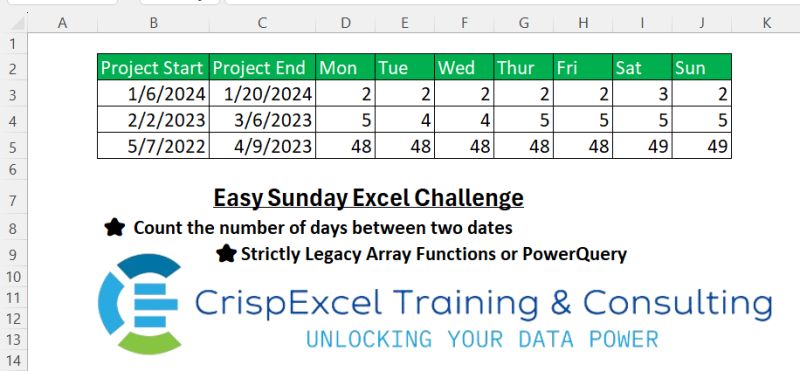
Count the number of days between two dates Strictly Legacy Array Functions or PowerQuery Hazem Hassan
📌 Challenge Details and Links
Challenge Number: 2
Challenge Difficulty: ⭐⭐
📥Download Sample File
📥Link to the solutions on LinkedIn
Solving the challenge of Counting Days of the Week Between Dates with Power Query
Power Query solution 1 for Counting Days of the Week Between Dates, proposed by Alejandro Simón 🇵🇦 🇪🇸:
let
  Source = Excel.CurrentWorkbook(){[Name = "Table1"]}[Content],
  Process = Table.AddColumn(
    Source,
    "A",
    each
      let
        a = {Number.From([Project Start]) .. Number.From([Project End])},
        b = List.Transform(a, Date.From),
        c = List.Transform(
          {0 .. 6},
          (x) => List.Count(List.Select(b, each Date.DayOfWeek(_, Day.Monday) = x))
        ),
        d = List.Transform({2 .. 6, 0 .. 1}, each Text.Start(Date.DayOfWeekName(_, "en-US"), 3)),
        e = Table.FromRows({c}, d)
      in
        e
  ),
  Sol = Table.ExpandTableColumn(Process, "A", Table.ColumnNames(Process[A]{0}))
in
  Sol
Power Query solution 2 for Counting Days of the Week Between Dates, proposed by Brian Julius:
let
  Source = Excel.CurrentWorkbook(){[Name = "Table1"]}[Content],
  AddDayList = Table.AddColumn(
    Source,
    "DayShort",
    each [
      a = {Number.From([Project Start]) .. Number.From([Project End])},
      b = List.Transform(a, each Text.Start(Date.DayOfWeekName(Date.From(_)), 3))
    ][b]
  ),
  Expand = Table.DuplicateColumn(
    Table.ExpandListColumn(AddDayList, "DayShort"),
    "Project Start",
    "PivotIdx"
  ),
  Pivot = Table.Pivot(Expand, List.Distinct(Expand[DayShort]), "DayShort", "PivotIdx", List.Count),
  ExtractDate = Table.Sort(
    Table.TransformColumns(
      Pivot,
      {{"Project Start", DateTime.Date, type date}, {"Project End", DateTime.Date, type date}}
    ),
    {"Project Start", Order.Descending}
  ),
  Reorder = Table.ReorderColumns(
    ExtractDate,
    {"Project Start", "Project End", "Mon", "Tue", "Wed", "Thu", "Fri", "Sat", "Sun"}
  )
in
  Reorder
Power Query solution 3 for Counting Days of the Week Between Dates, proposed by Nelson Mwangi:
let
  Source = Excel.CurrentWorkbook(){[Name = "Table1"]}[Content],
  ListOfDates = Table.AddColumn(
    Source,
    "Custom",
    each {Number.From([Project Start]) .. Number.From([Project End])}
  ),
  XpandList = Table.ExpandListColumn(ListOfDates, "Custom"),
  DateType = Table.TransformColumnTypes(XpandList, {{"Custom", type date}}),
  DayOfWeek = Table.AddColumn(
    DateType,
    "DayOfWeek",
    each Date.DayOfWeek([Custom], Day.Sunday),
    Int64.Type
  ),
  DayList = {
    "Monday, 1",
    "Tuesday, 2",
    "Wednesday, 3",
    "Thursday, 4",
    "Friday, 5",
    "Saturday, 6",
    "Sunday,0"
  },
  ListToTbl = Table.FromList(DayList, Splitter.SplitTextByDelimiter(","), {"DayOfWk", "Day"}),
  DataType = Table.TransformColumnTypes(ListToTbl, {{"Day", Int64.Type}}),
  Join = Table.Join(DayOfWeek, "DayOfWeek", DataType, "Day", JoinKind.LeftOuter),
  Group = Table.Group(
    Join,
    {"Project Start", "Project End", "DayOfWk"},
    {{"Count", each Table.RowCount(Table.Distinct(_)), type number}}
  ),
  Pivot = Table.Pivot(Group, List.Distinct(Group[DayOfWk]), "DayOfWk", "Count", List.Sum)
in
  Pivot
Solving the challenge of Counting Days of the Week Between Dates with Excel
Excel solution 1 for Counting Days of the Week Between Dates, proposed by Rick Rothstein:
=SUMPRODUCT(0+(WEEKDAY(
   ROW(
       INDEX(
           A:A,
           $B3):INDEX(
           A:A,
           $C3)),
   2)=COLUMNS(
   $D:D)))
Excel solution 2 for Counting Days of the Week Between Dates, proposed by محمد حلمي:
=SUM(
   N(
       WEEKDAY(
           ROW(
               INDIRECT(
                   $B3&":"&$C3)))=MOD(
           COLUMN(
               A1),
           7)+1))
Excel solution 3 for Counting Days of the Week Between Dates, proposed by 🇰🇷 Taeyong Shin:
=NETWORKDAYS.INTL(
   +B3:B5,
    +C3:C5,
    SUBSTITUTE(
        1111111,
         1,
         0,
         SEQUENCE(
             ,
              7)))
Excel solution 4 for Counting Days of the Week Between Dates, proposed by 🇰🇷 Taeyong Shin:
=@INDEX(
   FREQUENCY(
       WEEKDAY(
           ROW(
               INDEX(
                   A:A,
                    $B3):INDEX(
                   A:A,
                    $C3)),
            2),
        COLUMN(
            $A:A)),
    COLUMN(
        A:A))
Excel solution 5 for Counting Days of the Week Between Dates, proposed by Oscar Mendez Roca Farell:
=INT((C3:C5-B3:B5 + WEEKDAY(
   B3:B5-TOROW(
       ROW(
           1:7)),
   2))/7)
Excel solution 6 for Counting Days of the Week Between Dates, proposed by Abdallah Ally:
=$C3-$B3+1-NETWORKDAYS.INTL(
   $B3,
   $C3,
    IF(
        COLUMN()+8>17,
        11,
        COLUMN()+8))
Excel solution 7 for Counting Days of the Week Between Dates, proposed by Bhavya Gupta:
=IF(
   MOD(
       COLUMN(
           A$1)-MATCH(
           TEXT(
               $B3,
               "ddd"),
           $D$2:$J$2,
           0),
       7)+1<=MOD(
       $C3-$B3+1,
       7),
   QUOTIENT(
       $C3-$B3+1,
       7)+1,
   QUOTIENT(
       $C3-$B3+1,
       7))
Excel solution 8 for Counting Days of the Week Between Dates, proposed by Mey Tithveasna:
=SUM(--(WEEKDAY(
   ROW(
       INDIRECT(
           $B3&":"&$C3)),
   2)=COLUMN(
   A1)))
Excel solution 9 for Counting Days of the Week Between Dates, proposed by Crispo Mwangi:
=INT((WEEKDAY(
   $B3-COLUMN(
       A1),
   2)-$B3+$C3)/7)