
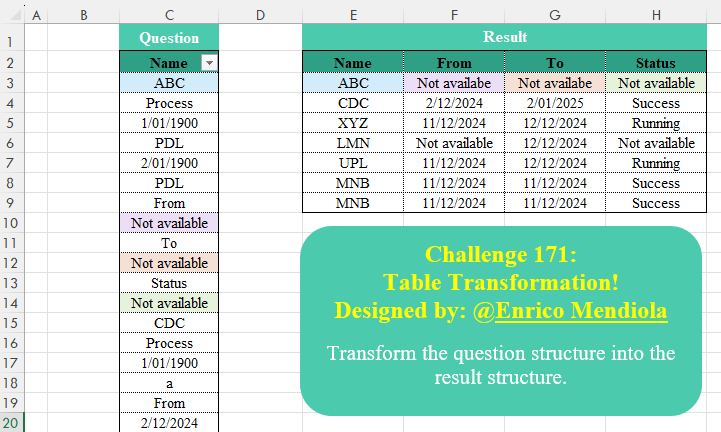
Transform the question structure into the result structure.
📌 Challenge Details and Links
Challenge Number: 171
Challenge Difficulty: ⭐⭐
Designed by: Enrico Mendiola
📥Download Sample File
📥Link to the solutions on LinkedIn
Solving the challenge of Table Transformation! Part 20 with Power Query
Power Query solution 1 for Table Transformation! Part 20, proposed by Zoran Milokanović:
let
  Source = Excel.CurrentWorkbook(){[Name = "Data"]}[Content],
  _ = Table.Combine(
    Table.Group(
      Source,
      {"Name"},
      {
        "T",
        each
          let
            r = List.Zip(List.Split({"Name", [Name]{0}} & List.Skip([Name], each _ <> "From"), 2))
          in
            Table.FromRows({r{1}}, r{0})
      },
      0,
      (b, n) => Byte.From(Source{Table.PositionOf(Source, n) + 1}[Name] = "Process")
    )[T]
  )
in
  _
Power Query solution 2 for Table Transformation! Part 20, proposed by Alejandro Simón 🇵🇦 🇪🇸:
let
Source = Excel.CurrentWorkbook(){[Name="Data"]}[Content],
Grp = Table.Group(Source, "Name", {"A", each
 let
 a = _,
 b = Table.Skip(a, each [Name] <> "From"),
 c = List.Split(Table.ToColumns(b){0}, 2),
 d = Table.PromoteHeaders(Table.FromColumns(c))
 in d},
0,
(x,y)=>
 Number.From( if y="PDL" then false else
 let
 a = List.Transform({x,y}, each Text.Length(Text.Select(Text.From(_), {"A".."Z"}))),
 b = a{0}=a{1}
 in b)),
Sol = Table.ExpandTableColumn(Grp, "A", Table.ColumnNames(Grp[A]{0}))
in
Sol
Power Query solution 3 for Table Transformation! Part 20, proposed by Alejandro Simón 🇵🇦 🇪🇸:
let
Source = Excel.CurrentWorkbook(){[Name="Data"]}[Content],
Name = List.Transform(List.PositionOf(Source[Name], "Process", 2), each Source[Name]{_-1}),
Grp = Table.Group(Source, "Name", {"A", each
 let
 a = _,
 b = Table.Skip(a, each [Name] <> "From"),
 c = List.Split(Table.ToColumns(b){0}, 2),
 d = Table.PromoteHeaders(Table.FromColumns(c))
 in d},
0, (x,y)=> Number.From(List.Contains(Name, y))),
Sol = Table.ExpandTableColumn(Grp, "A", Table.ColumnNames(Grp[A]{0}))
in
Sol
Power Query solution 4 for Table Transformation! Part 20, proposed by Kris Jaganah:
let
  A = Excel.CurrentWorkbook(){[Name = "Data"]}[Content][Name],
  B = {"Name", "From", "To", "Status"},
  C = Table.FromColumns(
    List.Transform(
      B,
      each List.TransformMany(
        List.PositionOf(A, if _ = "Name" then "Process" else _, 3),
        (x) => {if _ = "Name" then x - 1 else x + 1},
        (v, w) => A{w}
      )
    ),
    B
  )
in
  C
Power Query solution 5 for Table Transformation! Part 20, proposed by Seokho MOON:
let
  Source = Excel.CurrentWorkbook(){[Name = "Data"]}[Content][Name],
  ColNames = {"Name", "From", "To", "Status"},
  Recs = List.Accumulate(
    List.Positions(Source),
    {},
    (a, v) =>
      if Source{v} = "Process" then
        a & {[Name = Source{v - 1}]}
      else if List.Contains(ColNames, Source{v}) then
        List.RemoveLastN(a) & {Record.AddField(List.Last(a), Source{v}, Source{v + 1})}
      else
        a
  ),
  Res = Table.FromRecords(Recs)
in
  Res
Power Query solution 6 for Table Transformation! Part 20, proposed by Seokho MOON:
let
  Source = Excel.CurrentWorkbook(){[Name = "Data"]}[Content][Name],
  Rep = List.ReplaceMatchingItems(Source, {{"Process", "Name"}}),
  ColNames = {"Name", "From", "To", "Status"},
  Rows = [
    A = List.Split(List.PositionOfAny(Rep, ColNames, Occurrence.All), 4),
    B = List.Transform(A, each {Rep{_{0} - 1}, Rep{_{1} + 1}, Rep{_{2} + 1}, Rep{_{3} + 1}})
  ][B],
  Res = Table.FromRows(Rows, ColNames)
in
  Res
Power Query solution 7 for Table Transformation! Part 20, proposed by Alexandre Garcia:
let
U = Excel.CurrentWorkbook(){[Name="Data"]}[Content][Name],
H = List.Transform,
P = {"Process","From","To", "Status"},
L = H(List.Split(List.PositionOfAny(U,P,2),4), each {_{0} -1, _{1} + 1, _{2} + 1, _{3} + 1}),
C = Table.FromRows(List.Accumulate(L,{},(s,c)=> s & {H(c, each try Date.From(U{_}) otherwise U{_})}), {"Name"} & List.Skip(P))
in C
Power Query solution 8 for Table Transformation! Part 20, proposed by Vida Vaitkunaite:
let
 Source = Excel.CurrentWorkbook(){[Name="Data"]}[Content],
 Dates = Table.ReplaceValue(Source, each [Name], try each Date.From(Number.RoundDown(Number.From([Name]))) otherwise [Name], Replacer.ReplaceValue, {"Name"}),
 ID = Table.FillDown(Table.AddColumn(Dates, "ID", each if [Name] = "Process" then 1 else if [Name] = "From" then 2 else null),{"ID"}),
 Data = Table.SelectRows(Table.RemoveColumns(Table.SelectRows(ID, each ([ID] <> 1)),{"ID"}), each ([Name] <> "From" and [Name] <> "Status" and [Name] <> "To")),
 Tbl = Table.FromList(List.Transform(Table.Split(Data, 4), (x)=> Table.Transpose(x, {"Name", "From", "To", "Status"})), Splitter.SplitByNothing()),
 Combine = Table.Combine(Tbl[Column1])
in
 Combine
I think last 2 rows in result table are duplicates
Solving the challenge of Table Transformation! Part 20 with Excel
Excel solution 1 for Table Transformation! Part 20, proposed by 🇰🇷 Taeyong Shin:
=LET(d,
    C3:C148,
    h,
    {"Name",
    "From",
    "To",
    "Status"},
    F,
    LAMBDA(x,
    [n],
    LET(b,
    BYROW((d=x)*(SEQUENCE(
        ROWS(
            d
        )
    )+n+1),
    SUM),
    INDEX(
        d,
        FILTER(
            b,
            b
        )
    ))),
    VSTACK(
        h,
        HSTACK(
            F(
                "Process",
                -2
            ),
            WRAPROWS(
                F(
                    h
                ),
                3
            )
        )
    ))
Excel solution 2 for Table Transformation! Part 20, proposed by Oscar Mendez Roca Farell:
=LET(
    R,
    WRAPROWS,
    w,
    R(
        C3:C148,
        2
    ),
    F,
    LAMBDA(
        i,
        DROP(
            R(
                DROP(
                    FILTER(
                        w,
                        TAKE(
                            w,
                            ,
                            1
                        )>""
                    ),
                    ,
                    -1^i
                ),
                4
            ),
            ,
            -3^i
        )
    ),
    VSTACK(
        {"Name",
        "From",
        "To",
        "Status"},
        HSTACK(
            F(
                1
            ),
            F(
                0
            )
        )
    )
)
Excel solution 3 for Table Transformation! Part 20, proposed by Julian Poeltl:
=LET(
    N,
    C3:C148,
    S,
    SEQUENCE(
        ROWS(
            N
        )
    ),
    H,
    HSTACK(
        "From",
        "To",
        "Status"
    ),
    VSTACK(
        HSTACK(
            "Name",
            H
        ),
        HSTACK(
            INDEX(
                N,
                FILTER(
                    S,
                    N="Process"
                )-1
            ),
            DROP(
                REDUCE(
                    0,
                    H,
                    LAMBDA(
                        A,
                        B,
                        HSTACK(
                            A,
                            INDEX(
                                N,
                                FILTER(
                                    S,
                                    N=B
                                )+1
                            )
                        )
                    )
                ),
                ,
                1
            )
        )
    )
)
Excel solution 4 for Table Transformation! Part 20, proposed by Kris Jaganah:
=LET(
    a,
    Data[[    #All],
    [Name]],
    b,
    SEQUENCE(
        ROWS(
            a
        )
    ),
    c,
    {"Name",
    "From",
    "To",
    "Status"},
    VSTACK(
        c,
        DROP(
            REDUCE(
                "",
                c,
                LAMBDA(
                    x,
                    y,
                    HSTACK(
                        x,
                        LET(
                            d,
                            LAMBDA(
                                v,
                                w,
                                XLOOKUP(
                                    FILTER(
                                        b,
                                        v=a
                                    )+w,
                                    b,
                                    a
                                )
                            ),
                            IF(
                                y="Name",
                                d(
                                    "Process",
                                    -1
                                ),
                                d(
                                    y,
                                    1
                                )
                            )
                        )
                    )
                )
            ),
            ,
            1
        )
    )
)
Excel solution 5 for Table Transformation! Part 20, proposed by Sunny Baggu:
=LET(     n,
     Data,     s,
     SEQUENCE(
         ROWS(
             n
         )
     ),     HSTACK(          VSTACK(

               TAKE(
                   n,
                    1
               ),

               DROP(
                   INDEX(
                       n,
                        TOCOL(
                            IF(
                                n = "Status",
                                 s + 2,
                                 1 / x
                            ),
                             3
                        )
                   ),
                    -1
               )

          ),          WRAPROWS(

               TOCOL(

                    INDEX(
                        n,
                         IF(
                             n = {"From",
                              "To",
                              "Status"},
                              s + 1,
                              1 / x
                         )
                    ),

                    3

               ),

               3

          )     ))
Excel solution 6 for Table Transformation! Part 20, proposed by Asheesh Pahwa:
=LET(
    d,
    C3:C148,
    s,
    SCAN(
        "",
        d,
        LAMBDA(
            x,
            y,
            IF(
                OFFSET(
                    y,
                    1,
                    0
                )="Process",
                y,
                x
            )
        )
    ),    u,
    UNIQUE(
        s
    ),
    REDUCE(
        R3:U3,
        u,
        LAMBDA(
            x,
            y,
            VSTACK(
                x,
                LET(
                    f,
                    FILTER(
                        d,
                        s=y
                    ),

                    HSTACK(
                        y,
                        TOROW(
                            INDEX(
                                f,
                                XMATCH(
                                    {"From";"To";"Status"},
                                    f
                                )+1,

                            )
                        )
                    )
                )
            )
        )
    )
)
Excel solution 7 for Table Transformation! Part 20, proposed by Asheesh Pahwa:
=LET(
    d,
    C2:C148,
    s,
    SEQUENCE(
        ROWS(
            d
        )
    ),
    r,
    DROP(
        REDUCE(
            "",
            {"From";"To";"Status"},
            LAMBDA(
                x,
                y,
                HSTACK(
                    x,
                    LET(
                        f,
                        FIND(
                            y,
                            d
                        ),
                        INDEX(
                            d,
                            FILTER(
                                s,
                                ISNUMBER(
                                    f
                                )
                            )+1
                        )
                    )
                )
            )
        ),
        ,
        1
    ),
    HSTACK(
        INDEX(
            d,
            FILTER(
                s,
                ISNUMBER(
                    FIND(
                        "Process",
                        d
                    )
                )
            )-1
        ),
        r
    )
)
Excel solution 8 for Table Transformation! Part 20, proposed by Bilal Mahmoud kh.:
=LET(
    a,
    WRAPROWS(
        C3:C148,
        2
    ),
    from,
    FILTER(
        TAKE(
            a,
            ,
            -1
        ),
        TAKE(
            a,
            ,
            1
        )="from"
    ),
    N,
    FILTER(
        TAKE(
            a,
            ,
            1
        ),
        TAKE(
            a,
            ,
            -1
        )="Process"
    ),
    to,
    FILTER(
        TAKE(
            a,
            ,
            -1
        ),
        TAKE(
            a,
            ,
            1
        )="to"
    ),
    st,
    FILTER(
        TAKE(
            a,
            ,
            -1
        ),
        TAKE(
            a,
            ,
            1
        )="Status"
    ),
    VSTACK(
        {"Name",
        "From",
        "To",
        "Status"},
        HSTACK(
            N,
            from,
            to,
            st
        )
    )
)
Excel solution 9 for Table Transformation! Part 20, proposed by Hamidi Hamid:
=LET(
    m,
    LAMBDA(
        c,
        d,
        TOCOL(
            MAP(
                c,
                LAMBDA(
                    a,
                    IF(
                        a="from",
                        OFFSET(
                            a,
                            d,
                            0
                        ),
                        1/0
                    )
                )
            ),
            3
        )
    ),
    x,
    DROP(
        VSTACK(
            C3,
            m(
                C4:C148,
                6
            )
        ),
        -1
    ),
    y,
    m(
        C4:C148,
        1
    ),
    z,
    m(
        C4:C148,
        3
    ),
    w,
    m(
        C4:C148,
        5
    ),
    t,
    HSTACK(
        x,
        y,
        z,
        w
    ),
    n,
    VSTACK(
        t,
        TAKE(
            t,
            -1
        )
    ),
    n
)
Excel solution 10 for Table Transformation! Part 20, proposed by Md. Zohurul Islam:
=LET(
    z,
    C3:C148,    sq,
    SEQUENCE(
        ROWS(
            z
        )
    ),    cr,
    HSTACK(
        "Process",
        "From",
        "To",
        "Status"
    ),    num,
    SEQUENCE(
        ,
        COUNTA(
            cr
        )
    ),    u,
    DROP(
        REDUCE(
            "",
            num,
            LAMBDA(
                x,
                y,
                LET(

                    a,
                    z=CHOOSECOLS(
                        cr,
                        y
                    ),

                    b,
                    FILTER(
                        sq,
                        a
                    ),

                    c,
                    IF(
                        y=1,
                        b-1,
                        b+1
                    ),

                    d,
                    INDEX(
                        z,
                        c
                    ),

                    e,
                    HSTACK(
                        x,
                        d
                    ),

                    e
                )
            )
        ),
        ,
        1
    ),    hdr,
    HSTACK(
        Data345[[        #Headers],
        [Name]],
        DROP(
            cr,
            ,
            1
        )
    ),    result,
    VSTACK(
        hdr,
        u
    ),    result
)
Excel solution 11 for Table Transformation! Part 20, proposed by Pieter de B.:
=LET(
    f,
    {"Name",
    "From",
    "To",
    "Status"},
    VSTACK(
        f,
        WRAPROWS(
            FILTER(
                C3:C148,
                ISNA(
                    XMATCH(
                        C2:C147,
                        f
                    )
                )*ISNA(
                    XMATCH(
                        C4:C149,
                        "Process"
                    )
                )=0
            ),
            4
        )
    )
)
Solving the challenge of Table Transformation! Part 20 with Python
Python solution 1 for Table Transformation! Part 20, proposed by Konrad Gryczan, PhD:
import pandas as pd

path = "CH-171 Table Transformation.xlsx"
input = pd.read_excel(path, usecols="C", skiprows=1, nrows=148, names=["Name"])
test = pd.read_excel(path, usecols="E:H", skiprows=1, nrows=6).rename(columns=lambda x: x.split('.')[0])
test[['From', 'To']] = test[['From', 'To']].replace("availabe", "available", regex=True)
test = test.sort_values(by='Name').reset_index(drop=True)

even_rows, odd_rows = input.iloc[::2].reset_index(drop=True), input.iloc[1::2].reset_index(drop=True)
result = pd.DataFrame({'Name': even_rows['Name'], 'Value': odd_rows['Name']})
result = result[(result['Name'].isin(['From', 'To', 'Status'])) | (result['Value'] == "Process")]
result['group'] = result.apply(lambda row: row['Name'] if row['Value'] == "Process" else None, axis=1).ffill()
result = result[result['Name'] != result['group']]

pivot_result = result.pivot(index='group', columns='Name', values='Value').reset_index().rename(columns={'group': 'Name'})
pivot_result = pivot_result[['Name', 'From', 'To', 'Status']]

print(pivot_result.equals(test)) # True
Solving the challenge of Table Transformation! Part 20 with Python in Excel
Python in Excel solution 1 for Table Transformation! Part 20, proposed by Aditya Kumar Darak 🇮🇳:
df = xl("Data[Name]")


def MyFun(word, sign):
 return df.loc[df[df[0] == word].index + sign, 0].reset_index(drop=True)


Name = MyFun("Process", -1)
From = MyFun("From", 1)
To = MyFun("To", 1)
Status = MyFun("Status", 1)

result = pd.DataFrame({"Name": Name, "From": From, "To": To, "Status": Status})

result
Python in Excel solution 2 for Table Transformation! Part 20, proposed by Alejandro Campos:
xl("Data[Name]")[0]]
transformed_data = []
i = 0
while i < len(data):
 if data[i] not in ["From"]:
 name = data[i]
 i += 1
 while data[i] != 'From':
 i += 1
 from_date = data[i + 1]
 to_date = data[i + 3]
 status = data[i + 5]
 transformed_data.append([name, from_date, to_date, status])
 i += 6
df = pd.DataFrame(transformed_data, columns=["Name","From","To","Status"])
Solving the challenge of Table Transformation! Part 20 with R
R solution 1 for Table Transformation! Part 20, proposed by Konrad Gryczan, PhD:
library(tidyverse)
library(readxl)

path = "files/CH-171 Table Transformation.xlsx"
input = read_excel(path, range = "C2:C148")
test = read_excel(path, range = "E2:H8") %>%
 mutate(across(c(From, To), ~ str_replace(., "availabe", "available")))

r1 = input %>% filter(row_number() %% 2 == 1)
r2 = input %>% filter(row_number() %% 2 == 0) %>% rename(Value = Name)

result = cbind(r1, r2) %>%
 filter(Name %in% c('From', 'To', 'Status') | Value == "Process") %>%
 mutate(group = ifelse(Value == "Process", Name, NA)) %>%
 fill(group) %>%
 filter(group != Name) %>%
 pivot_wider(names_from = Name, values_from = Value)

all.equal(result, test, check.attributes = FALSE)
# [1] TRUE
Solving the challenge of Table Transformation! Part 20 with Google Sheets
Google Sheets solution 1 for Table Transformation! Part 20, proposed by Peter Krkos:
PowerQuery solution:
https://docs.google.com/spreadsheets/d/1zR5IZLz8OT76vhaPEHfsPrw8-RDKnLyyqS49IJjdhFk/edit?pli=1&gid=1916215620#gid=1916215620