
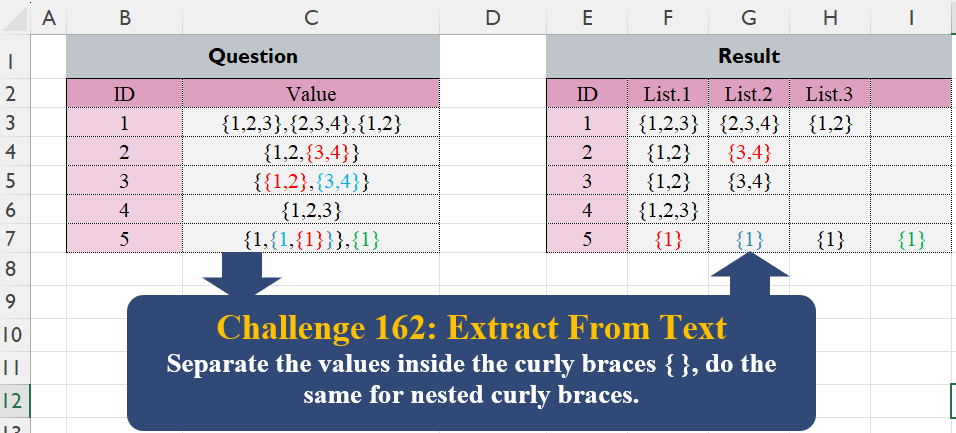
Separate the values inside the curly braces { }, do the same for nested curly braces.
📌 Challenge Details and Links
Challenge Number: 162
Challenge Difficulty: ⭐⭐⭐
📥Download Sample File
📥Link to the solutions on LinkedIn
Solving the challenge of Extract From Text! Part 5 with Power Query
Power Query solution 1 for Extract From Text! Part 5, proposed by Luan Rodrigues:
let
  Fonte = Table.TransformColumns(
    Tabela1,
    {
      "Value",
      each
        let
          a = Splitter.SplitTextByCharacterTransition({","}, {"{"})(_),
          b = {"},", "{", "}", ",}"},
          c = Text.Combine(
            List.Transform(
              a,
              (x) =>
                "{"
                  & List.Accumulate(
                    {0 .. List.Count(b) - 1},
                    x,
                    (s, c) => Text.TrimEnd(Text.Replace(s, b{c}, ""), ",")
                  )
                  & "}"
            ),
            ","
          )
        in
          c
    }
  )
in
  Fonte
Power Query solution 2 for Extract From Text! Part 5, proposed by Rafael González B.:
let
Source = Question_Table,
Grouping = Table.AddColumn(Source, "Transform", each
let
a = Text.Split([Value], "},{"),
b = List.Transform(a, each Text.Split(_, ",{")),
c = List.Transform(List.Combine(b),
each "{" & Text.Remove(_, {"{", "}"}) & "}"),
d = Text.Combine(c, "|")
in
d
)[[ID], [Transform]],
Anw = Table.SplitColumn(Grouping,
"Transform",
Splitter.SplitTextByDelimiter("|"),
{"List.1", "List.2", "List.3", ""})
in
Anw
🧙🏻♂️🧙🏻♂️🧙🏻♂️Power Query solution 3 for Extract From Text! Part 5, proposed by Alejandro Simón 🇵🇦 🇪🇸:
let
Source = Excel.CurrentWorkbook(){[Name="Table1"]}[Content],
Lista = Table.AddColumn(Source, "A", (w)=>
 let
 a = List.Transform({"{","}"}, (x)=> Text.PositionOf(w[Value], x, 2)),
 b = List.TransformMany(a{0}, (x)=> a{1}, (x,y)=> {x,y, y-x}),
 c = List.Select(b, each _{2}>0),
 d = List.Last(List.Generate(()=> [k={}, y=c, w={null}],
 each not List.IsEmpty([w]),
 each [z = List.Min(List.Transform([y], each _{2})),
 k = [k]&List.Select([y], each _{2}=z),
 j = List.Transform(k, each _{0}),
 n = List.Transform(k, each _{1}),
 y = List.Select(List.Select([y], each not List.Contains(j,_{0})), each not List.Contains(n, _{1})),
 w = [y] ],
 each [k])),
Power Query solution 4 for Extract From Text! Part 5, proposed by Kris Jaganah:
let
  A = Excel.CurrentWorkbook(){[Name = "Table1"]}[Content],
  B = Table.AddColumn(
    A,
    "Ans",
    each List.Transform(Text.Split([Value], ",{"), each "{" & Text.Remove(_, {"{", "}"}) & "}")
  )[Ans],
  C = List.Zip(B),
  D = List.Transform({1 .. List.Count(C)}, each "List." & Text.From(_)),
  E = Table.FromColumns(C, D)
in
  E
Power Query solution 5 for Extract From Text! Part 5, proposed by CA Raghunath Gundi:
let
  Source = Excel.CurrentWorkbook(){[Name = "Table1"]}[Content],
  Split = Table.SplitColumn(
    Source,
    "Value",
    Splitter.SplitTextByDelimiter(",{", QuoteStyle.Csv),
    {"List.1", "List.2", "List.3", "List.4"}
  ),
  Replace1 = Table.TransformColumns(
    Split,
    List.Transform(
      List.Skip(Table.ColumnNames(Split), 1),
      (Colnam) => {Colnam, each Text.Replace(Text.Replace(_, "{", ""), "}", "")}
    )
  ),
  Result = Table.TransformColumns(
    Replace1,
    List.Transform(List.Skip(Table.ColumnNames(Replace1), 1), (col) => {col, each "{" & _ & "}"})
  )
in
  Result
Power Query solution 6 for Extract From Text! Part 5, proposed by Seokho MOON:
let
  Source = Excel.CurrentWorkbook(){[Name = "Table1"]}[Content],
  Rows = List.Transform(
    Source[Value],
    each [
      A = Text.Split(_, ",{"),
      B = List.Transform(A, each "{" & Text.Remove(_, {"{", "}"}) & "}")
    ][B]
  ),
  Cols = {Source[ID]} & List.Zip(Rows),
  ColNames = {"ID"} & List.Transform({1 .. List.Count(Cols) - 1}, each "List." & Text.From(_)),
  Res = Table.FromColumns(Cols, ColNames)
in
  Res
Power Query solution 7 for Extract From Text! Part 5, proposed by Glyn Willis:
let
  Source = Excel.CurrentWorkbook(){[Name = "Table1"]}[Content],
  #"Changed Type" = Table.TransformColumnTypes(Source, {{"ID", Int64.Type}, {"Value", type text}}),
  #"Added Custom" = Table.AddColumn(
    #"Changed Type",
    "Custom",
    each [
      split = Splitter.SplitTextByAnyDelimiter({",{", "},"})([Value]),
      trim = List.Transform(split, each "{" & Text.Trim(_, {"}", "{"}) & "}"),
      rec = [ID = [ID]]
        & Record.FromList(
          trim,
          List.Transform({1 .. List.Count(trim)}, each "List " & Text.From(_))
        )
    ][rec]
  )[[ID], [Custom]],
  Result = Table.FromRecords(#"Added Custom"[Custom], null, MissingField.UseNull)
in
  Result
Power Query solution 8 for Extract From Text! Part 5, proposed by Vida Vaitkunaite:
let
 Source = Excel.CurrentWorkbook(){[Name="Table1"]}[Content],
 Transform = Table.AddColumn(Source, "Tbl", each let
a = Text.SplitAny([Value], "},{"),
b = Table.FromList(a),
c = Table.AddIndexColumn(b, "Index"),
d = Table.ReplaceValue(c,"",null,Replacer.ReplaceValue,{"Column1"}),
e = Table.AddColumn(d, "Custom", each if [Column1]= null then [Index] else null),
f = Table.FillDown(e,{"Custom"}),
g = Table.Group(f, {"Custom"}, {{"Group", each "{" & Text.Combine(List.RemoveNulls(_[Column1]), ",") & "}" }}),
h = Table.SelectRows(g, each ([Group] <> "{}")),
i = Table.Transpose(Table.RemoveColumns(h, {"Custom"})),
j = [ID],
k = Table.AddColumn(i, "ID", each j),
l = Table.TransformColumnNames(k, each Text.Replace( _, "Column", "List." ) ),
m = Table.ReorderColumns(l, List.Sort(Table.ColumnNames(l)))
in m),
 Combine = Table.Combine(Transform[Tbl])
in
 Combine
Solving the challenge of Extract From Text! Part 5 with Excel
Excel solution 1 for Extract From Text! Part 5, proposed by Bo Rydobon 🇹🇭:
=TEXTSPLIT(CONCAT(C3:C7&"|"),{"{","}",",{","},"},"|",1,,"")Excel solution 2 for Extract From Text! Part 5, proposed by Oscar Mendez Roca Farell:
=LET(
    o,
    "{",
    c,
    "}",
    IFNA(
        o&TEXTSPLIT(
            CONCAT(
                SUBSTITUTE(
                    C3:C7,
                    ",{",
                    "}|{"
                )&"-"
            ),
            HSTACK(
                "|",
                o,
                c
            ),
            "-",
            1
        )&c,
        ""
    )
)
Excel solution 3 for Extract From Text! Part 5, proposed by Julian Poeltl:
=IFNA(
    DROP(
        REDUCE(
            0,
            C3:C7,
            LAMBDA(
                A,
                V,
                VSTACK(
                    A,
                    "{"&SUBSTITUTE(
                        SUBSTITUTE(
                            TEXTSPLIT(
                                V,
                                ",{"
                            ),
                            "{",
                            ""
                        ),
                        "}",
                        ""
                    )&"}"
                )
            )
        ),
        1
    ),
    ""
)
Excel solution 4 for Extract From Text! Part 5, proposed by Kris Jaganah:
=IFNA(
    REDUCE(
        "List"&{1,
        2,
        3,
        4},
        C3:C7,
        LAMBDA(
            x,
            y,
            VSTACK(
                x,
                LET(
                    a,
                    TEXTSPLIT(
                        y,
                        {"{",
                        "}",
                        "},{"},
                        ,
                        1
                    ),
                    "{"&IF(
                        RIGHT(
                            a
                        )=",",
                        TEXTBEFORE(
                            a,
                            ",",
                            -1
                        ),
                        a
                    )&"}"
                )
            )
        )
    ),
    ""
)
Excel solution 5 for Extract From Text! Part 5, proposed by John Jairo Vergara Domínguez:
=LET(
    i,
    TEXTSPLIT(
        CONCAT(
            C3:C7&"-"
        ),
        {"";","}&{"{",
        "}"},
        "-",
        1,
        ,
        ""
    ),
    IF(
        i="",
        i,
        "{"&i&"}"
    )
)
Excel solution 6 for Extract From Text! Part 5, proposed by Imam Hambali:
=LET(    s,
     SUBSTITUTE,    a,
     DROP(
         TEXTSPLIT(
             TEXTJOIN(
                 "",
                 1,
                 s(
                     ";"&C3:C7,
                     ",{",
                     ",/"
                 )
             ),
             ",/",
             ";"
         ),
         1
     ),    b,
     s(
         s(
             a,
             "}",
             ""
         ),
         "{",
         ""
     ),    HSTACK(
        B3:B7,
         IFNA(
             "{"&b&"}",
             ""
         )
    ))
Excel solution 7 for Extract From Text! Part 5, proposed by Ernesto Vega Castillo:
="{"&TEXTSPLIT(
    TEXTJOIN(
        "-",
        TRUE,
        TEXTSPLIT(
            REGEXREPLACE(
                C3,
                "{{1,2}|,{{1}|},{1}|}",
                "-"
            ),
            {"-"}
        )
    ),
    "-"
)
Excel solution 8 for Extract From Text! Part 5, proposed by Khanh Lam chi:
=IFNA(REDUCE("List."&{1,2,3,4},C3:C7,LAMBDA(x,y,VSTACK(x,"{"&TEXTSPLIT(y,{"{","}",",{","},"},,1)&"}"))),"")Excel solution 9 for Extract From Text! Part 5, proposed by Luis Enrique Charca Ponce:
=LET(
    nonDup,
    LAMBDA(
        raw,        SUBSTITUTE(
            SUBSTITUTE(
                raw,
                "{{",
                "{"
            ),
            "}}",
            "}"
        )
    ),    nonDup(
        nonDup(
            SUBSTITUTE(
                C3:C7,
                ",{",
                "},{"
            )
        )
    )
)
Excel solution 10 for Extract From Text! Part 5, proposed by Md. Zohurul Islam:
=LET(
    id,
    B2:B7,
    v,
    C3:C7,
    p,
    IFNA(
        DROP(
            REDUCE(
                "",
                v,
                LAMBDA(
                    x,
                    y,
                    VSTACK(
                        x,
                        TEXTSPLIT(
                            SUBSTITUTE(
                                SUBSTITUTE(
                                    SUBSTITUTE(
                                        y,
                                        ",{",
                                        "-"
                                    ),
                                    "{",
                                    ""
                                ),
                                "}",
                                ""
                            ),
                            "-"
                        )
                    )
                )
            ),
            1
        ),
        ""
    ),
    q,
    MAP(
        p,
        LAMBDA(
            x,
            IF(
                x<>"",
                "{"&x&"}",
                ""
            )
        )
    ),
    hdr,
    "List."&SEQUENCE(
        ,
        COLUMNS(
            q
        )
    ),
    ans,
    HSTACK(
        id,
        VSTACK(
            hdr,
            q
        )
    ),
    ans
)
Excel solution 11 for Extract From Text! Part 5, proposed by Pieter de B.:
=LET(
    n,
    {1,
    2,
    3,
    4},
    IFNA(
        REDUCE(
            "List"&n,
            C3:C7,
            LAMBDA(
                x,
                y,
                LET(
                    a,
                    TEXTSPLIT(
                        y,
                        {"{",
                        "}",
                        "},{"},
                        ,
                        1
                    ),
                    b,
                    TAKE(
                        TEXTAFTER(
                            TEXTBEFORE(
                                y,
                                "}",
                                n
                            ),
                            "{",
                            -1
                        ),
                        ,
                        COUNTA(
                            a
                        )
                    ),
                    VSTACK(
                        x,
                        "{"&SORTBY(
                            IF(
                                RIGHT(
                            a
                        )=",",
                                LEFT(
                                    a,
                                    LEN(
                            a
                        )-1
                                ),
                                a
                            ),
                            LEN(
                                b
                            )-LEN(
                                SUBSTITUTE(
                                    b,
                                    "}",

                                )
                            ),
                            -1
                        )&"}"
                    )
                )
            )
        ),
        ""
    )
)
Excel solution 12 for Extract From Text! Part 5, proposed by Pieter de B.:
=DROP(
    TEXTSPLIT(
        CONCAT(
            MAP(
                C3:C7,
                LAMBDA(
                    c,
                    LET(
                        x,
                        TEXTSPLIT(
                            c,
                            {"{",
                            "}"},
                            ,
                            1
                        ),
                        TEXTJOIN(
                            "|",
                            ,
                            "{"&FILTER(
                                x,
                                x<>","
                            )&"}"
                        )&"•"
                    )
                )
            )
        ),
        "|",
        "•",
        ,
        ,
        ""
    ),
    -1
)
The order is off with this for the nested brackets,
     I just realize (even though the result appears the same)
Solving the challenge of Extract From Text! Part 5 with Python
Python solution 1 for Extract From Text! Part 5, proposed by Konrad Gryczan, PhD:
import pandas as pd
import re
path = "CH-162 Extract from Text.xlsx"
input = pd.read_excel(path, usecols="B:C", skiprows=1, nrows=6)
test = pd.read_excel(path, usecols="E:I", skiprows=1, nrows=6)
def clean_value(value):
 value = re.sub(r"(d),{", r"1},{", value)
 value = re.sub(r"{+", "{", value)
 value = re.sub(r"}+", "}", value)
 return value
input['Value'] = input['Value'].apply(clean_value)
input = input.assign(Value=input['Value'].str.split(r"(?<=}),(?={)")).explode('Value')
input['rn'] = input.groupby('ID').cumcount() + 1
r1 = input.pivot(index='ID', columns='rn', values='Value').reset_index()
r1.columns = test.columns
print(r1.equals(test)) # True
Solving the challenge of Extract From Text! Part 5 with Python in Excel
Python in Excel solution 1 for Extract From Text! Part 5, proposed by Alejandro Campos:
def split_string(raw):
 return [f"{{{i.strip('{}')}}}" if i else None for i in raw.replace(
 '{{', '{').replace('}}', '}').replace(',{', '},{').replace(
 '},{', '};{').replace("},{", "|").replace("};{", "|").split("|")]
df = xl("B2:C7", headers=True)
split_values = df['Value'].apply(split_string).apply(
 lambda x: x + [None] * (3 - len(x)) if len(x) < 3 else x).apply(lambda x: x[:3])
df[['List.1', 'List.2', 'List.3']] = pd.DataFrame(split_values.tolist(), index=df.index)
df[' '] = None
df.at[df.index[-1], ' '] = "{1}"
df[['ID', 'List.1', 'List.2', 'List.3', ' ']].fillna(' ')
Solving the challenge of Extract From Text! Part 5 with R
R solution 1 for Extract From Text! Part 5, proposed by Konrad Gryczan, PhD:
library(tidyverse)
library(readxl)
path = "files/CH-162 Extract from Text.xlsx"
input = read_excel(path, range = "B2:C7")
test = read_excel(path, range = "E2:I7")
r1 = input %>%
 mutate(Value = str_replace_all(Value, "(\d),\{", "\1},\{")) %>%
 mutate(Value = str_replace_all(Value, "\{+", "{")) %>%
 mutate(Value = str_replace_all(Value, "\}+", "}")) %>%
 separate_rows(Value, sep = "(?<=\}),(?=\{)") %>%
 mutate(rn = row_number(), .by = ID) %>%
 pivot_wider(names_from = rn, values_from = Value) %>%
 setNames(colnames(test))
all.equal(r1, test, check.attributes = FALSE)
# TRUE
Solving the challenge of Extract From Text! Part 5 with Google Sheets
Google Sheets solution 1 for Extract From Text! Part 5, proposed by Peter Krkos:
PowerQuery solution:
https://docs.google.com/spreadsheets/d/1zR5IZLz8OT76vhaPEHfsPrw8-RDKnLyyqS49IJjdhFk/edit?pli=1&gid=809963860#gid=809963860