
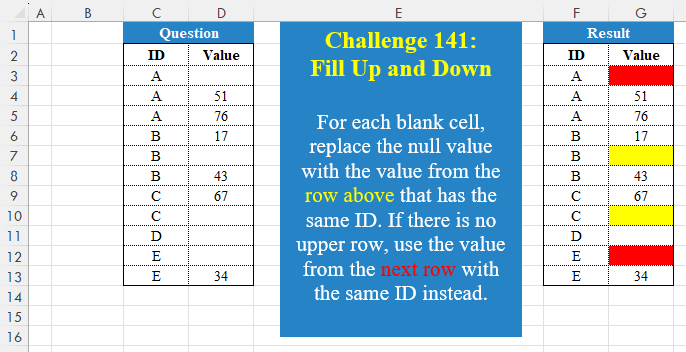
For each blank cell, replace the null value with the value from the row above that has the same ID. If there is no upper row, use the value from the next row with the same ID instead.
📌 Challenge Details and Links
Challenge Number: 141
Challenge Difficulty: ⭐
📥Download Sample File
📥Link to the solutions on LinkedIn
📥Link to the solution on YouTube
Solving the challenge of Fill Up And Down ! with Power Query
Power Query solution 1 for Fill Up And Down !, proposed by Zoran Milokanović:
let
  Source = Excel.CurrentWorkbook(){[Name = "Input"]}[Content],
  S = Table.Combine(
    Table.Group(Source, "ID", {"T", each Table.FillUp(Table.FillDown(_, {"Value"}), {"Value"})})[T]
  )
in
  S
Power Query solution 2 for Fill Up And Down !, proposed by Zoran Milokanović:
let
  Source = Excel.CurrentWorkbook(){[Name = "Input"]}[Content],
  S = Table.FromRows(
    List.Accumulate(
      Table.ToRows(Source),
      {},
      (b, n) =>
        let
          l = List.Last(b, {""})
        in
          {b & {n}, List.RemoveLastN(b) & {n, n}, b & {l}, b & {n}}{
            List.PositionOf({l{0} <> n{0}, l{1} = null, n{1} = null, true}, true)
          }
    ),
    Table.ColumnNames(Source)
  )
in
  S
Power Query solution 3 for Fill Up And Down !, proposed by Brian Julius:
let
  Source = Excel.CurrentWorkbook(){[Name = "Table1"]}[Content],
  GrpFill = Table.ExpandTableColumn(
    Table.Group(
      Source,
      {"ID"},
      {{"All", each Table.FillUp(Table.FillDown(_, {"Value"}), {"Value"})}}
    ),
    "All",
    {"Value"},
    {"Value"}
  )
in
  GrpFill
Power Query solution 4 for Fill Up And Down !, proposed by Aditya Kumar Darak 🇮🇳:
let
  Source = Excel.CurrentWorkbook(){[Name = "data"]}[Content],
  Group = Table.Group(
    Source,
    "ID",
    {"A", each Table.FillUp(Table.FillDown(_, {"Value"}), {"Value"})}
  ),
  Return = Table.Combine(Group[A])
in
  Return
Power Query solution 5 for Fill Up And Down !, proposed by Alejandro Simón 🇵🇦 🇪🇸:
let
Source = Excel.CurrentWorkbook(){[Name="Table1"]}[Content],
Group = Table.Group(Source, {"ID"}, {{"A", each
 let
 a = [[Value]],
 b = Table.FillUp(Table.FillDown(a, {"Value"}), {"Value"})
 in b}}),
Sol = Table.ExpandTableColumn(Group, "A",
 Table.ColumnNames(Group[A]{0}))
in
Sol
Power Query solution 6 for Fill Up And Down !, proposed by Kris Jaganah:
let
  A = Excel.CurrentWorkbook(){[Name = "Table1"]}[Content],
  B = Table.Combine(
    Table.Group(A, {"ID"}, {"All", each Table.FillUp(Table.FillDown(_, {"Value"}), {"Value"})})[All]
  )
in
  B
Power Query solution 7 for Fill Up And Down !, proposed by 🇮🇷 Navid Esmaeilzadeh اسماعیل زاده:
let
  S = Excel.CurrentWorkbook(){[Name = "Table1"]}[Content],
  A = Table.Group(S, {"ID"}, {{"T", each _}}),
  B = Table.AddColumn(A, "T2", each Table.FillUp(Table.FillDown([T], {"Value"}), {"Value"})),
  C = Table.Combine(B[T2])
in
  C
Solving the challenge of Fill Up And Down ! with Excel
Excel solution 1 for Fill Up And Down !, proposed by Bo Rydobon 🇹🇭:
=MAP(
    C3:C13,
    D3:D13,
    LAMBDA(
        i,
        v,
        IF(
            v="",
            IFERROR(
                TAKE(
                    TOCOL(
                        FILTER(
                            v:D3,
                            i:C3=i
                        ),
                        3
                    ),
                    -1
                ),
                IFERROR(
                    @TOCOL(
                        FILTER(
                            v:D13,
                            i:C13=i
                        ),
                        3
                    ),
                    ""
                )
            ),
            v
        )
    )
)
Excel solution 2 for Fill Up And Down !, proposed by 🇰🇷 Taeyong Shin:
=LET(
    d,
    C3:C13,
    v,
    D3:D13,
    n,
    IF(
        v,
        v,
        MMULT(
            -INDEX(
                v,
                XMATCH(
                    d,
                    d
                )+{0,
                1}
            ),
            -{1;1}
        )
    ),
    IF(
        n,
        n,
        ""
    )
)

=LET(
    d,
    C3:C13,
    v,
    D3:D13,
    HSTACK(
        d,
        IF(
            v,
            v,
            XLOOKUP(
                d,
                FILTER(
                    d,
                    v
                ),
                TOCOL(
                    v,
                    1
                ),
                ""
            )
        )
    )
)
Excel solution 3 for Fill Up And Down !, proposed by Oscar Mendez Roca Farell:
=MAP(
    C2:D13,
     LAMBDA(
         b,
          IF(
              LEN(
                  b
              ),
               b,
               IFNA(
                   VLOOKUP(
                       OFFSET(
                           b,
                            ,
                           -1
                       ),
                        IF(
                            D3:D13,
                             C3:D13
                        ),
                        2,

                   ),
                   ""
               )
          )
     )
)
Excel solution 4 for Fill Up And Down !, proposed by Julian Poeltl:
=LET(
    I,
    C3:C13,
    V,
    D3:D13,
    VSTACK(
        C2:D2,
        HSTACK(
            I,
            MAP(
                I,
                V,
                LAMBDA(
                    A,
                    B,
                    IF(
                        B=0,
                        LET(
                            X,
                            XLOOKUP(
                                A,
                                I,
                                V
                            ),
                            IF(
                                X=0,
                                XLOOKUP(
                                    A,
                                    I,
                                    V,
                                    ,
                                    ,
                                    -1
                                ),
                                X
                            )
                        ),
                        B
                    )
                )
            )
        )
    )
)
Excel solution 5 for Fill Up And Down !, proposed by Kris Jaganah:
=LET(a,
    C2:C13,
    b,
    D2:D13,
    c,
    OFFSET,
    d,
    c(
        a,
        -1,    ),
    e,
    IF((b="")*(a=d),
    c(
        b,
        -1,    ),
    b),
    f,
    c(
        a,
        1,    ),
    g,
    IF((e=0)*(a=f),
    c(
        b,
        1,    ),
    e),
    HSTACK(
        a,
        IF(
            g=0,
            "",
            g
        )
    ))
Excel solution 6 for Fill Up And Down !, proposed by Imam Hambali:
=LET(    i,
     C3:C13,    v,
     D3:D13,    nb,
     FILTER(
         HSTACK(
             i,
             v
         ),
         v<>""
     ),    ui,
     UNIQUE(
         i
     ),    vb,
     XLOOKUP(
         ui,
          TAKE(
              nb,
              ,
              1
          ),
          TAKE(
              nb,
              ,
              -1
          ),
         ""
     ),    vn,
     IF(
         v<>"",
         v,
          XLOOKUP(
              i,
              ui,
              vb
          )
     ),    VSTACK(
        C2:D2,
         HSTACK(
             i,
             vn
         )
    ))
Excel solution 7 for Fill Up And Down !, proposed by Sunny Baggu:
=HSTACK(     C3:C13,     DROP(          REDUCE(

               "",

               UNIQUE(
                   C3:C13
               ),

               LAMBDA(
                   x,
                    y,

                    VSTACK(

                         x,

                         LET(

                              _e,
                              LAMBDA(
                                  r,

                                   SCAN(
                                       "",
                                        r,
                                        LAMBDA(
                                            a,
                                             v,
                                             IF(
                                                 v = "",
                                                  a,
                                                  v
                                             )
                                        )
                                   )

                              ),

                              _a,
                              FILTER(
                                  D3:D13,
                                   C3:C13 = y
                              ),

                              _b,
                              _e(
                                  _a
                              ),

                              _c,
                              SEQUENCE(
                                  ROWS(
                                  _a
                              )
                              ),

                              SORTBY(
                                  _e(
                                      SORTBY(
                                          _b,
                                           _c,
                                           -1
                                      )
                                  ),
                                   _c,
                                   -1
                              )

                         )

                    )

               )

          ),          1     ))
Excel solution 8 for Fill Up And Down !, proposed by Cary Ballard, DML:
=LET(     i,
     C3:C13,     v,
     D3:D13,     f,
     FILTER(
         HSTACK(
             i,
             v
         ),
          v>0
     ),     IF(
         v=0,
          XLOOKUP(
             i,
              TAKE(
                  f,
                  ,
                  1
              ),
              TAKE(
                 f,
                 ,
                 -1
             ),
             ""
         ),
          v
     ))
Excel solution 9 for Fill Up And Down !, proposed by Fausto Bier:
=LET(i,C3:C13,e,C2:C14,v,D3:D13,s,SEQUENCE(ROWS(i)),A.COL(IF(v="",INDEX(v,IF(IFNA(e=i,),s-1,s+1)),v),3))Excel solution 10 for Fill Up And Down !, proposed by Hamidi Hamid:
=LET(
    c,
    C3:C13,
    d,
    D3:D13,
    x,
    FILTER(
        C3:D13,
        d>0
    ),
    HSTACK(
        c,
        IF(
            d>0,
            d,
            IFERROR(
                VLOOKUP(
                    c,
                    x,
                    2,
                    0
                ),
                ""
            )
        )
    )
)
Excel solution 11 for Fill Up And Down !, proposed by Hussein SATOUR:
=LET(
    O,
    OFFSET,
    MAP(
        D3:D13,
        LAMBDA(
            x,
            IFS(
                x<>"",
                x,
                OFFSET(
                    x,
                    ,
                    -1
                )=OFFSET(
                    x,
                    -1,
                    -1
                ),
                O(
                    x,
                    -1,
                    0
                ),
                1,
                O(
                    x,
                    1,
                    0
                )
            )
        )
    )
)
Solving the challenge of Fill Up And Down ! with Python
Python solution 1 for Fill Up And Down !, proposed by Konrad Gryczan, PhD:
import pandas as pd

path = "CH-141 Fill UP and Down.xlsx"
input = pd.read_excel(path, usecols="C:D", skiprows=1, nrows=12)

result = input.groupby('ID', group_keys=False).apply(lambda group: group.ffill().bfill()).reset_index(drop=True)

print(result)

# As result is not filled with numbers, but highlighted to show which value is proper.
# We need to validate it by eye, but it is correct.
Solving the challenge of Fill Up And Down ! with Python in Excel
Python in Excel solution 1 for Fill Up And Down !, proposed by Alejandro Campos:
df = xl("C2:D13", headers=True)

df['Value'] = df.groupby('ID')['Value'].apply(lambda x: x.ffill().bfill()).reset_index(drop=True).fillna(' ')
df
Python in Excel solution 2 for Fill Up And Down !, proposed by Ümit Barış Köse, MSc:
df = xl("C2:D13", headers=True)
df['Value'] = df.groupby('ID')['Value'].transform(lambda x: x.ffill().bfill()).fillna(' ')
df
Solving the challenge of Fill Up And Down ! with R
R solution 1 for Fill Up And Down !, proposed by Konrad Gryczan, PhD:
library(tidyverse)
library(readxl)

path = "files/CH-141 Fill UP and Down.xlsx"
input = read_excel(path, range = "C2:D13")

result = input %>%
 group_by(ID) %>%
 fill(Value, .direction = "downup")

# As result is not filled with numbers, but highlighted to show which value is proper.
# We need to validate it by eye, but it is correct.
Solving the challenge of Fill Up And Down ! with Google Sheets
Google Sheets solution 1 for Fill Up And Down !, proposed by Peter Krkos:
PowerQuery solution:
https://docs.google.com/spreadsheets/d/1zR5IZLz8OT76vhaPEHfsPrw8-RDKnLyyqS49IJjdhFk/edit?pli=1&gid=1588029383#gid=1588029383