
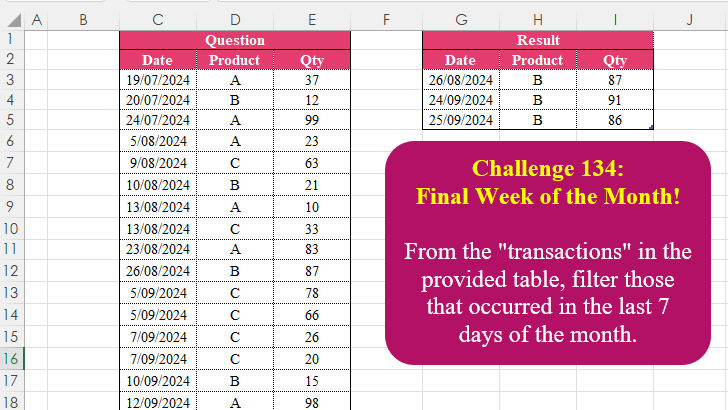
From the “transactions” in the provided table, filter those that occurred in the last 7 days of the month
📌 Challenge Details and Links
Challenge Number: 134
Challenge Difficulty: ⭐
📥Download Sample File
📥Link to the solutions on LinkedIn
📥Link to the solution on YouTube
Solving the challenge of Final Week Of The Month! with Power Query
Power Query solution 1 for Final Week Of The Month!, proposed by Zoran Milokanović:
let
  Source = Excel.CurrentWorkbook(){[Name = "Input"]}[Content],
  S      = Table.SelectRows(Source, each [Date] >= Date.EndOfMonth([Date]) - Duration.From(7))
in
  S
Power Query solution 2 for Final Week Of The Month!, proposed by Brian Julius:
let
  Source = Table.TransformColumnTypes(
    Excel.CurrentWorkbook(){[Name = "Table1"]}[Content],
    {"Date", Date.Type}
  ),
  Filter = Table.SelectRows(Source, each Date.DaysInMonth([Date]) - Date.Day([Date]) <= 6)
in
  Filter
Power Query solution 3 for Final Week Of The Month!, proposed by Ramiro Ayala Chávez:
let
S = Excel.CurrentWorkbook(){[Name="Table1"]}[Content],
a = Table.AddColumn(S,"E", each Date.Day(Date.EndOfMonth([Date]))),
b = Table.AddColumn(a,"L", each if Date.Day([Date])>=[E]-6 then "Y" else "N"),
Sol = Table.SelectRows(b, each [L]="Y")[[Date],[Product],[Qty]]
in
Sol
Power Query solution 4 for Final Week Of The Month!, proposed by Alejandro Simón 🇵🇦 🇪🇸:
let
 Source = Excel.CurrentWorkbook(){[Name="Table2"]}[Content],
 Sol = Table.Combine(Table.Group(Source, "Date", {{"A", each
let
a = _,
b = Date.Day(Date.EndOfMonth(Date.From(a[Date]{0})))-7,
c = Table.SelectRows(a, each Date.Day([Date])>b)
in c}},0, (a,b)=> Number.From(Date.Month(b)<>Date.Month(a)))[A])
in
 Sol
Power Query solution 5 for Final Week Of The Month!, proposed by Alejandro Simón 🇵🇦 🇪🇸:
let
  Source = Excel.CurrentWorkbook(){[Name = "Table2"]}[Content],
  Sol = Table.SelectRows(
    Source,
    each Date.Day(Date.From([Date])) > Date.Day(Date.EndOfMonth(Date.From([Date]))) - 7
  )
in
  Sol
Power Query solution 6 for Final Week Of The Month!, proposed by Abdallah Ally:
let
  Source    = Excel.CurrentWorkbook(){[Name = "Table1"]}[Content],
  Transform = Table.TransformColumnTypes(Source, {"Date", type date}),
  Result    = Table.SelectRows(Transform, each [Date] > Date.AddDays(Date.EndOfMonth([Date]), - 7))
in
  Result
Power Query solution 7 for Final Week Of The Month!, proposed by Kris Jaganah:
let
  A = Excel.CurrentWorkbook(){[Name = "Table3"]}[Content],
  B = Table.SelectRows(A, each Number.From([Date]) > Number.From(Date.EndOfMonth([Date])) - 7)
in
  B
Power Query solution 8 for Final Week Of The Month!, proposed by Yaroslav Drohomyretskyi:
let
  Source = Excel.CurrentWorkbook(){[Name = "Table2"]}[Content],
  Filter = Table.SelectRows(
    Source,
    each (Number.From(Date.EndOfMonth([Date])) - Number.From([Date]) <= 7)
  )
in
  Filter
Power Query solution 9 for Final Week Of The Month!, proposed by 🇮🇷 Navid Esmaeilzadeh اسماعیل زاده:
let
S = Excel.CurrentWorkbook(){[Name="Table2"]}[Content],
A = Table.AddColumn(S, "T", each Duration.TotalDays(Date.From(Date.EndOfMonth([Date]))-Date.From([Date]))<7),
B = Table.SelectRows(A, each ([T] = true)),
C = Table.RemoveColumns(B,{"T"}),
D = Table.TransformColumnTypes(C,{{"Date", type date}})
in
D
Power Query solution 10 for Final Week Of The Month!, proposed by Ahmed Ariem:
let
  Source = Excel.CurrentWorkbook(){[Name = "Table1"]}[Content],
  Types  = Table.TransformColumnTypes(Source, {{"Date", type date}}),
  Select = Table.SelectRows(Types, each [Date] > Date.AddDays(Date.EndOfMonth([Date]), - 7))
in
  Select
Power Query solution 11 for Final Week Of The Month!, proposed by CA Raghunath Gundi:
let
  Source = Excel.CurrentWorkbook(){[Name = "Table2"]}[Content],
  DaysInMonth = Table.AddColumn(Source, "Days in Month", each Date.DaysInMonth([Date]), Int64.Type),
  Result = Table.SelectColumns(
    Table.SelectRows(
      Table.AddColumn(DaysInMonth, "a", each [Days in Month] - Date.Day([Date])),
      each [a] < 7
    ),
    {"Date", "Product", "Qty"}
  )
in
  Result
Power Query solution 12 for Final Week Of The Month!, proposed by Pierluigi Stallone:
let
  Source = Excel.CurrentWorkbook(){[Name = "Table1"]}[Content],
  #"Added Custom" = Table.AddColumn(
    Source,
    "EoMonth",
    each
      if [Date] >= Date.AddDays(Date.EndOfMonth([Date]), - 7) and [Date] <= Date.EndOfMonth([Date]) then
        1
      else
        0
  ),
  #"Filtered Rows" = Table.SelectRows(#"Added Custom", each ([EoMonth] = 1))
in
  #"Filtered Rows"
Solving the challenge of Final Week Of The Month! with Excel
Excel solution 1 for Final Week Of The Month!, proposed by Oscar Mendez Roca Farell:
=FILTER(
    C3:E27,
    EOMONTH(
        +C3:C27,
        0
    )-C3:C27<7
)
Excel solution 2 for Final Week Of The Month!, proposed by Julian Poeltl:
=FILTER(
    C3:E27,
    C3:C27>EOMONTH(
        --C3:C27,
        0
    )-7
)
Excel solution 3 for Final Week Of The Month!, proposed by Kris Jaganah:
=FILTER(
    C3:E27,
    C3:C27>EOMONTH(
        --C3:C27,
        0
    )-7
)
Excel solution 4 for Final Week Of The Month!, proposed by Abdallah Ally:
=VSTACK(
    C2:E2,
    FILTER(
        C3:E27,
        MAP(
            C3:C27,
            LAMBDA(
                x,
                x> EOMONTH(
                    x,
                    0
                )-7
            )
        )
    )
)
Excel solution 5 for Final Week Of The Month!, proposed by Imam Hambali:
=LET(dt,
     C3:C27,
     a,
     BYROW(
         dt,
         LAMBDA(
             x,
              EOMONTH(
                  x,
                  0
              )
         )
     ),
     VSTACK(Solution[
#Headers],
     FILTER(C3:E27,
     (a-dt)<7)))
Excel solution 6 for Final Week Of The Month!, proposed by Ivan William:
=GROUPBY(
    B2:C27,
    D2:D27,
    SINGLE,
    3,
    0,
    ,
    MAP(
        B3:B27,
        LAMBDA(
            x,
            DAY(
                EOMONTH(
                    x,
                     0
                )-x
            )<7
        )
    )
)
2.=FILTER(
    B3:D27,
    MAP(
        B3:B27,
        LAMBDA(
            x,
            DAY(
                EOMONTH(
                    x,
                     0
                )-x
            )<7
        )
    )
)
Excel solution 7 for Final Week Of The Month!, proposed by Sunny Baggu:
=FILTER(     C3:E27,     EOMONTH(
         --C3:C27,
          0
     ) - C3:C27 < 7)
Excel solution 8 for Final Week Of The Month!, proposed by Andy Heybruch:
=FILTER(
    C3:E27,
    C3:C27>EOMONTH(
        1*C3:C27,
        0
    )-7
)
Excel solution 9 for Final Week Of The Month!, proposed by Asheesh Pahwa:
=FILTER(
    C3:E27,
    DROP(
        REDUCE(
            "",
            C3:C27,
            LAMBDA(
                x,
                y,
                VSTACK(
                    x,
                    EOMONTH(
                        y,
                        0
                    )-y<7
                )
            )
        ),
        1
    )
)
Excel solution 10 for Final Week Of The Month!, proposed by Asheesh Pahwa:
=FILTER(
    C3:E27,
    EOMONTH(
        --C3:C27,
        0
    )-C3:C27<7
)
Excel solution 11 for Final Week Of The Month!, proposed by CA Raghunath Gundi:
=LET(EOM,
    BYROW(
        $C$3:$C$27,
        LAMBDA(
            a,
             EOMONTH(
                 a,
                 0
             )
        )
    ),FILTER(Question,
    (EOM-Question[Date])<7))
Excel solution 12 for Final Week Of The Month!, proposed by Eddy Wijaya:
=LET(
    d,
    C3:E27,    dat,
    TAKE(
        d,
        ,
        1
    ),    l,
    MAP(
        dat,
        LAMBDA(
            m,
            EOMONTH(
                m,
                0
            )-7
        )
    ),    FILTER(
        d,
        dat>l
    )
)
Excel solution 13 for Final Week Of The Month!, proposed by Fausto Bier:
=FILTER(C3:E27,
    (EOMONTH(
        +C3:C27,
        0
    )-7)
Excel solution 14 for Final Week Of The Month!, proposed by ferhat CK:
=GROUPBY(
    C3:D27,
    E3:E27,
    MAX,
    ,
    0,
    ,
    C3:C27>EOMONTH(
        --C3:C27,
        0
    )-7
)
Excel solution 15 for Final Week Of The Month!, proposed by Hamidi Hamid:
=LET(x,
    HSTACK(MAP(C3:C27,
    LAMBDA(a,
    FILTER(a,
    (DAY(
        a
    )>DAY(
        EOMONTH(
            a,
            0
        )
    )-7),
    ))),
    D3:D27,
    E3:E27),
    VSTACK(
        C2:E2,
        FILTER(
            x,
            NOT(
                ISERROR(
                    TAKE(
                        x,
                        ,
                        1
                    )
                )
            ),

        )
    ))
Excel solution 16 for Final Week Of The Month!, proposed by Hussein SATOUR:
=FILTER(
    C3:E27,
    MAP(
        C3:C27,
        LAMBDA(
            x,
            EOMONTH(
                x,
                0
            )-x<7
        )
    )
)
Excel solution 17 for Final Week Of The Month!, proposed by Luis Enrique Charca Ponce:
=LET(iTbl,
    C3:E27,dates,
    TAKE(
        iTbl,
        ,
        1
    ),FILTER(iTbl,
    BYROW(dates,LAMBDA(r,
    (EOMONTH(
        r,
        0
    )-r)<7))))
Excel solution 18 for Final Week Of The Month!, proposed by Md. Zohurul Islam:
=LET(     rng,
     C3:E27,     a,
     ABS(
         C3:C27
     ),     b,
     EOMONTH(
         a,
          0
     ) - 7,     c,
     FILTER(
         rng,
          a > b
     ),     header,
     {
     "Date",     "Product",     "Qty"
     },     Result,
     VSTACK(
         header,
          c
     ),     Result)
Excel solution 19 for Final Week Of The Month!, proposed by Michael D. Newby:
=LET(     header,
     {"Date",
     "Product",
     "Qty"},     rawdata,
     C3:E27,     dates,
     C3:C27,     datescutoff,
     BYROW(
         dates,
          LAMBDA(
              dates,
               EOMONTH(
                   dates,
                    0
               ) + 1 - 7
          )
     ),     data,
     FILTER(
         rawdata,
          CHOOSECOLS(
              dates,
               1
          ) >= datescutoff
     ),     VSTACK(
         header,
          data
     ))
Excel solution 20 for Final Week Of The Month!, proposed by Philippe Brillault:
=LET(
    t,
    T_Input,
    d,
    INDEX(
        t,
        ,
        1
    ),
    VSTACK(
        OFFSET(
            t,
            -1,
            0,
            1
        ),
        FILTER(
            t,
            d>DATE(
                YEAR(
                    d
                ),
                MONTH(
                    d
                )+1,
                -7
            )
        )
    )
)
Excel solution 21 for Final Week Of The Month!, proposed by QABBAL HICHAM:
=FILTER(
    C3:E27;
    C3:C27>=EOMONTH(
        C3:C27;
        0
    )-6
)
Excel solution 22 for Final Week Of The Month!, proposed by Rick Rothstein:
=FILTER(C3:E27,C3:C27>EOMONTH(+C3:C27,0)-7)

With the header...

=VSTACK(C2:E2,FILTER(C3:E27,C3:C27>EOMONTH(+C3:C27,0)-7))
Excel solution 23 for Final Week Of The Month!, proposed by Songglod Petchamras:
=FILTER(
    C3:E27,
    LET(
        d,
        --C3:C27,
        DAY(
            EOMONTH(
                d,
                0
            )
        )-DAY(
            d
        )
    )<7
)
Excel solution 24 for Final Week Of The Month!, proposed by Ümit Barış Köse, MSc:
=
FILTER(
 Table4,
 Table4[Date] > EOMONTH(Table4[Date], 0) - 7
)
Solving the challenge of Final Week Of The Month! with Python
Python solution 1 for Final Week Of The Month!, proposed by Konrad Gryczan, PhD:
import pandas as pd
path = "CH-134 Final Week of the Month.xlsx"
input = pd.read_excel(path, usecols= "C:E", skiprows= 1, nrows= 27)
test = pd.read_excel(path, usecols="G:I", skiprows=1, nrows=3).rename(columns=lambda x: x.split('.')[0])

input['Date'] = pd.to_datetime(input['Date'])
input['EoM'] = input['Date'] + pd.offsets.MonthEnd(0)
input = input[input['EoM'] - input['Date'] < pd.Timedelta(days=7)]
result = input[["Date","Product","Qty"]].reset_index(drop=True)
print(result.equals(test)) # True
Solving the challenge of Final Week Of The Month! with Python in Excel
Python in Excel solution 1 for Final Week Of The Month!, proposed by Abdallah Ally:
df = xl("C2:E27", headers=True)

# Perform data manipulation
df = df[
df['Date'] > df['Date'] + pd.offsets.MonthEnd(0) - pd.Timedelta(days=7)
].reset_index(drop=True)

# Display the final results
df
Python in Excel solution 2 for Final Week Of The Month!, proposed by Alejandro Campos:
df = xl("C2:E27", headers=True)
df['Date'] = pd.to_datetime(df['Date'], format='%d/%m/%Y')
filtered_transactions = df[df['Date'].dt.day > (df['Date'].dt.days_in_month - 7)].reset_index(drop=True)
Solving the challenge of Final Week Of The Month! with R
R solution 1 for Final Week Of The Month!, proposed by Konrad Gryczan, PhD:
library(tidyverse)
library(readxl)

path = "files/CH-134 Final Week of the Month.xlsx"
input = read_excel(path, range = "C2:E27")
test = read_excel(path, range = "G2:I5")

result = input %>%
 mutate(day = day(Date),
 month_end = ceiling_date(Date, "month") - days(1)) %>%
 filter(day >= day(month_end) - 6) %>%
 select(-day, -month_end)

all.equal(result, test, check.attributes = FALSE)
#> [1] TRUE
Solving the challenge of Final Week Of The Month! with Google Sheets
Google Sheets solution 1 for Final Week Of The Month!, proposed by Milan Shrimali:
GOOGLE SHEETS:
=LET(MAIN,BYROW(C3:E20,LAMBDA(X,LET(A,EOMONTH(CHOOSECOLS(X,1),0),STCK,HSTACK(X,DATEDIF(CHOOSECOLS(X,1),A,"D")),IFERROR(FILTER(CHOOSECOLS(STCK,1,2,3),CHOOSECOLS(STCK,4)<=6),"")))),FILTER(MAIN,CHOOSECOLS(MAIN,1)<>""))
Google Sheets solution 2 for Final Week Of The Month!, proposed by Peter Krkos:
PowerQuery solution:
https://docs.google.com/spreadsheets/d/1zR5IZLz8OT76vhaPEHfsPrw8-RDKnLyyqS49IJjdhFk/edit?pli=1&gid=1389072501#gid=1389072501
Solving the challenge of Final Week Of The Month! with SQL
SQL solution 1 for Final Week Of The Month!, proposed by Abdallah Ally:
💹T-SQL solution ✍


hashtag
#Python
hashtag
#R
hashtag
#SQL
hashtag
#Excel
hashtag
#PowerBI
hashtag
#PowerQuery

-- T-SQL Query

SELECT [date],
 [product],
 [qty]
FROM  [Omid].[dbo].[ch_134]
WHERE [date] > DATEADD(DAY, -7, EOMONTH([date]))