
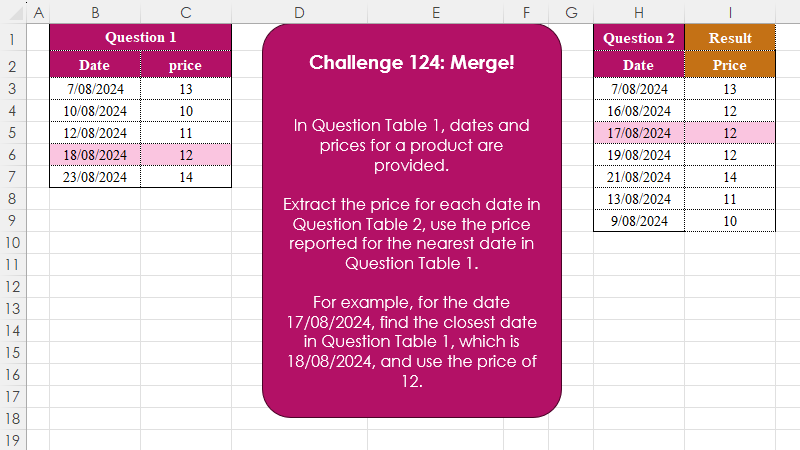
In Question Table 1, dates and prices for a product are provided. Extract the price for each date in Question Table 2, use the price reported for the nearest date in Question Table 1. For example, for the date 17/08/2024, find the closest date in Question Table 1, which is 18/08/2024, and use the price of 12.
📌 Challenge Details and Links
Challenge Number: 124
Challenge Difficulty: ⭐⭐⭐
📥Download Sample File
📥Link to the solutions on LinkedIn
📥Link to the solution on YouTube
Solving the challenge of Merge! Part 2 with Power Query
Power Query solution 1 for Merge! Part 2, proposed by Zoran Milokanović:
let
  Source = each Excel.CurrentWorkbook(){[Name = _]}[Content],
  S = Table.AddColumn(
    Source("Table2"),
    "Price",
    (r) => Table.Sort(Source("Table1"), each Number.Abs(Number.From([Date] - r[Date])))[price]{0}
  )
in
  S
Power Query solution 2 for Merge! Part 2, proposed by Brian Julius:
let
  Source = Table.TransformColumnTypes(
    Excel.CurrentWorkbook(){[Name = "Table1"]}[Content],
    {"Date", Date.Type}
  ),
  Dates = Table.SelectColumns(
    Table.TransformColumnTypes(
      Excel.CurrentWorkbook(){[Name = "Table2"]}[Content],
      {"Date", Date.Type}
    ),
    "Date"
  ),
  AddPrice = Table.AddColumn(
    Dates,
    "Price",
    each [
      z = Number.From([Date]),
      a = List.Transform(Source[Date], each Number.Abs(z - Number.From(_))),
      b = List.Min(a),
      c = List.PositionOf(a, b),
      d = Source[price]{c}
    ][d]
  )
in
  AddPrice
Power Query solution 3 for Merge! Part 2, proposed by Ramiro Ayala Chávez:
let
Q1 = Excel.CurrentWorkbook(){[Name="Question1"]}[Content],
Q2 = Excel.CurrentWorkbook(){[Name="Question2"]}[Content],
A = Table.AddColumn,
a = A(Q2,"P", each Record.ToList(Table.Last(Table.SelectRows(Q1,(x)=>x[Date]<=[Date])))),
b = A(a,"N", each Record.ToList(Table.First(Table.SelectRows(Q1,(x)=>x[Date]>=[Date])))),
c = A(b,"M", each Table.FromRows({[P]&[N]},{"C1","C2","C3","C4"}))[[Date],[M]],
d = Table.ExpandTableColumn(c,"M",{"C1","C2","C3","C4"}),
e = A(d,"D1", each Number.Abs(Duration.Days([Date]-[C1]))),
f = A(e,"D2", each Number.Abs(Duration.Days([Date]-[C3]))),
Sol = A(f,"Price", each if [D1]<=[D2] then [C2] else [C4])[[Date],[Price]]
in
Sol
Power Query solution 4 for Merge! Part 2, proposed by Alejandro Simón 🇵🇦 🇪🇸:
let
Date1 = Excel.CurrentWorkbook(){[Name="Table1"]}[Content],
Date2 = Excel.CurrentWorkbook(){[Name="Table2"]}[Content],
Sol = Table.AddColumn(Date2, "Price", (x)=>
 let
 a = Date1,
 b = Table.AddColumn(a, "B", each Number.Abs(Number.From([Date]-x[Date]))),
 c = Table.SelectRows(b, each [B] = List.Min(b[B]))[price]{0}
 in c)
in
Sol
Power Query solution 5 for Merge! Part 2, proposed by Abdallah Ally:
let
  ReadTable = each Excel.CurrentWorkbook(){[Name = _]}[Content],
  AddColumn = Table.AddColumn(
    ReadTable("Table2"),
    "Price",
    each [
      a = ReadTable("Table1"),
      b = Table.AddColumn(a, "Days", (x) => Number.Abs(Duration.Days(x[Date] - [Date]))),
      c = Table.Min(b, each [Days])[price]
    ][c]
  ),
  Result = Table.TransformColumnTypes(AddColumn, {"Date", type date})
in
  Result
Power Query solution 6 for Merge! Part 2, proposed by Kris Jaganah:
let
A =(x) => Excel.CurrentWorkbook(){[Name=x]}[Content],
B = Table.AddColumn(A("Table2") , "Price", each [
 a = A("Table1"),
 b = [Date] ,
 c = List.Min( List.Select(a[Date], each _ >= b)) ,
 d = List.Max( List.Select(a[Date], each _ <= b)),
 e = if c -b < b-d then c else d,
 f = a[price] { List.PositionOf(a[Date] ,e)}] [f])
in B
Power Query solution 7 for Merge! Part 2, proposed by 🇮🇷 Navid Esmaeilzadeh اسماعیل زاده:
let
  Data = Excel.CurrentWorkbook(){[Name = "Table1"]}[Content],
  Question = Excel.CurrentWorkbook(){[Name = "Table2"]}[Content],
  A = Table.AddColumn(Question, "T", each Data),
  B = Table.ExpandTableColumn(A, "T", {"Date", "price"}, {"Date.1", "price"}),
  C = Table.AddColumn(B, "diff", each Number.Abs(Duration.TotalDays([Date] - [Date.1]))),
  D = Table.Group(C, {"Date"}, {{"T", each _}}),
  E = Table.AddColumn(
    D,
    "Price",
    each Table.SelectRows([T], (n) => n[diff] = List.Min([T][diff]))[price]{0}
  ),
  F = Table.SelectColumns(E, {"Date", "Price"}),
  G = Table.TransformColumnTypes(F, {{"Date", type date}})
in
  G
Power Query solution 8 for Merge! Part 2, proposed by Sahan Jayasuriya:
let
 // q1 table
 Q1_T = Excel.CurrentWorkbook(){[Name="dTable"]}[Content],
 // q2 table
 Q2_T = Excel.CurrentWorkbook(){[Name="Qtable"]}[Content],
 NewPriceCol = Table.AddColumn(Q2_T, "Price", each

 [
 step1 = List.Transform(Q1_T[Date], (x)=> Number.From(x)),
 step2 = List.Transform(step1, (x)=> Number.Abs(x - Number.From([Date]))),
 step3 = List.PositionOf(step2, List.Min(step2)),
 result = Q1_T[price]{step3}
 ][result]
 ),
 ChangedType = Table.TransformColumnTypes(NewPriceCol,{{"Date", type date}, {"Price", Int64.Type}})
in
 ChangedType
Solving the challenge of Merge! Part 2 with Excel
Excel solution 1 for Merge! Part 2, proposed by 🇰🇷 Taeyong Shin:
=MAP(
    H3:H9,
    LAMBDA(
        x,
        XLOOKUP(
            0,
            ABS(
                B3:B7-x
            ),
            C3:C7,
            ,
            1
        )
    )
)
Excel solution 2 for Merge! Part 2, proposed by Aditya Kumar Darak 🇮🇳:
=MAP(
    H3:H9,
     LAMBDA(
         a,
          XLOOKUP(
              0,
               ABS(
                   B3:B7 - a
               ),
               C3:C7,
               ,
               1
          )
     )
)
Excel solution 3 for Merge! Part 2, proposed by Oscar Mendez Roca Farell:
=BYROW(ABS(
    H3:H9-TOROW(
        B3:B7
    )
),
     LAMBDA(r,
     MAX(TOROW(
         C3:C7
     )*(r=MIN(
         r
     )))))
Excel solution 4 for Merge! Part 2, proposed by Julian Poeltl:
=LET(
    D,
    B3:B7,
    P,
    C3:C7,
    MAP(
        H3:H9,
        LAMBDA(
            A,
            LET(
                C,
                ABS(
                    D-A
                ),
                XLOOKUP(
                    MIN(
                        C
                    ),
                    C,
                    P
                )
            )
        )
    )
)
Excel solution 5 for Merge! Part 2, proposed by Kris Jaganah:
=LET(
    a,
    B3:B7,
    b,
    H3:H9,
    c,
    XLOOKUP(
        b,
        a,
        a,
        ,
        -1
    ),
    d,
    XLOOKUP(
        b,
        a,
        a,
        ,
        1
    ),
    e,
    IF(
        b-c>d-b,
        d,
        c
    ),
    HSTACK(
        b,
        XLOOKUP(
            e,
            a,
            C3:C7
        )
    )
)
Excel solution 6 for Merge! Part 2, proposed by Imam Hambali:
=BYROW(
    ABS(
        H3:H9-TRANSPOSE(
            B3:B7
        )
    ),
     LAMBDA(
         x,
          INDEX(
              C3:C7,
              XMATCH(
                  MIN(
                      x
                  ),
                  x
              )
          )
     )
)
Excel solution 7 for Merge! Part 2, proposed by Sunny Baggu:
=LET(     d,
     B3:B7,     p,
     C3:C7,     fd,
     E3:E9,     _a,
     XMATCH(
         fd,
          d,
          {1,
          -1}
     ),     _b,
     INDEX(
         d,
          _a,
          1
     ),     _c,
     ABS(
         INDEX(
         d,
          _a,
          1
     ) - fd
     ),     _d,
     BYROW(
         _c,
          LAMBDA(
              a,
               MIN(
                   a
               )
          )
     ),     XLOOKUP(
         BYROW(
             IF(
                 _c = _d,
                  _b,
                  x
             ),
              LAMBDA(
                  b,
                   UNIQUE(
                       TOCOL(
                           b,
                            3
                       )
                   )
              )
         ),
          d,
          p
     ))
Excel solution 8 for Merge! Part 2, proposed by Ankur Sharma:
=MAP(
    E3:E9,
     LAMBDA(
         z,
          LET(
              a,
               B3:B7,
               b,
               C3:C7,
               c,
               XMATCH(
                   z,
                    a,
                    -1
               ),
               d,
               XMATCH(
                   z,
                    a,
                    1
               ),
               IF(
                   z - INDEX(
                       a,
                        c
                   ) > INDEX(
                       a,
                        d
                   ) - z,
                    INDEX(
                        b,
                         d
                    ),
                    INDEX(
                        b,
                         c
                    )
               )
          )
     )
)
Excel solution 9 for Merge! Part 2, proposed by Eddy Wijaya:
=LET(    q,
    H3:H9,    resD,
    BYROW(
        q,
        LAMBDA(
            r,

            LET(

                db,
                XLOOKUP(
                    r,
                    B:B,
                    B:B,
                    ,
                    {1,
                    -1}
                ),

                dif,
                ABS(
                    db-r
                ),

                INDEX(
                    db,
                    ,
                    XMATCH(
                        MIN(
                            dif
                        ),
                        dif,
                        0
                    )
                )
            )
        )
    ),    VSTACK(
        H2:I2,        HSTACK(
            q,
            XLOOKUP(
                resD,
                B:B,
                C:C
            )
        )
    )
)
Excel solution 10 for Merge! Part 2, proposed by El Badlis Mohd Marzudin:
=XLOOKUP(
    H3:H9-1,
    B3:B7,
    C3:C7,
    ,
    1
)
Excel solution 11 for Merge! Part 2, proposed by ferhat CK:
=LET(
    n,
    XLOOKUP,
    a,
    n(
        H3:H9,
        B3:B7,
        B3:B7,
        ,
        {-1,
        1}
    ),
    b,
    ABS(
        a-H3:H9
    ),
    f,
    CHOOSEROWS,
    c,
    MAP(
        SEQUENCE(
            ROWS(
                a
            )
        ),
        LAMBDA(
            x,
            n(
                0,
                f(
                    b,
                    x
                ),
                f(
                    a,
                    x
                ),
                ,
                1
            )
        )
    ),
    n(
        c,
        B3:B7,
        C3:C7
    )
)
Excel solution 12 for Merge! Part 2, proposed by Gerson Pineda:
=LET(
    p,
    B3:B7,
    MAP(
        E3:E9,
        LAMBDA(
            x,
            INDEX(
                C3:C7,
                XMATCH(
                    MIN(
                        ABS(
                            x-p
                        )
                    ),
                    ABS(
                            x-p
                        )
                )
            )
        )
    )
)
Excel solution 13 for Merge! Part 2, proposed by Hamidi Hamid:
=LET(
    b,
    B3:B7,
    h,
    H3:H9,
    m,
    ABS(
        XLOOKUP(
            h,
            b,
            b,
            ,
            1
        )-H3:H9
    ),
    n,
    ABS(
        XLOOKUP(
            h,
            b,
            b,
            ,
            -1
        )-h
    ),
    o,
    XLOOKUP(
        h,
        b,
        C3:C7,
        ,
        -1
    ),
    k,
    XLOOKUP(
        h,
        b,
        C3:C7,
        ,
        1
    ),
    j,
    IF(
        m<=n,
        k,
        o
    ),
    j
)
Excel solution 14 for Merge! Part 2, proposed by Hussein SATOUR:
=MAP(E3:E9,
    LAMBDA(x,
    LET(a,
    ABS(
        x-B3:B7
    ),
    SUM(C3:C7*(a=MIN(
        a
    ))))))
Excel solution 15 for Merge! Part 2, proposed by Md. Shah Alam, Microsoft Certified Trainer:
=MAP(
    H3:H9,
    LAMBDA(
        x,
        XLOOKUP(
            MIN(
                ABS(
                    B3:B7-x
                )
            ),
            ABS(
                    B3:B7-x
                ),
            C3:C7
        )
    )
)
Excel solution 16 for Merge! Part 2, proposed by Nicolas Micot:
=MAP(
    H3:H9;
    LAMBDA(
        l_date;
        LET(
            _ecart;
            ABS(
                B3:B7-l_date
            );
            PRENDRE(
                TRIERPAR(
                    C3:C7;
                    _ecart;
                    1
                );
                1
            )
        )
    )
)
Excel solution 17 for Merge! Part 2, proposed by Pieter de B.:
=MAP(
    H3:H9,
    LAMBDA(
        a,
        XLOOKUP(
            0,
            ABS(
                B3:B7-a
            ),
            C3:C7,
            ,
            1
        )
    )
)
Solving the challenge of Merge! Part 2 with Python
Python solution 1 for Merge! Part 2, proposed by Konrad Gryczan, PhD:
import pandas as pd

path = "CH-124 Merge.xlsx"

input = pd.read_excel(path, usecols="B:C", skiprows=1, nrows=5).sort_values('Date').reset_index(drop=True)
input2 = pd.read_excel(path, usecols="H:H", skiprows=1, nrows=7)
 .rename(columns=lambda x: x.replace('.1', ''))
 .sort_values('Date')
 .reset_index(drop=True)
test = pd.read_excel(path, usecols="H:I", skiprows=1, nrows=7).rename(columns=lambda x: x.replace('.1', ''))

result = pd.merge_asof(input2, input, on='Date', direction='nearest')
result = pd.merge(result, test, on='Date', how='inner')

print(result["Price"].eq(result["price"]).all()) # True
Solving the challenge of Merge! Part 2 with Python in Excel
Python in Excel solution 1 for Merge! Part 2, proposed by Alejandro Campos:
df1 = xl("B2:C7", headers=True)
df2 = xl("H2:I9", headers=True)
df1['Date'], df2['Date'] = [pd.to_datetime(df[col], format='%d/%m/%Y') for df, col in [(df1, 'Date'), (df2, 'Date')]]
df2['Price'] = df2['Date'].apply(lambda d: df1.loc[(df1['Date'] - d).abs().idxmin(), 'Price'])
df2
Solving the challenge of Merge! Part 2 with R
R solution 1 for Merge! Part 2, proposed by Konrad Gryczan, PhD:
library(tidyverse)
library(readxl)
library(data.table)


path = "files/CH-124 Merge.xlsx"
input = read_excel(path, range = "B2:C7") %>% as.data.table()
input2 = read_excel(path, range = "H2:H9") %>% as.data.table()
test = read_excel(path, range = "I2:I9") %>% as.data.table()

result = input[input2, on = "Date", roll = "nearest"]

all.equal(result$price, test$Price, check.attributes = FALSE)
#> [1] TRUE
Solving the challenge of Merge! Part 2 with Google Sheets
Google Sheets solution 1 for Merge! Part 2, proposed by Peter Krkos:
PowerQuery Solution:
https://docs.google.com/spreadsheets/d/1zR5IZLz8OT76vhaPEHfsPrw8-RDKnLyyqS49IJjdhFk/edit?gid=1338040650#gid=1338040650