
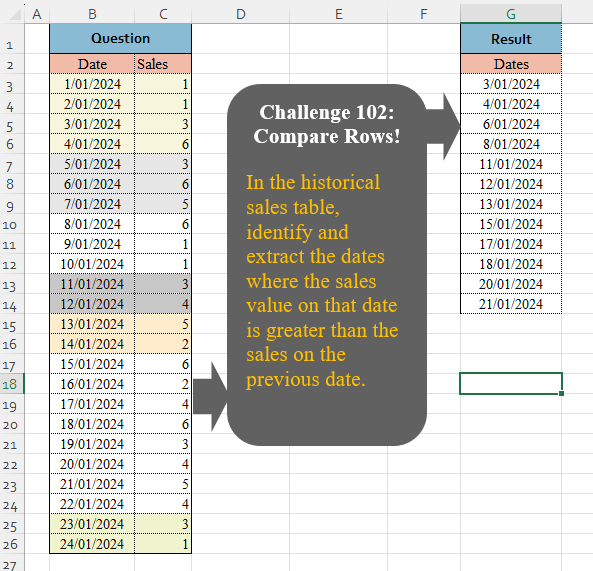
In the historical sales table, identify and extract the dates where the sales value on that date is greater than the sales on the previous date.
📌 Challenge Details and Links
Challenge Number: 102
Challenge Difficulty: ⭐
📥Download Sample File
📥Link to the solutions on LinkedIn
Solving the challenge of Compare Rows! Part 1 with Power Query
Power Query solution 1 for Compare Rows! Part 1, proposed by Zoran Milokanović:
let
  Source = Excel.CurrentWorkbook(){[Name = "Input"]}[Content],
  S = Table.SelectRows(
    Source,
    each
      let
        p = Table.PositionOf(Source, _),
        s = each Source{_}[Sales]
      in
        p > 0 and s(p) > s(p - 1)
  )[[Date]]
in
  S
Power Query solution 2 for Compare Rows! Part 1, proposed by Brian Julius:
let
  Source = Table.TransformColumnTypes(
    Excel.CurrentWorkbook(){[Name = "Table1"]}[Content],
    {"Date", Date.Type}
  ),
  ColNames = Table.ColumnNames(Source) & {"PrevSales"},
  ColList = {Table.ToColumns(Source) & {{null} & List.RemoveLastN(Source[Sales])}}{0},
  Tab2 = Table.SelectColumns(
    Table.SelectRows(Table.FromColumns(ColList, ColNames), each [Sales] > Number.From([PrevSales])),
    "Date"
  )
in
  Tab2
Power Query solution 3 for Compare Rows! Part 1, proposed by Ramiro Ayala Chávez:
let
S = Excel.CurrentWorkbook(){[Name="Table1"]}[Content],
A = Table.AddColumn(Table.AddIndexColumn(S,"I"),"N", each try S{[I]-1}[Sales] otherwise null),
Sol = Table.RenameColumns(Table.SelectRows(A, each [Sales]>[N])[[Date]],{"Date","Dates"})
in
Sol
Power Query solution 4 for Compare Rows! Part 1, proposed by Aditya Kumar Darak 🇮🇳:
let
  Source = Excel.CurrentWorkbook(){[Name = "data"]}[Content],
  Index1 = Table.AddIndexColumn(Source, "Index1"),
  Index2 = Table.AddIndexColumn(Index1, "Index2", 1),
  Join   = Table.AddJoinColumn(Index2, "Index1", Index2, "Index2", "Join"),
  Expand = Table.ExpandTableColumn(Join, "Join", {"Sales"}, {"Previous"}),
  Return = Table.SelectRows(Expand, each [Sales] > [Previous])[[Date]]
in
  Return
Power Query solution 5 for Compare Rows! Part 1, proposed by Alejandro Simón 🇵🇦 🇪🇸:
let
  Source = Excel.CurrentWorkbook(){[Name = "Table1"]}[Content],
  Lista  = Table.ToRows(Source),
  Comp   = List.Transform({0 .. List.Count(Lista) - 2}, each Lista{_ + 1}{1} > Lista{_}{1}),
  Sol    = List.Transform(List.PositionOf(Comp, true, 2), each Lista{_ + 1}{0})
in
  Sol
Power Query solution 6 for Compare Rows! Part 1, proposed by Abdallah Ally:
let
  Source = Excel.CurrentWorkbook(){[Name = "Table1"]}[Content],
  Select = Table.SelectRows(
    Source,
    each [
      a = Table.PositionOf(Source, _),
      b = if a = 0 then false else Source[Sales]{a} > Source[Sales]{a - 1}
    ][b]
  )[[Date]],
  Result = Table.TransformColumnTypes(Select, {{"Date", type date}})
in
  Result
Power Query solution 7 for Compare Rows! Part 1, proposed by Kris Jaganah:
let
  Source = Excel.CurrentWorkbook(){[Name = "Table1"]}[Content],
  Less = Table.AddColumn(
    Source,
    "Custom",
    each List.Last(Table.SelectRows(Source, (x) => x[Date] < [Date])[Sales])
  ),
  Filter = Table.SelectRows(Less, each [Sales] > [Custom]),
  Keep = Table.SelectColumns(Filter, {"Date"})
in
  Keep
Power Query solution 8 for Compare Rows! Part 1, proposed by Yaroslav Drohomyretskyi:
let
  Source = Excel.CurrentWorkbook(){[Name = "Table1"]}[Content],
  Index = Table.AddIndexColumn(Source, "Index", 0, 1, Int64.Type),
  Dates = Table.AddColumn(
    Index,
    "Dates",
    each try if [Sales] > Index{[Index] - 1}[Sales] then [Date] else null otherwise null
  ),
  Result = Table.SelectColumns(
    Table.SelectRows(Dates, each [Dates] <> null and [Dates] <> ""),
    {"Dates"}
  )
in
  Result
Power Query solution 9 for Compare Rows! Part 1, proposed by 🇮🇷 Navid Esmaeilzadeh اسماعیل زاده:
let
  Source = Excel.CurrentWorkbook(){[Name = "Table1"]}[Content],
  A      = Table.TransformColumnTypes(Source, {{"Date", type date}, {"Sales", Int64.Type}}),
  B      = Table.AddIndexColumn(A, "I", 0, 1, Int64.Type),
  C      = Table.AddColumn(B, "TC", each try [Sales] > B[Sales]{[I] - 1} otherwise null),
  D      = Table.SelectRows(C, each ([TC] = true)),
  E      = Table.SelectColumns(D, {"Date"})
in
  E
Power Query solution 10 for Compare Rows! Part 1, proposed by Amit Rathi:
let
  Source = Excel.CurrentWorkbook(){[Name = "Table1"]}[Content],
  SortedData = Table.Sort(Source, {{"Date", Order.Ascending}}),
  AddIndex = Table.AddIndexColumn(SortedData, "Index", 1, 1, Int64.Type),
  AddPreviousSales = Table.AddColumn(
    AddIndex,
    "PreviousSales",
    each try AddIndex[Sales]{[Index] - 2} otherwise [Sales]
  ),
  AddComparison = Table.AddColumn(
    AddPreviousSales,
    "IsGreater",
    each if [Sales] > [PreviousSales] then true else false
  ),
  FilteredData = Table.SelectRows(AddComparison, each [IsGreater] = true),
  FinalTable = Table.SelectColumns(FilteredData, {"Date"})
in
  FinalTable
Power Query solution 11 for Compare Rows! Part 1, proposed by Paige Martin:
let
 Source = Excel.CurrentWorkbook(){[Name="Table1"]}[Content],
 Joinable = Table.RenameColumns(
 Table.TransformColumns(Source,
 {“Date”, each Date.AddDays(_,1)}),
 {
 {“Date”,”JoinToDate”},
 {“Sales”,”PriorSales}
}),
Joined=Table.SelectRows(
 Table.Join(
 Source, “Date”,
 Priors,”JoinToDate”,
 JoinKind.Inner),
 each [Sales]>[PriorSales])
in
Table.SelectColumns(Joined,”Dates”)

Not sure if this works with date conventions outside the US though. It’s a weak area for me.
Solving the challenge of Compare Rows! Part 1 with Excel
Excel solution 1 for Compare Rows! Part 1, proposed by محمد حلمي:
=TOCOL(B4:B26/(C4:C26>C3:C25),2)Excel solution 2 for Compare Rows! Part 1, proposed by 🇵🇪 Ned Navarrete C.:
=REDUCE("Dates",C3:C26,LAMBDA(a,v,LET(rn,OFFSET(v,1,0),IF((rn-v)>0,VSTACK(a,@+B26:rn),a))))Excel solution 3 for Compare Rows! Part 1, proposed by Aditya Kumar Darak 🇮🇳:
=FILTER(
    B3:B26,
     VSTACK(
         0,
          DROP(
              C3:C26,
               1
          ) > DROP(
              C3:C26,
               -1
          )
     )
)
Excel solution 4 for Compare Rows! Part 1, proposed by Oscar Mendez Roca Farell:
=TOCOL(
    IFS(
        C4:C26>C3:C26,
         B4:B26
    ),
     2
)
Excel solution 5 for Compare Rows! Part 1, proposed by Julian Poeltl:
=FILTER(
    B3:B26,
    IFNA(
        C3:C26
Excel solution 6 for Compare Rows! Part 1, proposed by Kris Jaganah:
=LET(a,
    C3:C26,
    TOCOL(B3:B26/((a-VSTACK(
        @a,
        DROP(
            a,
            -1
        )
    ))>0),
    3))
Excel solution 7 for Compare Rows! Part 1, proposed by Abdallah Ally:
=LET(
    a,
    B3:B26,
    FILTER(
        a,
        OFFSET(
            a,
            ,
            1
        )>OFFSET(
            a,
            -1,
            1
        )
    )
)
Excel solution 8 for Compare Rows! Part 1, proposed by Imam Hambali:
=FILTER(
    B3:B26,
    IFERROR(
        C3:C26-C2:C25,
        0
    )>0
)
Excel solution 9 for Compare Rows! Part 1, proposed by Sunny Baggu:
=FILTER(
    B4:B26,
    DROP(
        C3:C26,
        1
    )>DROP(
        C3:C26,
        -1
    )
)
Excel solution 10 for Compare Rows! Part 1, proposed by Asheesh Pahwa:
=LET(
    s,
    SCAN(
        0,
        C3:C26,
        LAMBDA(
            x,
            y,

            IF(
                y>OFFSET(
                    y,
                    -1,
                    0
                ),
                1,
                ""
            )
        )
    ),    FILTER(
        B3:B26,
        s=1
    )
)
Excel solution 11 for Compare Rows! Part 1, proposed by Asheesh Pahwa:
=LET(
    d,
    DROP(
        REDUCE(
            "",
            B3:B26,
            LAMBDA(
                x,
                y,
                VSTACK(
                    x,

                    LET(
                        xl,
                        XLOOKUP(
                            y,
                            B3:B26,
                            C3:C26
                        ),
                        xlp,
                        XLOOKUP(
                            y-1,
                            B3:B26,
                            C3:C26,
                            ""
                        ),

                        IFERROR(
                            xl-xlp,
                            -1
                        )
                    )
                )
            )
        ),
        1
    ),
    FILTER(
        B3:B26,
        d>0
    )
)
Excel solution 12 for Compare Rows! Part 1, proposed by Bilal Mahmoud kh.:
=DROP(
    UNIQUE(
        REPT(
            B4:B26,
            C3:C25
Excel solution 13 for Compare Rows! Part 1, proposed by Eddy Wijaya:
=LET(
    db,
    SCAN(
        C3,
        C3:C33,
        LAMBDA(
            a,
            v,
            IF(
                v>OFFSET(
                    v,
                    -1,
                    0
                ),
                "bigger",
                ""
            )
        )
    ),
    DROP(
        FILTER(
            B3:B33,
            db="bigger"
        ),
        1
    )
)
Excel solution 14 for Compare Rows! Part 1, proposed by ferhat CK:
=LET(
    a,
    REDUCE(
        "Dates",
        C3:C26,
        LAMBDA(
            x,
            y,
            VSTACK(
                x,
                IF(
                    OFFSET(
                        y,
                        -1,
                        0
                    )0
    )
)
Excel solution 15 for Compare Rows! Part 1, proposed by Gerson Pineda:
=FILTER(B3:B26,C3:C26>C2:C25)Excel solution 16 for Compare Rows! Part 1, proposed by Hafiz Shoaib Ali:
=IFERROR(
    INDEX(
        B$4:B$26,
         SMALL(
             IF(
                 C$4:C$26>C$3:C$25,
                  ROW(
                      B$4:B$26
                  )-MIN(
                      ROW(
                      B$4:B$26
                  )
                  )+1,
                  ""
             ),
              ROW(
                  A1
              )
         )
    ),
    ""
)
Excel solution 17 for Compare Rows! Part 1, proposed by Hussein SATOUR:
=FILTER(
    B4:B26,
    C4:C26-C3:C25>0
)
Excel solution 18 for Compare Rows! Part 1, proposed by Mey Tithveasna:
=LET(
    b,
    B3:B26,
    FILTER(
        b,
        OFFSET(
            b,
            0,
            1
        )>OFFSET(
            b,
            -1,
            1
        )
    )
)
Excel solution 19 for Compare Rows! Part 1, proposed by Milan Shrimali:
=unique(
    map(
        b3:b21,
        c3:c21,
        lambda(
            x,
            y,
            if(
                y>offset(
                    y,
                    -1,
                    0
                ),
                x,
                ""
            )
        )
    ),
    0,
    1
)
Excel solution 20 for Compare Rows! Part 1, proposed by Peter Bartholomew:
= Increasingλ(sales,
     date)
where
Increasingλ
//Returns times t that correspond to an increase in x
= LAMBDA(
    x,
     t,     LET(          x₀,
          VSTACK(
              "x₀",
               DROP(
                   x,
                    -1
               )
          ),          FILTER(
              t,
               x > x₀
          )     ))
Excel solution 21 for Compare Rows! Part 1, proposed by Pieter de B.:
=FILTER(
    B4:B26,
    C4:C26>C3:C25
)

Or more dynamic:
=LET(
    d,
    B3:C26,
    FILTER(
        DROP(
            d,
            1,
            -1
        ),
        DROP(
            d,
            1,
            1
        )>DROP(
            d,
            -1,
            1
        )
    )
)
Excel solution 22 for Compare Rows! Part 1, proposed by Rick Rothstein:
=FILTER(
    B4:B26,
    C4:C26>C3:C25
)
Excel solution 23 for Compare Rows! Part 1, proposed by sathish kumar:
=IFERROR(
    INDEX(
        $A$2:$A$25,
         AGGREGATE(
             15,
              6,
              IF(
                  $B$3:$B$25>$B$2:$B$24,
                   ROW(),
                   NA()
              ),
              {1,
             2,
             3,
             4,
             5,
             6,
             7,
             8,
             9,
             10,
             11,
             12,
             13,
             14,
             15,
             16,
             17,
             18,
             19,
             20,
             21,
             22,
             23,
             24}
         )
    ),
     ""
)}

IFERROR(
    ...
): Shows a blank if there's an error.

INDEX(
    $A$2:$A$25,
     ...
): Picks a value from A2:A25 based on the row number.

AGGREGATE(
    15,
     6,
     ...
): Finds the smallest row numbers where sales increased.

IF(
    $B$3:$B$25 > $B$2:$B$24,
     ROW(),
     NA()
): Compares current sales to previous; returns the row number if sales increased.

{1,
    2,
    3,
    ...,
    24}: Purpose: This array represents the k-th smallest value that AGGREGATE should return. Since we're using Excel 2010,
     which doesn’t support dynamic arrays,
     we manually input these values to simulate dynamic behavior.This array ensures that each applicable row number is processed in order,
     and the corresponding date is returned by INDEX.

Final Result:The INDEX function,
     combined with AGGREGATE,
     returns the dates where the sales value was greater than the previous day’s sales.

Why the Static Array ({1,
    2,
    3,
    ...,
    24})
Excel solution 24 for Compare Rows! Part 1, proposed by Tomasz Jakóbczyk:
=FILTER(B3:B26,C3:C26Solving the challenge of Compare Rows! Part 1 with Python
Python solution 1 for Compare Rows! Part 1, proposed by Konrad Gryczan, PhD:
import pandas as pd
import numpy as np

path = "CH-102 Compare Rows.xlsx"
input = pd.read_excel(path, usecols = "B:C", skiprows = 1)
test  = pd.read_excel(path, usecols = "G", skiprows = 1, nrows = 12)

result = input.where(input["Sales"] - input["Sales"].shift(1) > 0).dropna().reset_index(drop = True)
result = result["Date"].rename("Dates")
print(result.equals(test["Dates"])) # True

# II Aproach with no comparison using > or < operators

result = input.where(np.sign(input["Sales"] - input["Sales"].shift(1)) == 1).dropna().reset_index(drop = True)
result = result["Date"].rename("Dates")
print(result.equals(test["Dates"])) # True

# be careful and call only first or second approach. :D
Solving the challenge of Compare Rows! Part 1 with Python in Excel
Python in Excel solution 1 for Compare Rows! Part 1, proposed by Abdallah Ally:
df = xl("B2:C26", headers=True)

# Perform data munging
df = df['Date'][df['Sales'] > df['Sales'].shift(1)].reset_index(drop=True)

# Display the final results
df
Python in Excel solution 2 for Compare Rows! Part 1, proposed by Alejandro Campos:
xl("B2:C26", headers=True).assign(Date=lambda df: pd.to_datetime(df['Date'], format='%d/%m/%Y')).loc[lambda df: df['Sales'] > df['Sales'].shift(1), ['Date']].reset_index(drop=True)Python in Excel solution 3 for Compare Rows! Part 1, proposed by George Mount:
df = xl("B2:C26", headers=True)
df[df['Sales'] > df['Sales'].shift(1)]['Date']
Solving the challenge of Compare Rows! Part 1 with R
R solution 1 for Compare Rows! Part 1, proposed by Konrad Gryczan, PhD:
library(tidyverse)
library(readxl)

path = "files/CH-102 Compare Rows.xlsx"
input = read_excel(path, range = "B2:C26")
test = read_excel(path, range = "G2:G14")

result = input %>%
 filter(Sales - lag(Sales) > 0) %>%
 select(Dates = Date)

identical(result, test)
# [1] TRUE

# Second approach (no comparison gte or lte)

result = input %>%
 filter(sign(Sales - lag(Sales)) == 1) %>%
 select(Dates = Date)
# [1] TRUE
Solving the challenge of Compare Rows! Part 1 with Google Sheets
Google Sheets solution 1 for Compare Rows! Part 1, proposed by Peter Krkos:
PowerQuerySolution:
https://docs.google.com/spreadsheets/d/1zR5IZLz8OT76vhaPEHfsPrw8-RDKnLyyqS49IJjdhFk/edit?usp=sharing