
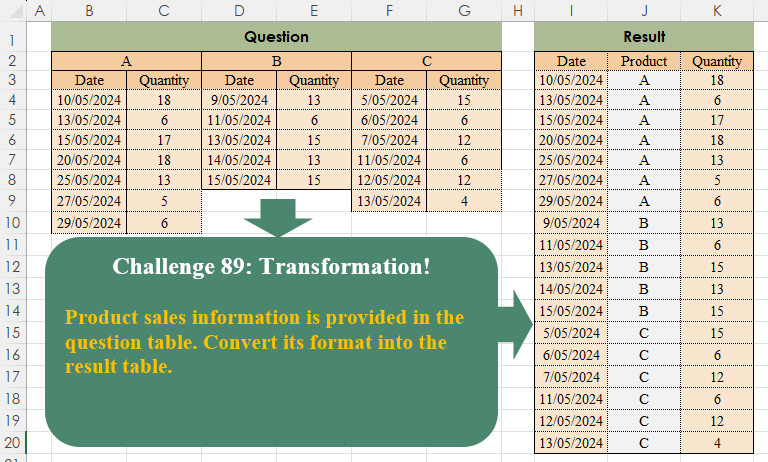
Product sales information is provided in the question table. Convert its format into the result table.
📌 Challenge Details and Links
Challenge Number: 89
Challenge Difficulty: ⭐⭐
📥Download Sample File
📥Link to the solutions on LinkedIn
Solving the challenge of Table Transformation! Part 9 with Power Query
Power Query solution 1 for Table Transformation! Part 9, proposed by Zoran Milokanović:
let
  Source = Excel.CurrentWorkbook(){[Name = "Input"]}[Content],
  S = Table.Sort(
    Table.FromRows(
      List.TransformMany(
        List.Skip(Table.ToRows(Source)),
        each List.Select(
          List.Transform(
            List.Zip({List.Split(_, 2), List.Alternate(Table.ColumnNames(Source), 1, 1, 1)}),
            each List.InsertRange(_{0}, 1, {_{1}})
          ),
          each _{0} <> null
        ),
        (i, _) => _
      ),
      let
        h = Record.ToList(Source{0})
      in
        {h{0}, "Product", h{1}}
    ),
    {"Product", "Date"}
  )
in
  S
Power Query solution 2 for Table Transformation! Part 9, proposed by Luan Rodrigues:
let
  Fonte = Tabela1,
  cab = Table.DemoteHeaders(Fonte),
  div = List.Split(Table.ToColumns(cab), 2),
  tab = List.Transform(
    div,
    each Table.SelectRows(
      Table.PromoteHeaders(Table.Skip(Table.FromColumns(_ & {{null} & {"Product"} & {_{0}{0}}}), 1)),
      each [Date] <> null
    )
  ),
  res = Table.FillDown(Table.Combine(tab), {"Product"})[[Date], [Product], [Quantity]]
in
  res
Power Query solution 3 for Table Transformation! Part 9, proposed by Rafael González B.:
let
 Source = Excel.CurrentWorkbook(){0}[Content],
 Skip = Table.Transpose(Table.Skip(Source,1)),
 ListTab = List.Transform(Table.Split(Skip,2),
 each Table.SelectRows(
 Table.PromoteHeaders(Table.Transpose(_)),
 each [Date] <> null)
 ),
 Products = List.RemoveNulls(Record.ToList(Source{0})),
 Join = Table.FromColumns({Products, ListTab}, {"Products", "Tbls"}),
 Result = Table.ExpandTableColumn(Join, "Tbls",
 {"Date", "Quantity"},
 {"Date", "Quantity"}
 )[[Date], [Products], [Quantity]]
in
 Result
Power Query solution 4 for Table Transformation! Part 9, proposed by Aditya Kumar Darak 🇮🇳:
let
  Source = Excel.CurrentWorkbook(){[Name = "data"]}[Content] meta [Table = "B2:G10", Header = false],
  Transpose = Table.Transpose(Source),
  Group = Table.Group(
    Transpose,
    "Column1",
    {"T", each Table.PromoteHeaders(Table.Skip(Table.Transpose(_)))},
    0,
    (x, y) => Number.From(y <> null)
  ),
  Expand = Table.ExpandTableColumn(Group, "T", List.Distinct(Transpose[Column2])),
  Filter = Table.SelectRows(Expand, each [Date] <> null),
  Rename = Table.RenameColumns(Filter, {"Column1", "Product"}),
  Return = Table.ReorderColumns(Rename, {"Date", "Product"})
in
  Return
Power Query solution 5 for Table Transformation! Part 9, proposed by Alejandro Simón 🇵🇦 🇪🇸:
let
  Source = Excel.CurrentWorkbook(){[Name = "Table1"]}[Content],
  Col = List.Split(Table.ToColumns(Source), 2),
  Sol = Table.Combine(
    List.Transform(
      Col,
      each
        let
          a = Table.FromColumns(_, {"Date", "Quantity"}),
          b = Table.AddColumn(a, "Product", each a[Date]{0}),
          c = Table.Skip(b, each [Date] is text),
          d = Table.SelectRows(c, each [Date] <> null),
          e = Table.SelectColumns(d, {"Date", "Product", "Quantity"})
        in
          e
    )
  )
in
  Sol
Power Query solution 6 for Table Transformation! Part 9, proposed by Kris Jaganah:
let
  Source = Excel.CurrentWorkbook(){[Name = "Table4"]}[Content],
  Demote = Table.DemoteHeaders(Source),
  Transpose = Table.Transpose(Demote),
  Custom1 = Table.TransformColumns(
    Transpose,
    {"Column1", each if Text.StartsWith(_, "Column") then null else _}
  ),
  Fill = Table.FillDown(Custom1, {"Column1"}),
  Merge = Table.CombineColumns(
    Fill,
    {"Column1", "Column2"},
    Combiner.CombineTextByDelimiter(",", QuoteStyle.None),
    "Merged"
  ),
  Unpiv = Table.UnpivotOtherColumns(Merge, {"Merged"}, "A", "V"),
  Split = Table.SplitColumn(Unpiv, "Merged", Splitter.SplitTextByDelimiter(","), {"Product", "Att"}),
  Pivot = Table.Pivot(Split, List.Distinct(Split[Att]), "Att", "V"),
  Rmove = Table.RemoveColumns(Pivot, {"A"}),
  Reorder = Table.ReorderColumns(Rmove, {"Date", "Product", "Quantity"})
in
  Reorder
Power Query solution 7 for Table Transformation! Part 9, proposed by 🇮🇷 Navid Esmaeilzadeh اسماعیل زاده:
let
  Source = Excel.CurrentWorkbook(){[Name = "Table2"]}[Content],
  A      = Table.Transpose(Source),
  B      = Table.FillDown(A, {"Column1"}),
  C      = Table.RenameColumns(B, {{"Column1", "Product"}}),
  D      = Table.UnpivotOtherColumns(C, {"Product", "Column2"}, "Attribute", "Value"),
  E      = Table.SelectRows(D, each ([Column2] = "Date")),
  F      = Table.AddIndexColumn(E, "Index", 1, 1, Int64.Type),
  B2     = D,
  G      = Table.SelectRows(B2, each ([Column2] = "Quantity")),
  H      = Table.AddIndexColumn(G, "Index", 1, 1, Int64.Type),
  I      = Table.NestedJoin(F, {"Index"}, H, {"Index"}, "C"),
  J      = Table.ExpandTableColumn(I, "C", {"Value"}, {"Value.1"}),
  K      = Table.SelectColumns(J, {"Product", "Value", "Value.1"}),
  L      = Table.RenameColumns(K, {{"Value", "Date"}, {"Value.1", "Quantity"}}),
  M      = Table.TransformColumnTypes(L, {{"Date", type date}})
in
  M
Power Query solution 8 for Table Transformation! Part 9, proposed by Peter Tholstrup:
let
 Source = Excel.CurrentWorkbook(){[Name= "data"]}[Content], // "data" = B2:G10
 transpose = Table.Transpose(Source),
 rename = Table.RenameColumns(transpose, {{"Column1", "Product"},{"Column2", "Headers"}}),
 fill = Table.FillDown(rename, {"Product"}),
 unpivot = Table.UnpivotOtherColumns(fill, {"Product", "Headers"}, "Ignore", "Quantity"),
 pivot = Table.Pivot(unpivot, List.Distinct(unpivot[Headers]), "Headers", "Quantity"),
 result = pivot[[Date],[Product],[Quantity]]
in
 result
Power Query solution 9 for Table Transformation! Part 9, proposed by Szabolcs Phraner:
let Source = ..,
 Transpose = Table.Transpose(Source),
 GroupByProduct = Table.Group(Transpose, {"Column1"}, {{"Tables",

 each
[
 Tbl = _,

 Unpivot = Table.PromoteHeaders ( Table.Skip(Table.Transpose ( Tbl ) ) ),
 RemoveEmptyVals = Table.SelectRows(Unpivot, each [Date] <> ""),
 AddProd = Table.AddColumn(RemoveEmptyVals, "Product", each Table.FirstValue(Tbl), type text)

] [AddProd]

}},0, (i,a) => Number.From(a[Column1] <>""))
[Tables],
 Combine = Table.Combine( GroupByProduct ),
 Reorder = Table.ReorderColumns(Combine,{"Date", "Product", "Quantity"})
in
 Reorder
Power Query solution 10 for Table Transformation! Part 9, proposed by Victor Wang:
let
  Source = Excel.CurrentWorkbook(){[Name = "Table1"]}[Content],
  ToColumns = Table.ToColumns(Source),
  Split = List.Split(ToColumns, 2),
  Transform = List.Transform(
    Split,
    each
      let
        product = _{0}{0}
      in
        Table.AddColumn(
          Table.PromoteHeaders(Table.Skip(Table.FromColumns(_))),
          "Product",
          each product
        )
  ),
  Combine = Table.Combine(Transform),
  RemoveNulls = Table.SelectRows(Combine, each ([Date] <> null))
in
  RemoveNulls
Solving the challenge of Table Transformation! Part 9 with Excel
Excel solution 1 for Table Transformation! Part 9, proposed by محمد حلمي:
=LET(
    d,
    TOCOL(
        B4:G10&B2:G2,
        ,
        1
    ),
    i,
    FILTER(
        d,
        LEN(
            d
        )=6
    ),    HSTACK(
        --LEFT(
            i,
            5
        ),
        RIGHT(
            i
        ),
        TOCOL(
            --d,
            2
        )
    )
)
Excel solution 2 for Table Transformation! Part 9, proposed by Oscar Mendez Roca Farell:
=LET(
    d,
     B2:G10,
     r,
     MOD(
         SEQUENCE(
             ,
              COLUMNS(
                  d
              )
         ),
          2
     ),
     e,
     DROP(
         d,
          2
     ),
     f,
     FILTER(
         e,
          r
     ),
     VSTACK(
         I2:K2,
          HSTACK(
              TOCOL(
                  f,
                   3,
                   1
              ),
               TOCOL(
                   IFS(
                       f,
                        TOROW(
                            TAKE(
                                d,
                                 1
                            ),
                             1
                        )
                   ),
                    3,
                    1
               ),
               TOCOL(
                   FILTER(
                       e,
                        1-r
                   ),
                    3,
                    1
               )
          )
     )
)
Excel solution 3 for Table Transformation! Part 9, proposed by Julian Poeltl:
=LET(
    D,
    WRAPROWS(
        TOCOL(
            B4:G10&B2:G2
        ),
        2
    ),
    F,
    FILTER(
        D,
        LEN(
            TAKE(
                D,
                ,
                1
            )
        )>1
    ),
    C,
    TAKE(
        F,
        ,
        1
    ),
    W,
    WRAPROWS(
        TEXTSPLIT(
            TEXTJOIN(
                ",",
                ,
                HSTACK(
                    LEFT(
                        C,
                        5
                    )&","&RIGHT(
                        C,
                        1
                    ),
                    TAKE(
                        F,
                        ,
                        -1
                    )
                )
            ),
            ","
        ),
        3
    ),
    VSTACK(
        HSTACK(
            B3,
            "Product",
            C3
        ),
        SORT(
            IFERROR(
                W*1,
                W
            ),
            2
        )
    )
)
Excel solution 4 for Table Transformation! Part 9, proposed by Imam Hambali:
=LET(    tcol,
     B3:G3,    data,
     B4:G10,    prd,
     B2:G2,    trow,
     B4:B10,    l,
     LAMBDA(
         x,
          TOCOL(
              FILTER(
                  data,
                   MOD(
                       SEQUENCE(
                           ,
                           COUNTA(
                               tcol
                           )
                       ),
                       2
                   )=x
              )
          )
     ),    y,
     SORT(
         HSTACK(
             l(
                 1
             ),
             TOCOL(
                 IF(
                     SEQUENCE(
                         LEN(
                             trow
                         )
                     ),
                     TOROW(
                         prd,
                         3
                     )
                 )
             ),
              l(
                  0
              )
         ),
         2
     ),    FILTER(
        y,
         TAKE(
             y,
             ,
             -1
         )<>0
    ))
Excel solution 5 for Table Transformation! Part 9, proposed by Sunny Baggu:
=LET(     p,
     SCAN(
         "",
          B2:G2,
          LAMBDA(
              a,
               v,
               IF(
                   v = "",
                    a,
                    v
               )
          )
     ),     up,
     UNIQUE(
         TOCOL(
             p
         )
     ),     REDUCE(          {"Date",
          "Product",
          "Quantity"},          up,          LAMBDA(
              a,
               v,

               VSTACK(

                    a,

                    LET(

                         a,
                         FILTER(
                             B4:G10,
                              p = v
                         ),

                         b,
                         FILTER(
                             a,
                              TAKE(
                                  a,
                                   ,
                                   1
                              ) <> ""
                         ),

                         IFNA(
                             HSTACK(
                                 TAKE(
                                     b,
                                      ,
                                      1
                                 ),
                                  v,
                                  TAKE(
                                      b,
                                       ,
                                       -1
                                  )
                             ),
                              v
                         )

                    )

               )

          )     ))
Excel solution 6 for Table Transformation! Part 9, proposed by Bilal Mahmoud kh.:
=LET(
    a,
    VSTACK(
        CHAR(
            SEQUENCE(
                COUNT(
                    C4:C10
                ),
                ,
                CODE(
                    B2
                ),
                0
            )
        ),
        CHAR(
            SEQUENCE(
                COUNT(
                    E4:E8
                ),
                ,
                CODE(
                    D2
                ),
                0
            )
        ),
        CHAR(
            SEQUENCE(
                COUNT(
                    G4:G9
                ),
                ,
                CODE(
                    F2
                ),
                0
            )
        )
    ),
    b,
    VSTACK(
        B4:B10,
        D4:D8,
        F4:F9
    ),
    c,
    VSTACK(
        C4:C10,
        E4:E8,
        G4:G9
    ),
    VSTACK(
        {"Date",
        "Product",
        "QTY"},
        HSTACK(
            b,
            a,
            c
        )
    )
)
Excel solution 7 for Table Transformation! Part 9, proposed by Fatemeh Heydari:
=LET(     H,
     {"Date",
    "Product",
    "Quantity"},     dates,
     VSTACK(
         B4:B10,
          D4:D8,
          F4:F9
     ),     products,
     VSTACK(          IF(
              SEQUENCE(
                  COUNTA(
                      B4:B10
                  ),
                   1
              ) > 0,
               "A",
               ""
          ),          IF(
              SEQUENCE(
                  COUNTA(
                      D4:D8
                  ),
                   1
              ) > 0,
               "B",
               ""
          ),          IF(
              SEQUENCE(
                  COUNTA(
                      F4:F9
                  ),
                   1
              ) > 0,
               "C",
               ""
          )     ),     quantities,
     VSTACK(
         C4:C10,
          E4:E8,
          G4:G9
     ),     data,
     HSTACK(
         dates,
          products,
          quantities
     ),     result,
     VSTACK(
         H,
          data
     ),     result)
Excel solution 8 for Table Transformation! Part 9, proposed by ferhat CK:
=LET(a,B4:B10,aq,C4:C10,b,D4:D8,bq,E4:E8,c,F4:F9,cq,G4:G9,p,VSTACK(RIGHT(SEQUENCE(COUNTA(a))&"A"),RIGHT(SEQUENCE(COUNTA(b))&"B"),RIGHT(SEQUENCE(COUNTA(c))&"C")),VSTACK({"Date","Product","Quantity"},HSTACK(VSTACK(a,b,c),p,VSTACK(aq,bq,cq))))Excel solution 9 for Table Transformation! Part 9, proposed by Gerson Pineda:
=LET(
    m,
    DROP(
        REDUCE(
            1,
            B3:G3,
            LAMBDA(
                i,
                x,
                LET(
                    t,
                    OFFSET(
                        x,
                        1,
                        ,
                        7,
                        2
                    ),
                    p,
                    OFFSET(
                        t,
                        -2,
                        ,
                        1,
                        1
                    ),
                    VSTACK(
                        i,
                        IFNA(
                            HSTACK(
                                p,
                                IF(
                                    x="Date",
                                    t,
                                    0
                                )
                            ),
                            p
                        )
                    )
                )
            )
        ),
        1
    ),
    CHOOSECOLS(
        FILTER(
            m,
            INDEX(
                m,
                ,
                2
            )>0
        ),
        2,
        1,
        3
    )
)
Excel solution 10 for Table Transformation! Part 9, proposed by Hamidi Hamid:
=HSTACK(
    TOCOL(
        UNIQUE(
            CHOOSECOLS(
                B4:G58,
                SEQUENCE(
                    ,
                    3,
                    1,
                    2
                )
            )
        ),
        3,
        1
    ),
    VSTACK(
        IF(
            SEQUENCE(
                COUNTA(
                    B4:B59
                )
            ),
            "A",
            ""
        ),
        IF(
            SEQUENCE(
                COUNTA(
                    D4:D59
                )
            ),
            "B",
            ""
        ),
        IF(
            SEQUENCE(
                COUNTA(
                    F4:F59
                )
            ),
            "C",
            ""
        )
    ),
    TOCOL(
        UNIQUE(
            CHOOSECOLS(
                B4:G58,
                SEQUENCE(
                    ,
                    3,
                    2,
                    2
                )
            )
        ),
        3,
        1
    )
)
Excel solution 11 for Table Transformation! Part 9, proposed by Hussein SATOUR:
=LET(
    a,
    TEXTSPLIT(
        SUBSTITUTE(
            TEXTJOIN(
                "/",
                ,
                B4:G10&"/"&B2:G2
            ),
            "//",
            "|"
        ),
        "/",
        "|",
        1
    ),
    b,
    SORT(
        FILTER(
            a,
            ISNUMBER(
                --INDEX(
                    a,
                    ,
                    1
                )
            )
        ),
        {2,
        1}
    ),
    IFERROR(
        --b,
        b
    )
)
Excel solution 12 for Table Transformation! Part 9, proposed by Md. Zohurul Islam:
=LET(     P,
     B4:C10,     Q,
     D4:E8,     R,
     F4:G9,     S,
     VSTACK(
         P,
          Q,
          R
     ),     U,
     ROWS(
         B4:C10
     ),     V,
     ROWS(
         D4:E8
     ),     W,
     ROWS(
         F4:G9
     ),     a,
     SUBSTITUTE(
         SEQUENCE(
             U,
              ,
              1,
              0
         ),
          1,
          B2
     ),     b,
     SUBSTITUTE(
         SEQUENCE(
             V,
              ,
              1,
              0
         ),
          1,
          D2
     ),     d,
     SUBSTITUTE(
         SEQUENCE(
             W,
              ,
              1,
              0
         ),
          1,
          F2
     ),     e,
     VSTACK(
         a,
          b,
          d
     ),     res,
     HSTACK(
         S,
          e
     ),     result,
     CHOOSECOLS(
         res,
          1,
          3,
          2
     ),     VSTACK(
         {"Date",
          "Product",
          "Quantity"},
          result
     ))
Excel solution 13 for Table Transformation! Part 9, proposed by Rick Rothstein:
=LET(
    v,
    VSTACK(
        B4:B99&" "&B2&" "&C4:C99,
        D4:D99&" "&D2&" "&E4:E99,
        F4:F99&" "&F2&" "&G4:G99
    ),
    t,
    TEXTSPLIT(
        TEXTJOIN(
            "|",
            ,
            FILTER(
                v,
                LEFT(
                    v
                )<>" "
            )
        ),
        " ",
        "|"
    ),
    VSTACK(
        {"Date",
        "Product",
        "Quantity"},
        IFERROR(
            0+t,
            t
        )
    )
)
Solving the challenge of Table Transformation! Part 9 with Python
Python solution 1 for Table Transformation! Part 9, proposed by Konrad Gryczan, PhD:
import pandas as pd

path = "CH-089 Transformation.xlsx"
input = pd.read_excel(path, usecols="B:G", skiprows=1, nrows=9, header=None)
test = pd.read_excel(path, usecols="I:K", skiprows=1)

input.iloc[0] = input.iloc[0].ffill()
input.columns = input.iloc[1] + " " + input.iloc[0]
input = input.drop([0, 1]).reset_index(drop=True)

input = input.stack().reset_index()
input[["Measure", "Product"]] = input["level_1"].str.split(" ", expand=True)
input = input.rename(columns={0: "Value"}).drop(["level_1", "level_0"], axis=1)

input["rowname"] = input.index // 2
input = input.pivot(index=["rowname", "Product"], columns="Measure", values="Value")
 .sort_values(["Product", "Date"]).reset_index()
input.columns.name = None
input["Date"] = pd.to_datetime(input["Date"])
input["Quantity"] = input["Quantity"].astype("int64")
input = input[["Date", "Product", "Quantity"]]

print(input.equals(test))  # True
Solving the challenge of Table Transformation! Part 9 with Python in Excel
Python in Excel solution 1 for Table Transformation! Part 9, proposed by Owen Price:
xl("B2:G10")

# get products dynamically to handle new columns if needed
products = [p for p in raw_data.iloc[0] if p is not None]

# drop first two rows
raw_data = raw_data.iloc[2:,:]

data = [] # to hold the product dataframes as we create them
for i, p in enumerate(products,1):
 c = (i * 2) - 2 # 1 becomes 1, 2 becomes 3, 3 becomes 5
 df = raw_data.iloc[:,c:c+2].dropna() # get the two columns for this product, remove NaNs
 df.columns = ["Date","Quantity"] # rename the columns
 df["Product"] = p # add the product column
 data.append(df) # add this product's df to the list of dfs

data = pd.concat(data,ignore_index=True).loc[:,["Date","Product","Quantity"]]

data
Python in Excel solution 2 for Table Transformation! Part 9, proposed by Abdallah Ally:
df = xl("B2:G10", headers=True)

# Perform data munging
cols = df.columns
cols = [col if col else cols[key - 1] for key, col in enumerate(cols)]
cols = ['_'.join(x) for x in zip(df.iloc[0], cols)]
df.columns = cols
df = df.drop(0).reset_index()
df = df.melt(id_vars='index', value_vars=df.columns[1:]).dropna()
df[['Category', 'Product']] = df['variable'].str.split('_').tolist()
df = df.pivot(index=['index', 'Product'], columns='Category', values='value').reset_index()
df.columns.name = None
df = df.sort_values(by=['Product', 'Date'], ignore_index=True)
df = df.iloc[:, [2, 1, 3]]

# Display the final results
df
Solving the challenge of Table Transformation! Part 9 with R
R solution 1 for Table Transformation! Part 9, proposed by Konrad Gryczan, PhD:
library(tidyverse)
library(readxl)
library(unpivotr)

path = "files/CH-089 Transformation.xlsx"
input = read_excel(path, range = "B2:G10", col_names = F)
test = read_excel(path, range = "I2:K20")

result = as_cells(input) %>%
 behead("up-left", "Product") %>%
 mutate(col_mod = col %% 2)

list_r = map(0:1, ~result %>% filter(col_mod == .x) %>% select(chr, Product))

r1 = list_r[[1]]
r2 = list_r[[2]]

r3 = cbind(r2, r1) %>%
 set_names(c("Date", "Product", "Quantity", "Product2")) %>%
 as_tibble() %>%
 mutate(Quantity = suppressWarnings(as.numeric(Quantity))) %>%
 filter(!is.na(Quantity)) %>%
 select(-Product2) %>%
 mutate(Date = as.POSIXct(as.Date(as.numeric(Date), origin = "1899-12-30")))

identical(r3, test)
#> [1] TRUE
R solution 2 for Table Transformation! Part 9, proposed by Anil Kumar Goyal:
library unpivotr as Konrad Gryczan, PhD uses it, I am manually tweaking the names of columns (from merged cells). After that it is pretty easy using ".value" operator in pivot_longer


hashtag
#rstats
hashtag
#tidyverse

library(tidyverse)
library(openxlsx2)

df <- openxlsx2::read_xlsx(
 "OM Challanges/CH-089 Transformation.xlsx",
 cols = "B:G",
 rows = 2:10,
 col_names = FALSE,
 fill_merged_cells = TRUE
)

df |>
 slice(-(1:2)) |>
 set_names(
 df |>
 slice(1:2) |>
 summarise(across(everything(), ~ str_flat