
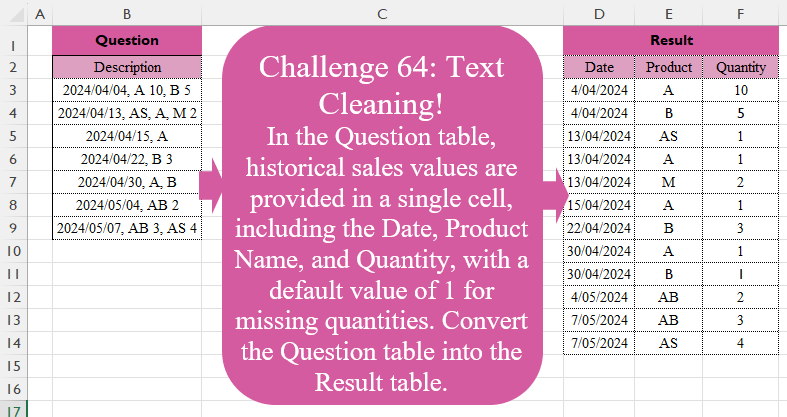
In the Question table, historical sales values are provided in a single cell, including the Date, Product Name, and Quantity, with a default value of 1 for missing quantities. Convert the Question table into the Result table.
📌 Challenge Details and Links
Challenge Number: 64
Challenge Difficulty: ⭐⭐⭐
📥Download Sample File
📥Link to the solutions on LinkedIn
Solving the challenge of Text Cleaning! with Power Query
Power Query solution 1 for Text Cleaning!, proposed by Zoran Milokanović:
let
  Source = Table.TransformRows(
    Excel.CurrentWorkbook(){[Name = "Input"]}[Content],
    each Text.Split([Description], ", ")
  ),
  S = Table.FromRows(
    List.TransformMany(
      Source,
      each List.Skip(_),
      (i, _) =>
        let
          p = Text.Split(_, " ")
        in
          {Date.FromText(i{0}, [Format = "yyyy/MM/dd"]), p{0}, p{1}? ?? "1"}
    ),
    {"Date", "Product", "Quantity"}
  )
in
  S
Power Query solution 2 for Text Cleaning!, proposed by Brian Julius:
let
  Source = Table1Raw,
  SplitLeft = Table.TransformColumnTypes(
    Table.SplitColumn(
      Source,
      "Description",
      Splitter.SplitTextByEachDelimiter({","}, QuoteStyle.Csv, false),
      {"Date", "Raw"}
    ),
    {"Date", Date.Type}
  ),
  CleanList = Table.AddColumn(
    SplitLeft,
    "Cleaned",
    each [
      a = [Raw],
      b = Text.Split(a, ", "),
      c = List.Transform(
        b,
        each if Text.Contains(Text.Trim(_), " ") then _ else Text.Trim(_) & " " & Text.From(1)
      ),
      d = Text.Combine(c, ",")
    ][d]
  ),
  SplitToRows = Table.RemoveColumns(
    Table.ExpandListColumn(
      Table.TransformColumns(
        CleanList,
        {{"Cleaned", Splitter.SplitTextByDelimiter(",", QuoteStyle.Csv)}}
      ),
      "Cleaned"
    ),
    "Raw"
  ),
  SplitBySpace = Table.TransformColumnTypes(
    Table.SplitColumn(
      Table.TransformColumns(SplitToRows, {{"Cleaned", Text.Trim}}),
      "Cleaned",
      Splitter.SplitTextByEachDelimiter({" "}, QuoteStyle.Csv, false),
      {"Product", "Quantity"}
    ),
    {"Quantity", Number.Type}
  )
in
  SplitBySpace
Power Query solution 3 for Text Cleaning!, proposed by Luan Rodrigues:
let
 Fonte = Tabela1,
 add = Table.TransformColumns(Fonte, {"Description", each
let
a = Text.Split(_,", "),
b = List.Transform(List.RemoveFirstN(a), (x)=> {a{0}} & Text.Split(if not Text.Contains(x," ") then x & " 1" else x," ") )
in Table.FromRows(b,{"Date","Product","Quantity"})})[Description],
 res = Table.Combine(add)
in
 res
Power Query solution 4 for Text Cleaning!, proposed by Aditya Kumar Darak 🇮🇳:
let
  Source = Excel.CurrentWorkbook(){[Name = "data"]}[Content][Description],
  Records = List.TransformMany(
    Source,
    (x) => Text.Split(Text.AfterDelimiter(x, ", "), ", "),
    (x, y) => [
      Date    = Date.From(Text.BeforeDelimiter(x, ",")),
      S       = Text.Split(y, " "),
      Product = S{0},
      Qty     = Number.From(S{1}? ?? 1)
    ]
  ),
  Return = Table.FromRecords(Records, type table [Date = date, Product = text, Qty = number])
in
  Return
Power Query solution 5 for Text Cleaning!, proposed by Alejandro Simón 🇵🇦 🇪🇸:
let
 Source = Excel.CurrentWorkbook(){[Name="Table1"]}[Content],
 Sol = Table.Combine(Table.AddColumn(Source, "A", each
let
a = Text.Split([Description], ", "),
b = List.Transform(a, each Text.Split(_, " ")),
d = List.Transform({1..List.Count(b)-1}, each if List.Count(b{_})=1 then {g,b{_}{0}, "1"} else {g}&b{_}),
e = Table.FromRows(d, {"Date", "Product", "Quantity"}),
f = List.Transform(Text.Split(b{0}{0}, "/"), Number.From),
g =
hashtag
#date(f{0},f{1}, f{2})
in e)[A])
in
 Sol
Power Query solution 6 for Text Cleaning!, proposed by Yaroslav Drohomyretskyi:
let
  Source = Excel.CurrentWorkbook(){[Name = "Table1"]}[Content],
  Split1 = Table.SplitColumn(
    Source,
    "Description",
    Splitter.SplitTextByEachDelimiter({", "}, QuoteStyle.Csv, false),
    {"Date", "Description"}
  ),
  Split2 = Table.SplitColumn(
    Table.ExpandListColumn(
      Table.AddColumn(Split1, "Custom", each Text.Split([Description], ", ")),
      "Custom"
    ),
    "Custom",
    Splitter.SplitTextByEachDelimiter({" "}, QuoteStyle.Csv, false),
    {"Product", "Quantity"}
  ),
  NullToOne = Table.ReplaceValue(Split2, null, "1", Replacer.ReplaceValue, {"Quantity"}),
  Result = Table.TransformColumnTypes(
    Table.RemoveColumns(NullToOne, {"Description"}),
    {{"Quantity", type number}}
  )
in
  Result
Power Query solution 7 for Text Cleaning!, proposed by 🇮🇷 Navid Esmaeilzadeh اسماعیل زاده:
let
  Source = Excel.CurrentWorkbook(){[Name = "Table1"]}[Content],
  #"Split Column by Delimiter" = Table.SplitColumn(
    Source,
    "Description",
    Splitter.SplitTextByEachDelimiter({", "}, QuoteStyle.Csv, false),
    {"Date", "D"}
  ),
  #"Split Column by Delimiter1" = Table.ExpandListColumn(
    Table.TransformColumns(
      #"Split Column by Delimiter",
      {
        {
          "D",
          Splitter.SplitTextByDelimiter(", ", QuoteStyle.Csv),
          let
            itemType = (type nullable text) meta [Serialized.Text = true]
          in
            type {itemType}
        }
      }
    ),
    "D"
  ),
  #"Changed Type" = Table.TransformColumnTypes(
    #"Split Column by Delimiter1",
    {{"Date", type date}, {"D", type text}}
  ),
  #"Split Column by Delimiter2" = Table.SplitColumn(
    #"Changed Type",
    "D",
    Splitter.SplitTextByDelimiter(" ", QuoteStyle.Csv),
    {"Product", "Qty"}
  ),
  #"Replaced Value" = Table.ReplaceValue(
    #"Split Column by Delimiter2",
    null,
    "1",
    Replacer.ReplaceValue,
    {"Qty"}
  )
in
  #"Replaced Value"
Power Query solution 8 for Text Cleaning!, proposed by Peter Tholstrup:
let
  Source = Excel.CurrentWorkbook(){[Name = "Table1"]}[Content],
  s      = Splitter.SplitTextByEachDelimiter,
  a      = Table.SplitColumn(Source, "Description", s({","}), {"Date", "Order"}),
  b      = Table.TransformColumns(a, {"Order", each Text.Split(_, ",")}),
  c      = Table.ExpandListColumn(b, "Order"),
  d      = Table.TransformColumns(c, {{"Order", Text.Trim}}),
  e      = Table.SplitColumn(d, "Order", s({" "}), {"Product", "Quantity"}, 1),
  result = Table.TransformColumnTypes(e, {{"Date", type date}, {"Quantity", Int64.Type}})
in
  result
Power Query solution 9 for Text Cleaning!, proposed by Artur Pilipczuk:
let
  Source = Excel.CurrentWorkbook(){[Name = "data"]}[Content],
  #"Promoted Headers" = Table.PromoteHeaders(Source, [PromoteAllScalars = true]),
  #"Inserted Text Before Delimiter" = Table.AddColumn(
    #"Promoted Headers",
    "Date",
    each Text.BeforeDelimiter([Description], ","),
    type text
  ),
  #"Added Custom" = Table.AddColumn(
    #"Inserted Text Before Delimiter",
    "Data",
    each Text.AfterDelimiter([Description], ",")
  ),
  Custom2 = Table.TransformColumns(
    #"Added Custom",
    {"Data", each Splitter.SplitTextByDelimiter(",")(Text.Trim(_))}
  ),
  #"Expanded Data" = Table.ExpandListColumn(Custom2, "Data"),
  #"Trimmed Text" = Table.TransformColumns(#"Expanded Data", {{"Data", Text.Trim, type text}}),
  #"Split Column by Delimiter" = Table.SplitColumn(
    #"Trimmed Text",
    "Data",
    Splitter.SplitTextByDelimiter(" ", QuoteStyle.Csv),
    {"Product", "Quantity"}
  ),
  #"Replaced Value" = Table.ReplaceValue(
    #"Split Column by Delimiter",
    null,
    "1",
    Replacer.ReplaceValue,
    {"Quantity"}
  ),
  #"Removed Columns" = Table.RemoveColumns(#"Replaced Value", {"Description"})
in
  #"Removed Columns"
Solving the challenge of Text Cleaning! with Excel
Excel solution 1 for Text Cleaning!, proposed by Bo Rydobon 🇹🇭:
=share&utm_medium=member_desktop

=WRAPROWS(
    REGEXEXTRACT(
        CONCAT(
            D2:F2&" ",
            REGEXREPLACE(
                B3:B9,
                ".+?([A-Z]+)( ?d+)?",
                LEFT(
                    B3:B9,
                    10
                )&" $1${2:- 1} "
            )
        ),
        "S+",
        1
    ),
    3
)
Excel solution 2 for Text Cleaning!, proposed by Bo Rydobon 🇹🇭:
=REDUCE(
    D2:F2,
    B3:B9,
    LAMBDA(
        h,
        a,
        LET(
            c,
            EXPAND(
                TEXTSPLIT(
                    a,
                    " ",
                    ", ",
                    ,
                    ,
                    1
                ),
                ,
                2,
                1
            ),
            VSTACK(
                h,
                CHOOSE(
                    {1,
                    2,
                    3},
                    --@c,
                    DROP(
                        c,
                        1,
                        -1
                    ),
                    --DROP(
                        c,
                        1,
                        1
                    )
                )
            )
        )
    )
)
Excel solution 3 for Text Cleaning!, proposed by 🇰🇷 Taeyong Shin:
=REDUCE(
    D2:F2,
    B3:B9,
    LAMBDA(
        a,
        v,
        LET(
            t,
            DROP(
                TEXTSPLIT(
                    v,
                    ,
                    ", "
                ),
                1
            ),
            VSTACK(
                a,
                CHOOSE(
                    {1,
                    2,
                    3},
                    --TEXTBEFORE(
                        v,
                        ", "
                    ),
                    TEXTSPLIT(
                        t,
                        " "
                    ),
                    --TEXTAFTER(
                        t,
                        " ",
                        ,
                        ,
                        ,
                        1
                    )
                )
            )
        )
    )
)
Excel solution 4 for Text Cleaning!, proposed by محمد حلمي:
=REDUCE(
    D2:F2,
    B3:B9,
    LAMBDA(
        a,
        v,
        LET(

            e,
            TEXTSPLIT(
                v,
                " ",
                ", "
            ),
            i,
            IFERROR(
                --e,
                e
            ),
            VSTACK(
                a,

                IFNA(
                    HSTACK(
                        @i,
                        DROP(
                            i,
                            1
                        )
                    ),
                    HSTACK(
                        @i,
                        0,
                        1
                    )
                )
            )
        )
    )
)
Excel solution 5 for Text Cleaning!, proposed by 🇵🇪 Ned Navarrete C.:
=REDUCE(
    D2:F2,
    B3:B9,
    LAMBDA(
        c,
        v,
        LET(
            m,
            TEXTSPLIT(
                v,
                ", "
            ),
            f,
            --@m,
            r,
            TOCOL(
                DROP(
                    m,
                    ,
                    1
                )
            ),
             p,
            IFNA(
                TEXTBEFORE(
                    r,
                    " "
                ),
                r
            ),
            q,
            IFNA(
                TEXTAFTER(
                    r,
                    " "
                ),
                1
            ),
            VSTACK(
                c,
                IFNA(
                    HSTACK(
                        f,
                        p,
                        --q
                    ),
                    f
                )
            )
        )
    )
)
Excel solution 6 for Text Cleaning!, proposed by Oscar Mendez Roca Farell:
=REDUCE(
    D2:F2,
     B3:B9,
     LAMBDA(
         i,
          x,
          LET(
              f,
               MID(
                   x,
                    1,
                    10
               ),
               m,
               TAKE(
                   IFNA(
                       HSTACK(
                           f,
                            TEXTSPLIT(
                                TEXTAFTER(
                                    x,
                                     ", "
                                )&" 1",
                                 " ",
                                 ", ",
                                 ,
                                 ,
                                 1
                            )
                       ),
                        f
                   ),
                    ,
                    3
               ),
               VSTACK(
                   i,
                    IFERROR(
                        --m,
                         m
                    )
               )
          )
     )
)
Excel solution 7 for Text Cleaning!, proposed by Julian Poeltl:
=LET(
    D,
    B3:B9,
    Dt,
    TEXTBEFORE(
        D,
        ","
    ),
    A,
    TEXTAFTER(
        D,
        ","
    ),
    WD,
    IF(
        ISNUMBER(
            SEARCH(
                ",",
                A
            )
        ),
        Dt&SUBSTITUTE(
            A,
            ",",
            ","&Dt
        ),
        Dt&A
    ),
    C,
    TEXTJOIN(
        ",",
        ,
        WD
    ),
    SPO,
    TRIM(
        TEXTSPLIT(
            C,
            {","}
        )
    ),
    N,
    IF(
        ISERR(
            RIGHT(
                SPO,
                1
            )*1
        ),
        SPO&" 1",
        SPO
    ),
    T,
    VSTACK(
        HSTACK(
            "Date",
            "Product",
            "Quantity"
        ),
        WRAPROWS(
            TEXTSPLIT(
                TEXTJOIN(
                    " ",
                    ,
                    N
                ),
                {",",
                " "}
            ),
            3
        )
    ),
    IFERROR(
        T*1,
        T
    )
)
Excel solution 8 for Text Cleaning!, proposed by Abdallah Ally:
=REDUCE(
    {"Date",
    "Product",
    "Quantity"},
    B3:B9,
    LAMBDA(
        x,
        y,
         VSTACK(
             x,
             LET(
                 a,
                 TEXTSPLIT(
                     y,
                     ", "
                 ),
                 b,
                 --TAKE(
                     a,
                     ,
                     1
                 ),
                 c,
                 TOCOL(
                     DROP(
                     a,
                     ,
                     1
                 )
                 ),
                  IFNA(
                      HSTACK(
                          b,
                          TEXTBEFORE(
                              c,
                              " ",
                              ,
                              ,
                              ,
                              c
                          ),
                          --TEXTAFTER(
                              c,
                              " ",
                              ,
                              ,
                              ,
                              1
                          )
                      ),
                      b
                  )
             )
         )
    )
)
Excel solution 9 for Text Cleaning!, proposed by Kris Jaganah:
=REDUCE(
    {"Date",
    "Product",
    "Quantity"},
    B3:B9,
    LAMBDA(
        x,
        y,
        VSTACK(
            x,
            LET(
                a,
                TEXTSPLIT(
                    y,
                    ,
                    ", "
                ),
                b,
                TAKE(
                    a,
                    1
                )&DROP(
                    a,
                    1
                ),
                c,
                LEFT(
                    b,
                    10
                ),
                d,
                TRIM(
                    TEXTAFTER(
                        b,
                        c
                    )
                ),
                e,
                TEXTBEFORE(
                    d,
                    " ",
                    ,
                    ,
                    ,
                    d
                ),
                f,
                TEXTAFTER(
                    d,
                    e
                ),
                HSTACK(
                    DATEVALUE(
                        c
                    ),
                    e,
                    --IF(
                        f="",
                        1,
                        f
                    )
                )
            )
        )
    )
)
Excel solution 10 for Text Cleaning!, proposed by JvdV –:
=REDUCE(
    {"Date",
    "Product",
    "Quantity"},
    _a,
    LAMBDA(
        X,
        Y,
        VSTACK(
            X,
            TEXTSPLIT(
                Y,
                ",",
                "|",
                1
            )
        )
    )
)

Or even:

=TEXTSPLIT(
    CONCAT(
        "Date,",
        "Product,",
        "Quantity|",
        _a
    ),
    ",",
    "|",
    1
)
Excel solution 11 for Text Cleaning!, proposed by Sunny Baggu:
=REDUCE(     {"Date",
     "Product",
     "Quantity"},     B3:B9,     LAMBDA(
         x,
          y,          VSTACK(

               x,

               LET(

                    _a,
                    TEXTSPLIT(
                        y,
                         ", "
                    ),

                    _d,
                    DATEVALUE(
                        TAKE(
                            _a,
                             ,
                             1
                        )
                    ),

                    _b,
                    TOCOL(
                        DROP(
                            _a,
                             ,
                             1
                        )
                    ),

                    _c,
                    TEXTBEFORE(
                        _b,
                         " ",
                         ,
                         ,
                         ,
                         _b
                    ),

                    _e,
                    TEXTAFTER(
                        _b,
                         " ",
                         ,
                         ,
                         ,
                         1
                    ),

                    IFNA(
                        HSTACK(
                            _d,
                             _c,
                             --_e
                        ),
                         _d
                    )

               )

          )     ))
Excel solution 12 for Text Cleaning!, proposed by Bilal Mahmoud kh.:
=TEXTSPLIT(
    TEXTJOIN(
        "|",
        ,
        MAP(
            B3:B9,
            LAMBDA(
                z,
                TEXTJOIN(
                    "|",
                    ,
                    LET(
                        a,
                        TEXTSPLIT(
                            z,
                            {","},
                            ,
                            TRUE
                        ),
                        b,
                        TAKE(
                            a,
                            ,
                            1
                        ),
                        c,
                        DROP(
                            a,
                            ,
                            1
                        ),
                        d,
                        SCAN(
                            "",
                            c,
                            LAMBDA(
                                x,
                                y,
                                IF(
                                    ISNUMBER(
                                        --RIGHT(
                                            y,
                                            1
                                        )
                                    ),
                                    y,
                                    y&" 1"
                                )
                            )
                        ),
                        b&d
                    )
                )
            )
        )
    ),
    " ",
    "|"
)
Excel solution 13 for Text Cleaning!, proposed by Diarmuid Early:
=LET(
    raw,
    REDUCE(
        {"Date",
        "Product",
        "Quantity"},
        B3:B9,
        LAMBDA(
            a,
            v,

             LET(
                 dt,
                 TEXTBEFORE(
                     v,
                     ", "
                 ),

                  VSTACK(
                      a,

                       IFERROR(
                           HSTACK(
                               dt,
                               TEXTSPLIT(
                                   TEXTAFTER(
                                       v,
                                       ", "
                                   ),
                                   " ",
                                   ", "
                               )
                           ),

                            HSTACK(
                                dt,
                                "1",
                                "1"
                            )
                       )
                  )
             )
        )
    ),     IFERROR(
         1*raw,
         raw
     )
)
Excel solution 14 for Text Cleaning!, proposed by Erik Oehm:
=TILE(
    B3:B9,
    LAMBDA(
        description,
         LET(

              _DatePart,
              DATEVALUE(
                  TEXTBEFORE(
                      description,
                       ",",
                       1
                  )
              ),

              _ProdQty,
              TILE(

                   TEXTSPLIT(
                       TEXTAFTER(
                           description,
                            ", ",
                            1
                       ),
                        ,
                        ", "
                   ),

                   LAMBDA(
                       x,
                        EXPAND(
                            TEXTSPLIT(
                                x,
                                 " "
                            ),
                             ,
                             2,
                             1
                        )
                   )

              ),

              _ToNumbers,
              IFERROR(
                  VALUE(
                      _ProdQty
                  ),
                   _ProdQty
              ),

              _Result,
              IFNA(
                  HSTACK(
                      _DatePart,
                       _ToNumbers
                  ),
                   _DatePart
              ),

              _Result

         )
    )
)
Excel solution 15 for Text Cleaning!, proposed by Hussein SATOUR:
=LET(
    a,
    IFNA(
        DROP(
            REDUCE(
                "",
                B3:B9,
                LAMBDA(
                    x,
                    y,
                    VSTACK(
                        x,
                        TEXTSPLIT(
                            TEXTAFTER(
                                SUBSTITUTE(
                                    SUBSTITUTE(
                                        y,
                                        ", ",
                                        ","&LEFT(
                                            y,
                                            10
                                        )&"|"
                                    ),
                                    " ",
                                    "|"
                                ),
                                ","
                            ),
                            "|",
                            ","
                        )
                    )
                )
            ),
            1
        ),
        1
    ),
    IFERROR(
        --a,
        a
    )
)
Solving the challenge of Text Cleaning! with Python
Python solution 1 for Text Cleaning!, proposed by Konrad Gryczan, PhD:
import pandas as pd
import re

input = pd.read_excel("CH-064 Text Cleaning.xlsx", usecols="B", skiprows=1, nrows = 7)
test = pd.read_excel("CH-064 Text Cleaning.xlsx", usecols="D:F", skiprows = 1, nrows = 12)
test['Date'] = test['Date'].astype(str)

result = input.copy()
result[['Date', 'Product']] = result['Description'].str.split(", ", n=1, expand=True)
result['Product'] = result['Product'].str.split(", ")
result = result.explode('Product')
result[['Product', 'Quantity']] = result['Product'].str.split(" ", n=1, expand=True)
result['Quantity'] = pd.to_numeric(result['Quantity'])
result['Date'] = result['Date'].str.replace("/", "-")
result['Quantity'].fillna(1, inplace=True)
result['Quantity'] = result['Quantity'].astype('int64')
result.drop('Description', axis=1