
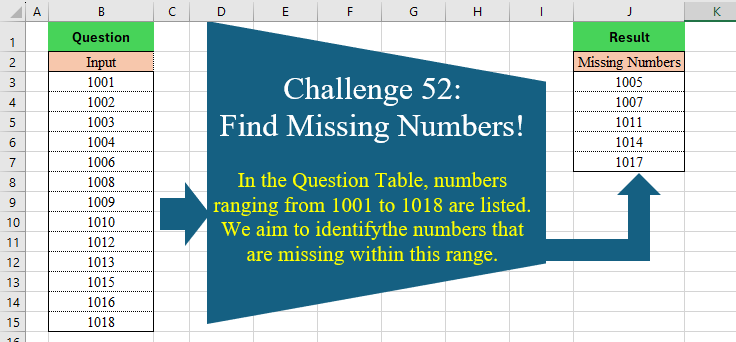
In the Question Table, numbers ranging from 1001 to 1018 are listed. We aim to identify the numbers that are missing within this range.
📌 Challenge Details and Links
Challenge Number: 52
Challenge Difficulty: ⭐⭐
📥Download Sample File
📥Link to the solutions on LinkedIn
Solving the challenge of Find Missing Numbers! with Power Query
Power Query solution 1 for Find Missing Numbers!, proposed by Zoran Milokanović:
let
  Source = Excel.CurrentWorkbook(){[Name = "Input"]}[Content][Input],
  S = List.TransformMany(
    {Source{0} .. List.Last(Source)},
    each List.Skip({_}, each List.Contains(Source, _)),
    (i, _) => _
  )
in
  S
Power Query solution 2 for Find Missing Numbers!, proposed by Brian Julius:
let
  Source = Excel.CurrentWorkbook(){[Name = "Table1"]}[Content],
  Answer = [
    a = Source[Input],
    b = {List.Min(a) .. List.Max(a)},
    c = List.Sort(List.RemoveMatchingItems(b, a)),
    d = Table.FromList(c, Splitter.SplitByNothing(), {"Missing Numbers"})
  ][d]
in
  Answer
Power Query solution 3 for Find Missing Numbers!, proposed by Cristobal Salcedo Beltran:
let
  Source = Excel.CurrentWorkbook(){0}[Content],
  Result = Table.FromList(
    List.Difference({List.Min(Source[Input]) .. List.Max(Source[Input])}, Source[Input]),
    Splitter.SplitByNothing(),
    {"Missing Numbers"},
    null,
    ExtraValues.Error
  )
in
  Result
Power Query solution 4 for Find Missing Numbers!, proposed by Ramiro Ayala Chávez:
let
S = Excel.CurrentWorkbook(){[Name="Table1"]}[Content],
a = S[Input],
b = List.Count(a)-1,
c = List.Difference({a{0}..a{b}},a),
Sol = Table.FromColumns({c},{"Missing Numbers"})
in
Sol
Power Query solution 5 for Find Missing Numbers!, proposed by Aditya Kumar Darak 🇮🇳:
let
  Source = Excel.CurrentWorkbook(){[Name = "data"]}[Content][Input],
  Return = List.Difference({List.Min(Source) .. List.Max(Source)}, Source)
in
  Return
Power Query solution 6 for Find Missing Numbers!, proposed by Owen Price:
let
  Source = Excel.CurrentWorkbook(){[Name = "Table1"]}[Content][Column1],
  Result = List.Difference({List.Min(Source) .. List.Max(Source)}, Source)
in
  Result
Power Query solution 7 for Find Missing Numbers!, proposed by Alejandro Simón 🇵🇦 🇪🇸:
let
  Source = Excel.CurrentWorkbook(){[Name = "Table1"]}[Content],
  A = Source[Input],
  Sol = Table.FromColumns({List.Difference({List.Min(A) .. List.Max(A)}, A)}, {"Missing Numbers"})
in
  Sol
Power Query solution 8 for Find Missing Numbers!, proposed by Kris Jaganah:
let
  a = Excel.CurrentWorkbook(){[Name = "Table1"]}[Content][Input],
  b = {List.Min(a) .. List.Max(a)}
in
  List.RemoveMatchingItems(b, a)
Power Query solution 9 for Find Missing Numbers!, proposed by Masoud Karami:
let
  Source = Excel.CurrentWorkbook(){[Name = "Table1"]}[Content],
  #"Added Index" = Table.AddIndexColumn(Source, "Index", 1, 1, Int64.Type),
  #"Added Custom" = Table.AddColumn(#"Added Index", "Custom", each Source{[Index]}[Input]),
  #"Inserted Subtraction" = Table.AddColumn(
    #"Added Custom",
    "Subtraction",
    each [Custom] - [Input],
    type number
  ),
  #"Added Custom1" = Table.AddColumn(
    #"Inserted Subtraction",
    "Custom.1",
    each try {1 .. [Subtraction]} otherwise {1}
  ),
  #"Expanded Custom.1" = Table.ExpandListColumn(#"Added Custom1", "Custom.1"),
  #"Added Index1" = Table.AddIndexColumn(
    #"Expanded Custom.1",
    "Index.1",
    Source{0}[Input],
    1,
    Int64.Type
  ),
  #"Added Conditional Column" = Table.AddColumn(
    #"Added Index1",
    "Missing Numbers",
    each if [Input] <> [Index.1] then [Index.1] else null
  ),
  #"Removed Other Columns" = Table.SelectColumns(#"Added Conditional Column", {"Missing Numbers"}),
  #"Filtered Rows" = Table.SelectRows(
    #"Removed Other Columns",
    each [Missing Numbers] <> null and [Missing Numbers] <> ""
  )
in
  #"Filtered Rows"
Power Query solution 10 for Find Missing Numbers!, proposed by 🇮🇷 Navid Esmaeilzadeh اسماعیل زاده:
let
  S1  = Excel.CurrentWorkbook(){[Name = "Table1"]}[Content],
  A   = Table.TransformColumnTypes(S1, {{"Input", Int64.Type}}),
  L   = {List.Min(A[Input]) .. List.Max(A[Input])},
  B   = Table.FromList(L, Splitter.SplitByNothing(), null, null, ExtraValues.Error),
  S2  = Table.RenameColumns(B, {{"Column1", "Missing Numbers"}}),
  C   = Table.NestedJoin(S2, {"Missing Numbers"}, A, {"Input"}, "N"),
  D   = Table.ExpandTableColumn(C, "N", {"Input"}, {"Input"}),
  E   = Table.SelectRows(D, each ([Input] = null)),
  Sol = Table.RemoveColumns(E, {"Input"})
in
  Sol
Power Query solution 11 for Find Missing Numbers!, proposed by Gerson Pineda:
let
  a = Excel.CurrentWorkbook(){[Name = "Table1"]}[Content][Input],
  b = {List.Min(a) .. List.Max(a)},
  c = Table.FromList(List.Difference(b, a), Splitter.SplitByNothing(), {"Missing Numbers"})
in
  c
Power Query solution 12 for Find Missing Numbers!, proposed by Rayan Saud:
let
 DataS = Excel.Workbook(File.Contents("C:TestMissingNumbers.xlsx"), null, true),
 Source = DataS{[Item = "Tbl", Kind = "Table"]}[Data],
 MinValue = List.Min(Source[Input]),
 MaxValue = List.Max(Source[Input]),
 CompleteSequence = List.Numbers(MinValue, MaxValue - MinValue + 1),
 MissingNumbers = List.Difference(CompleteSequence, Source[Input])
in
 MissingNumbers
Solving the challenge of Find Missing Numbers! with Excel
Excel solution 1 for Find Missing Numbers!, proposed by محمد حلمي:
=LET(
    b,
    B3:B15,
    m,
    MIN(
        b
    ),
    s,
    SEQUENCE(
        MAX(
        b
    )-m+1,
        ,
        m
    ),    FILTER(
        s,
        ISNA(
            XMATCH(
                s,
                b
            )
        )
    )
)
Excel solution 2 for Find Missing Numbers!, proposed by محمد حلمي:
=DROP(
    REDUCE(
        ,
        B3:B15,
        LAMBDA(
            A,
            D,
            LET(
                j,
                @N(
                    +TAKE(
                        B2:D,
                        -2
                    )
                ),
                IF(
                    D=j+1,
                    A,
                    VSTACK(
                        A,
                        SEQUENCE(
                            D-j-1
                        )+j
                    )
                )
            )
        )
    ),
    1
)
Excel solution 3 for Find Missing Numbers!, proposed by 🇵🇪 Ned Navarrete C.:
=LET(
    r,
    B3:B15,
    m,
    MIN(
        r
    )-1,
    s,
    SEQUENCE(
        MAX(
        r
    )-m
    )+m,
    FILTER(
        s,
        NOT(
            COUNTIF(
                r,
                s
            )
        )
    )
)
Excel solution 4 for Find Missing Numbers!, proposed by 🇵🇪 Ned Navarrete C.:
=UNIQUE(
    VSTACK(
        B3:B15,
        ROW(
            1:18
        )+1000
    ),
    ,
    1
)
Excel solution 5 for Find Missing Numbers!, proposed by Aditya Kumar Darak 🇮🇳:
=UNIQUE(
    VSTACK(
        B3:B15,
         SEQUENCE(
             MAX(
                 B3:B15
             ) - MIN(
                 B3:B15
             ) + 1,
              ,
              MIN(
                 B3:B15
             )
         )
    ),
     ,
     1
)
Excel solution 6 for Find Missing Numbers!, proposed by Owen Price:
=LET(
    d,
    D5:D17,
    seq,
    SEQUENCE(
        MAX(
            d
        )-MIN(
            d
        )+1,
        ,
        MIN(
            d
        )
    ),
    FILTER(
        seq,
        ISNA(
            XMATCH(
                seq,
                d
            )
        )
    )
)
Excel solution 7 for Find Missing Numbers!, proposed by Julian Poeltl:
=E_ListNotinList_Array(
    SEQUENZ(
        18;;1001
    );B3:B15
)

E_ListNotinList_Array:
=LAMBDA(
    LargeList,
    ListSearchforinLargeList,
    LET(
        FLL,
        FILTER(
            LargeList,
            LargeList<>""
        ),
        UFSL,
        UNIQUE(
            FILTER(
                ListSearchforinLargeList,
                ListSearchforinLargeList<>""
            )
        ),
        ListF0,
        IFERROR(
            MAP(
                FLL,
                LAMBDA(
                    ARR,
                    XMATCH(
                        ARR,
                        UFSL
                    )
                )
            ),
            0
        ),
        FILTER(
            FLL,
            ListF0=0
        )
    )
)
Excel solution 8 for Find Missing Numbers!, proposed by Julian Poeltl:
=LET(
    S,
    SEQUENCE(
        18,
        ,
        1001
    ),
    I,
    B3:B15,
    FILTER(
        S,
        NOT(
            ISNUMBER(
                XMATCH(
                    S,
                    I
                )
            )
        )
    )
)
Excel solution 9 for Find Missing Numbers!, proposed by Kris Jaganah:
=LET(
    a,
    B3:B15,
    b,
    MIN(
        a
    ),
    c,
    SEQUENCE(
        MAX(
        a
    )-b+1,
        ,
        b
    ),
    FILTER(
        c,
        ISNA(
            XLOOKUP(
                c,
                a,
                a
            )
        )
    )
)
Excel solution 10 for Find Missing Numbers!, proposed by Abdallah Ally:
=LET(
    a,
    B3:B15,
    REDUCE(
        "Missing Numbers",
        SEQUENCE(
            18
        )+1000,
         LAMBDA(
             x,
             y,
             IF(
                 OR(
                     y=a
                 ),
                 x,
                 VSTACK(
                     x,
                     y
                 )
             )
         )
    )
)
Excel solution 11 for Find Missing Numbers!, proposed by Abdallah Ally:
=UNIQUE(VSTACK("Missing Numbers",SEQUENCE(18)+1000, B3:B15),,1)Excel solution 12 for Find Missing Numbers!, proposed by Abdallah Ally:
=LET(a,VSTACK("Missing Numbers",SEQUENCE(18)+1000),FILTER(a, MAP(a,LAMBDA(x,COUNTIF(B3:B15,x)))=0))Excel solution 13 for Find Missing Numbers!, proposed by John Jairo Vergara Domínguez:
=LET(
    n,
    B3:B15,
    UNIQUE(
        VSTACK(
            n,
            SEQUENCE(
                1+MAX(
                    n
                )-@n;;@n
            )
        ),
        ,
        1
    )
)
Excel solution 14 for Find Missing Numbers!, proposed by Ankur Sharma:
=LET(
    a,
     B3:B15,
     b,
     SEQUENCE(
         MAX(
             a
         ) - MIN(
             a
         ) + 1,
          ,
          MIN(
             a
         )
     ),
     FILTER(
         b,
          COUNTIFS(
              a,
               b
          ) = 0
     )
)
Excel solution 15 for Find Missing Numbers!, proposed by Asheesh Pahwa:
=LET(
    in,
    B3:B15,
    s,
    SEQUENCE(
        MAX(
            in
        )-MIN(
            in
        ),
        ,
        MIN(
            in
        )
    ),    UNIQUE(
        VSTACK(
            s,
            in
        ),
        ,
        1
    )
)


=LET(
    in,
    B3:B15,    mn,
    MIN(
            in
        ),
    mx,
    MAX(
            in
        ),
    s,
    SEQUENCE(
        mx-mn+1,
        ,
        mn
    ),    r,
    DROP(
        REDUCE(
            "",
            s,
            LAMBDA(
                a,
                v,
                VSTACK(
                    a,
                    NOT(
                        ISNUMBER(
                            XMATCH(
                                v,
                                in
                            )
                        )
                    )
                )
            )
        ),
        1
    ),
    FILTER(
        s,
        r
    )
)
Excel solution 16 for Find Missing Numbers!, proposed by Ashutosh Sharma:
=LET(
    num,
    SEQUENCE(
        18,
        ,
        1001
    ),
    FILTER(
        num,
        ISNA(
            XMATCH(
                num,
                B3:B15
            )
        )
    )
)
Excel solution 17 for Find Missing Numbers!, proposed by Bilal Mahmoud kh.:
=b),
    d,
    FILTER(
        a,
        c
    ),
    d)
Excel solution 18 for Find Missing Numbers!, proposed by Ernesto Vega Castillo:
=LET(x,B3:B15,y,SEQUENCE(SUM(MAX(x)-MIN(x))+1,,MIN(x)),FILTER(y,1-COUNTIF(x,y)))Excel solution 19 for Find Missing Numbers!, proposed by ferhat CK:
=LET(
    a,
    SEQUENCE(
        B15-B3+1,
        1,
        B3,
        1
    ),
    b,
    B3:B15,
    c,
    COUNTIF(
        b,
        a
    ),
    FILTER(
        a,
        c=0
    )
)
Excel solution 20 for Find Missing Numbers!, proposed by Gabriel Pugliese:
=LET(
    d,
    A2:A14,    seq,
    SEQUENCE(
        max(
            d
        )-min(
            d
        )+1,
        1,
        min(
            d
        )
    ),    m,
    XMATCH(
        seq,
        d
    ),    FILTER(
        seq,
        ISNA(
            m
        )
    )
)
Excel solution 21 for Find Missing Numbers!, proposed by Gerson Pineda:
=LET(i,B3:B15,c,SEQUENCE(MAX(i)-MIN(i)+1,,MIN(i)),FILTER(c,ISERROR(XMATCH(c,i))))Excel solution 22 for Find Missing Numbers!, proposed by Hussein SATOUR:
=UNIQUE(
    VSTACK(
        B3:B15,
        SEQUENCE(
            18,
            ,
            1001
        )
    ),
    ,
    1
)
Excel solution 23 for Find Missing Numbers!, proposed by Ibrahim Sadiq:
=LET(
    a,
    SEQUENCE(
        18,
        ,
        1001
    ),
    FILTER(
        a,
        ISNA(
            XMATCH(
                a,
                B3:B15,

            )
        )
    )
)
Excel solution 24 for Find Missing Numbers!, proposed by LEONARD OCHEA 🇷🇴:
=TOCOL(
    IF(
        B4:B15-B3:B14-1,
        B3:B14+1,
        z
    ),
    2
)
Excel solution 25 for Find Missing Numbers!, proposed by LEONARD OCHEA 🇷🇴:
=LET(
    i,
    B3:B15,
    UNIQUE(
        VSTACK(
            i,
            SEQUENCE(
                MAX(
                    i
                )-@i+1,
                ,
                @i
            )
        ),
        ,
        1
    )
)
Excel solution 26 for Find Missing Numbers!, proposed by Martín Angosto Valverde:
=LET(incompleteSequence,
    B3:B15,
    completeSequence,
    SEQUENCE(MAX(ROWS(
        incompleteSequence
    ),
    (B15-B3)+1),
    1,
    B3,
    1),
    matchArray,
    IFNA(
        XMATCH(
            completeSequence,
            incompleteSequence,
            0,
            1
        ),
        completeSequence
    ),
    FILTER(
        matchArray,
        matchArray>B3-1
    ))
Excel solution 27 for Find Missing Numbers!, proposed by Mey Tithveasna:
=LET(
    a,
    B3:B15,
    s,
    SEQUENCE(
        MAX(
            a
        )-MIN(
            a
        )+1,
        ,
        MIN(
            a
        )
    ),
    b,
    COUNTIF(
        a,
        s
    ),
    FILTER(
        s,
        b=0
    )
)
Excel solution 28 for Find Missing Numbers!, proposed by Muhammad Nauman:
=IFERROR(
    INDEX(
        ROW(
            INDIRECT(
                "1001"&":"&"1019"
            )
        ),
        AGGREGATE(
            15,
            6,
            ROW(
                INDIRECT(
                    "1:"&"119"-"1"
                )
            )/ISNA(
                MATCH(
                    ROW(
                        INDIRECT(
                            "1001"&":"&"1019"
                        )
                    ),
                    $B$2:$B$15,
                    0
                )
            ),
            ROW(
                A1
            )
        )
    ),
    ""
)
Excel solution 29 for Find Missing Numbers!, proposed by Nicolas Micot:
=LET(
    _input;
    B3:B15;    _valMax;
    MAX(
        _input
    );    _valMin;
    MIN(
        _input
    );    _numbers;
    SEQUENCE(
        _valMax-_valMin+1;
        ;
        _valMin
    );    _numbersCount;
    NB.SI(
        _input;
        _numbers
    );    FILTRE(
        _numbers;
        _numbersCount=0;
        ""
    )
)
Excel solution 30 for Find Missing Numbers!, proposed by Rayan Saud:
=LET(
    s,
    SEQUENCE(
        18,
        ,
        B3
    ),
    r,
    MAP(
        s,
        LAMBDA(
            x,
            SUM(
                IFERROR(
                    FIND(
                        x,
                        B3:B15,
                        1
                    ),
                    0
                )
            )
        )
    ),
    FILTER(
        s,
        r=0
    )
)
Excel solution 31 for Find Missing Numbers!, proposed by Rick Rothstein:
=LET(
    s,
    SEQUENCE(
        18,
        ,
        1001
    ),
    FILTER(
        s,
        1-COUNTIF(
            B3:B15,
            s
        )
    )
)
Excel solution 32 for Find Missing Numbers!, proposed by Shyamsundar Baggu:
=LAMBDA(
    rng,    LET(
        a,
        TAKE(
            SORT(
                rng
            ),
            {1;-1}
        ),        b,
        1+SUM(
            a*{-1;1}
        ),        c,
        TAKE(
            a,
            1
        )+SEQUENCE(
            b,
            ,
            0
        ),        FILTER(
            c,
            1-ISNUMBER(
                XMATCH(
                    c,
                    rng
                )
            )
        )
    )
)(B3:B15)
Excel solution 33 for Find Missing Numbers!, proposed by Tamer Salem Shabib:
=LET(
    w,
    B3:B17,
    a,
    TEXTAFTER(
        FILTER(
            w,
            w<>""
        ),
        ""
    )*1,
    UNIQUE(
        VSTACK(
            SEQUENCE(
                MAX(
                    a
                )-MIN(
                    a
                )+1,
                ,
                MIN(
                    a
                )
            ),
            a
        ),
        ,
        1
    )
)
Excel solution 34 for Find Missing Numbers!, proposed by Thang Van:
=LET(
    a,
    SEQUENCE(
        18,
        ,
        1001,
        1
    ),
    b,
    MAP(
        a,
        LAMBDA(
            _each,
            IF(
                ISERROR(
                    MATCH(
                        TRUE,
                        ISNUMBER(
                            SEARCH(
                                B3:B15,
                                _each
                            )
                        ),
                        0
                    )=0
                ),
                _each,
                ""
            )
        )
    ),    FILTER(
        b,
        b<>""
    ))
Solving the challenge of Find Missing Numbers! with Python
Python solution 1 for Find Missing Numbers!, proposed by Konrad Gryczan, PhD:
import pandas as pd

input = pd.read_excel("CH-052 Find missing Numbers.xlsx",  usecols="B", skiprows=1)
test = pd.read_excel("CH-052 Find missing Numbers.xlsx",  usecols="J", skiprows=1, nrows = 5)

missing = list(set(range(min(input["Input"]), max(input["Input"]) + 1)) - set(input["Input"]))

print(missing == test["Missing Numbers"].tolist()) # True
Python solution 2 for Find Missing Numbers!, proposed by Luan Rodrigues:
import pandas as pd

filepath = 'CH-052 Find missing Numbers.xlsx'
df = pd.read_excel(filepath,usecols='B',skiprows=1)
def fonte(tabela):
 n = df['Input']
 seq = list(range(min(n), max(n) + 1))
 res = list(set(seq) - set(n))
 return res
print(fonte(df))
Solving the challenge of Find Missing Numbers! with Python in Excel
Python in Excel solution 1 for Find Missing Numbers!, proposed by Owen Price:
xl("B3:B15")[0].values)
set(range(min(input),max(inpu