
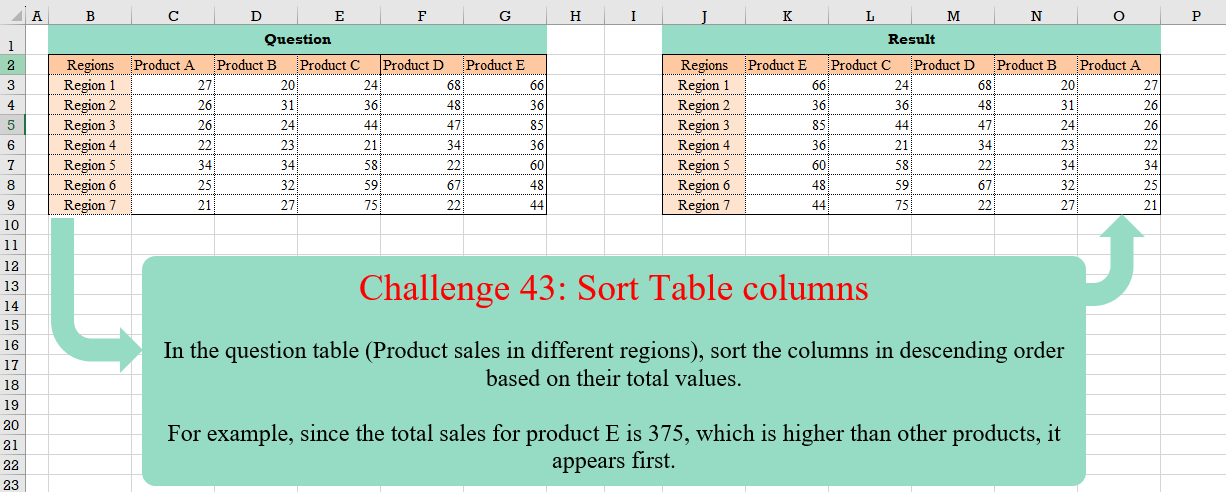
In the question table (Product sales in different regions), sort the columns in descending order based on their total values. For example, since the total sales for product E is 375, which is higher than other products, it appears first.
📌 Challenge Details and Links
Challenge Number: 43
Challenge Difficulty: ⭐⭐⭐
📥Download Sample File
📥Link to the solutions on LinkedIn
Solving the challenge of Sort Table Columns with Power Query
Power Query solution 1 for Sort Table Columns, proposed by Bo Rydobon 🇹🇭:
let
  Source = Excel.CurrentWorkbook(){[Name = "Table1"]}[Content],
  Sort = Table.SelectColumns(
    Source,
    List.Sort(
      Table.ColumnNames(Source),
      (c) => try - List.Sum(Table.Column(Source, c)) otherwise null
    )
  )
in
  Sort
Power Query solution 2 for Sort Table Columns, proposed by Pavel Adam:
let
  inTbl = Table.Buffer(inputTbl),
  vecColumnNames = Table.ColumnNames(inTbl),
  SortedColumnNames = List.Sort(
    List.Skip(vecColumnNames, 1),
    (a, b) =>
      Value.Compare(
        - List.Sum(Table.Column(inTbl, a)) ?? 0,
        - List.Sum(Table.Column(inTbl, b)) ?? 0
      )
  ),
  RearangedTable = Table.SelectColumns(inTbl, {vecColumnNames{0}} & SortedColumnNames)
in
  RearangedTable
Power Query solution 3 for Sort Table Columns, proposed by Brian Julius:
let
  Source = Excel.CurrentWorkbook(){[Name = "Table1"]}[Content],
  Order = [
    a = List.Skip(Table.ColumnNames(Source), 1),
    b = List.Transform(
      Table.ToColumns(Table.RemoveRows(Table.RemoveColumns(Source, "Regions"), 0, 1)),
      each List.Sum(_)
    ),
    c = Table.Sort(Table.FromColumns({a, b}), {"Column2", Order.Descending}),
    d = {"Regions"} & c[Column1]
  ],
  Reorder = Table.ReorderColumns(Source, Order[d])
in
  Reorder
Power Query solution 4 for Sort Table Columns, proposed by Cristobal Salcedo Beltran:
let
  Source = Excel.CurrentWorkbook(){[Name = "Table1"]}[Content],
  SortedColumns = Table.Sort(
    Table.FromColumns(
      {
        List.Transform({"A" .. "E"}, each "Product " & _),
        List.RemoveFirstN(List.Transform(Table.ToColumns(Source), List.Sum))
      },
      {"Product", "Total"}
    ),
    {{"Total", Order.Descending}}
  )[Product],
  ReorderedColumns = Table.ReorderColumns(Source, SortedColumns)
in
  ReorderedColumns
Power Query solution 5 for Sort Table Columns, proposed by Ramiro Ayala Chávez:
let
S = Excel.CurrentWorkbook(){[Name="Table1"]}[Content],
a = List.Skip(Table.ToColumns(S)),
b = List.Transform(a, each List.Sum(_)),
c = List.Zip({List.Skip(Table.ColumnNames(S)),b}),
d = Table.Sort(Table.FromRows(c),{"Column2",1})[Column1],
Sol = Table.ReorderColumns(S,{"Regions"}&d)
in
Sol
Power Query solution 6 for Sort Table Columns, proposed by Aditya Kumar Darak 🇮🇳:
let
  Source = Excel.CurrentWorkbook(){[Name = "data"]}[Content],
  ColNames = Table.ColumnNames(Source),
  Sorted = List.Sort(
    ColNames,
    {each try List.Sum(Table.Column(Source, _)) otherwise Number.PositiveInfinity, 1}
  ),
  Return = Table.SelectColumns(Source, Sorted)
in
  Return
Power Query solution 7 for Sort Table Columns, proposed by Alejandro Simón 🇵🇦 🇪🇸:
let
  Source = Excel.CurrentWorkbook(){[Name = "Table1"]}[Content],
  List = Table.ToColumns(Table.DemoteHeaders(Source)),
  Tbl = Table.FromColumns({List{0}} & List.Sort(List.Skip(List), {each List.Sum(List.Skip(_)), 1})),
  Sol = Table.PromoteHeaders(Tbl, [PromoteAllScalars = true])
in
  Sol
Power Query solution 8 for Sort Table Columns, proposed by Alexis Olson:
let
  Source = Excel.CurrentWorkbook(){[Name = "Table1"]}[Content],
  Products = List.Skip(Table.ColumnNames(Source)),
  Total = (col) => List.Sum(Table.Column(Source, col)),
  Result = Table.ReorderColumns(
    Source,
    List.Sort(Products, (x, y) => Value.Compare(Total(y), Total(x)))
  )
in
  Result
Power Query solution 9 for Sort Table Columns, proposed by Alexis Olson:
let
  Source  = Excel.CurrentWorkbook(){[Name = "Table1"]}[Content],
  Unpivot = Table.UnpivotOtherColumns(Source, {"Regions"}, "Product", "Value"),
  Group   = Table.Group(Unpivot, {"Product"}, {{"Total", each List.Sum([Value])}}),
  Sort    = Table.Sort(Group, {{"Total", Order.Descending}}),
  Result  = Table.ReorderColumns(Source, {"Regions"} & Sort[Product])
in
  Result
Power Query solution 10 for Sort Table Columns, proposed by Kris Jaganah:
let
  Source  = Excel.CurrentWorkbook(){[Name = "Table1"]}[Content],
  Unpivot = Table.UnpivotOtherColumns(Source, {"Regions"}, "Attribute", "Value"),
  Group   = Table.Group(Unpivot, {"Attribute"}, {{"Sum", each List.Sum([Value])}, {"All", each _}}),
  Xpand   = Table.ExpandTableColumn(Group, "All", {"Regions", "Value"}),
  Sort    = Table.Sort(Xpand, {"Sum", Order.Descending}),
  Remove  = Table.RemoveColumns(Sort, {"Sum"}),
  Pivot   = Table.Pivot(Remove, List.Distinct(Remove[Attribute]), "Attribute", "Value")
in
  Pivot
Power Query solution 11 for Sort Table Columns, proposed by Nelson Mwangi:
let
  Source = Excel.CurrentWorkbook(){[Name = "Table1"]}[Content],
  Unpivot = Table.UnpivotOtherColumns(Source, {"Regions"}, "Attribute", "Value"),
  Group = Table.Sort(
    Table.Group(Unpivot, {"Attribute"}, {{"Count", each List.Sum([Value]), type number}}),
    {"Count", Order.Descending}
  )[Attribute],
  Reorder = Table.ReorderColumns(Source, Group)
in
  Reorder
Power Query solution 12 for Sort Table Columns, proposed by 🇮🇷 Navid Esmaeilzadeh اسماعیل زاده:
let
  S = Excel.CurrentWorkbook(){[Name = "Table1"]}[Content],
  A = Table.UnpivotOtherColumns(S, {"Regions"}, "Attribute", "Value"),
  B = Table.Group(A, {"Attribute"}, {{"TV", each List.Sum([Value]), type number}}),
  C = Table.Sort(B, {{"TV", Order.Descending}}),
  D = Table.ReorderColumns(S, C[Attribute])
in
  D
Power Query solution 13 for Sort Table Columns, proposed by Kerwin Tan CPA:
let
  Source = Excel.CurrentWorkbook(){[Name = "input"]}[Content],
  #"Promoted Headers" = Table.PromoteHeaders(Source, [PromoteAllScalars = true]),
  Order =
    let
      tbl     = #"Promoted Headers",
      prodLst = List.Skip(Table.ColumnNames(tbl), 1),
      sumProd = List.Transform(prodLst, each {_, List.Sum(Table.Column(tbl, _))})
    in
      Table.Sort(Table.FromRows(sumProd), {{"Column2", Order.Descending}})[Column1],
  Output =
    let
      tbl = #"Promoted Headers"
    in
      Table.ReorderColumns(tbl, {List.First(Table.ColumnNames(tbl))} & Order)
in
  Output
Power Query solution 14 for Sort Table Columns, proposed by Nir Robinson:
let
  Source = Excel.CurrentWorkbook(){[Name = "Table1"]}[Content],
  UnpivotedOther = Table.UnpivotOtherColumns(Source, {"Regions"}, "product", "Value"),
  GroupedRows = Table.Group(
    UnpivotedOther,
    {"product"},
    {{"sum product", each List.Sum([Value]), type any}}
  ),
  SortedRows = Table.Sort(GroupedRows, {{"sum product", Order.Descending}}),
  ListProductOrder = SortedRows[product],
  #"ReorderedColumns" = Table.ReorderColumns(Source, ListProductOrder)
in
  #"ReorderedColumns"
Solving the challenge of Sort Table Columns with Excel
Excel solution 1 for Sort Table Columns, proposed by Bo Rydobon 🇹🇭:
=SORTBY(
    B2:G9,
    -1/BYCOL(
        B2:G9,
        SUM
    ),
    -1
)
Excel solution 2 for Sort Table Columns, proposed by محمد حلمي:
=LET(d,B2:G9,
SORTBY(d,-MMULT(TOROW(ROW(d))^0,IF(d>"",99,d))))
Excel solution 3 for Sort Table Columns, proposed by 🇵🇪 Ned Navarrete C.:
=HSTACK(B2:B9,SORTBY(C2:G9,BYCOL(C2:G9,LAMBDA(c,SUM(c))),-1))Excel solution 4 for Sort Table Columns, proposed by Oscar Mendez Roca Farell:
=HSTACK(
    B2:B9,
     SORTBY(
         C2:G9,
          -BYCOL(
              C3:G9,
               LAMBDA(
                   c,
                    SUM(
                        c
                    )
               )
          )
     )
)

Or:

=HSTACK(
    B2:B9,
     SORTBY(
         C2:G9,
          -MMULT(
              TOROW(
                  RIGHT(
                      B3:B9
                  )
              )^0,
               C3:G9
          )
     )
)
Excel solution 5 for Sort Table Columns, proposed by Julian Poeltl:
=LET(
    T,
    B2:G9,
    N,
    DROP(
        T,
        1,
        1
    ),
    S,
    BYCOL(
        N,
        LAMBDA(
            A,
            SUM(
                A
            )
        )
    ),
    HSTACK(
        TAKE(
            T,
            ,
            1
        ),
        SORTBY(
            DROP(
            T,
            ,
            1
        ),
            S,
            -1
        )
    )
)
Excel solution 6 for Sort Table Columns, proposed by Kris Jaganah:
=HSTACK(
    B2:B9,
    SORTBY(
        C2:G9,
        BYCOL(
            C2:G9,
            SUM
        ),
        -1
    )
)
Excel solution 7 for Sort Table Columns, proposed by Abdallah Ally:
=LET(
    a,
    C2:G9,
    HSTACK(
        B2:B9,
        SORTBY(
            a,
            BYCOL(
                a,
                SUM
            ),
            -1
        )
    )
)
Excel solution 8 for Sort Table Columns, proposed by Abdallah Ally:
=LET(a,C2:G9,HSTACK(B2:B9,SORTBY(a,-BYCOL(a,SUM))))Excel solution 9 for Sort Table Columns, proposed by John Jairo Vergara Domínguez:
=HSTACK(
    B2:B9,
    SORTBY(
        C2:G9,
        -BYCOL(
            C2:G9,
            SUM
        )
    )
)
Excel solution 10 for Sort Table Columns, proposed by Sunny Baggu:
=HSTACK(
    B2:B9,
    SORTBY(
        C2:G9,
        BYCOL(
            C3:G9,
            LAMBDA(
                a,
                SUM(
                    a
                )
            )
        ),
        -1
    )
)
Excel solution 11 for Sort Table Columns, proposed by Sunny Baggu:
=HSTACK(
    B2:B9,
    SORTBY(
        C2:G9,
        MMULT(
            SEQUENCE(
                ,
                ROWS(
                    B3:B9
                ),
                ,
                0
            ),
            C3:G9
        ),
        -1
    )
)
Excel solution 12 for Sort Table Columns, proposed by Ankur Sharma:
=LET(
    a,
     C2:G9,
     b,
     BYCOL(
         a,
          LAMBDA(
              c,
               SUM(
                   c
               )
          )
     ),
     SORTBY(
         a,
          b,
          -1
     )
)
Excel solution 13 for Sort Table Columns, proposed by Darren Stenson:
=LET(
    c,
    B2:B9,
    HSTACK(
        c,
        SORTBY(
            C2:G9,
            BYCOL(
                C3:G9,
                LAMBDA(
                    x,
                    SUM(
                        x
                    )
                )
            ),
            -1
        )
    )
)
Excel solution 14 for Sort Table Columns, proposed by Hussein SATOUR:
=LET(a,B1:F8,b,BYCOL(a,SUM),CHOOSECOLS(a,XMATCH(SORT(b,,-1,1),b)))Excel solution 15 for Sort Table Columns, proposed by Peter Compton:
=LET(data,C2:G9,titles,B2:B9,totals,BYCOL(data,LAMBDA(x,SUM(x))),HSTACK(titles,SORTBY(data,totals,-1)))Excel solution 16 for Sort Table Columns, proposed by Rayan Saud:
=LET(
    n,
    C3:G9,
    p,
    C2:G2,
    r,
    B3:B9,
    pl,
    INDEX(
        p,
        ,
        ROUNDDOWN(
            SEQUENCE(
                COUNTA(
                    n
                ),
                ,
                ,
                1/COUNTA(
                    r
                )
            ),
            0
        )
    ),
    nl,
    TOCOL(
        n,
        ,
        TRUE
    ),
    acc,
    MAP(
        p,
        LAMBDA(
            x,
            SUM(
                FILTER(
                    n,
                    p=x
                )
            )
        )
    ),
    sp,
    SORTBY(
        p,
        acc,
        -1
    ),
    HSTACK(
        B2:B9,
        VSTACK(
            p,
            WRAPCOLS(
                TEXTSPLIT(
                    TEXTJOIN(
                        ":",
                        ,
                        MAP(
                            sp,
                            LAMBDA(
                                x,
                                TEXTJOIN(
                                    ":",
                                    ,
                                    FILTER(
                    n,
                    p=x
                )
                                )
                            )
                        )
                    ),
                    ,
                    ":"
                ),
                7
            )
        )
    )
)
Excel solution 17 for Sort Table Columns, proposed by Rick Rothstein:
=HSTACK(
    B2:B9,
    SORTBY(
        C2:G9,
        BYCOL(
            C3:G9,
            LAMBDA(
                x,
                SUM(
                    x
                )
            )
        ),
        -1
    )
)
Excel solution 18 for Sort Table Columns, proposed by Tolga Demirci:
=LET(
    i,
    BYCOL(
        B3:F9,
        LAMBDA(
            a,
            SUM(
                a
            )
        )
    ),
    DROP(
        TRANSPOSE(
            TEXTSPLIT(
                TEXTJOIN(
                    ,
                    ,
                    MAP(
                        SORT(
                            TOCOL(
                                i
                            ),
                            ,
                            -1
                        ),
                        LAMBDA(
                            y,
                            TEXTJOIN(
                                ",",
                                ,
                                TOROW(
                                    XLOOKUP(
                                        y,
                                        i,
                                        B3:F9
                                    )
                                )
                            )
                        )
                    )&"/"
                ),
                ",",
                "/"
            )
        ),
        ,
        -1
    )
)
Solving the challenge of Sort Table Columns with Python
Python solution 1 for Sort Table Columns, proposed by Abdallah Ally:
import pandas as pd

# Read the Excel file
file_path = 'CH-043 Sort Table columns .xlsx'
df = pd.read_excel(file_path, usecols='B:G', nrows=8, skiprows=1)

# Perform data transformation and cleansing
totals = df.iloc[:, 1:].sum()
df1 = df[totals.sort_values(ascending=False).index] # sorted df
df = pd.concat([df.iloc[:, 0], df1], axis=1)

# Print the output
df
Solving the challenge of Sort Table Columns with R
R solution 1 for Sort Table Columns, proposed by Konrad Gryczan, PhD:
library(tidyverse)
library(readxl)

input = read_excel("files/CH-043 Sort Table columns .xlsx", range = "B2:G9")
test = read_excel("files/CH-043 Sort Table columns .xlsx", range = "J2:O9")

result =  input %>% select(Regions, names(sort(colSums(select(., -Regions)), decreasing = TRUE)))

-------------------------
Python
import pandas as pd
import re

input = pd.read_excel('CH-043 Sort Table columns .xlsx', usecols="B:G", skiprows=1, nrows = 7)
test = pd.read_excel('CH-043 Sort Table columns .xlsx', usecols="J:O", skiprows=1, nrows = 7)
test.columns = test.columns.str.replace(r'.1$', '', regex=True)

result = input[['Regions'] + input.drop('Regions', axis=1).sum().sort_values(ascending=False).index.tolist()]
Solving the challenge of Sort Table Columns with Google Sheets
Google Sheets solution 1 for Sort Table Columns, proposed by Olasunkanmi Babatope:
={B2:B9, ARRAYFORMULA(SORT(C2:G9, SUM(C3:G9), FALSE))}