
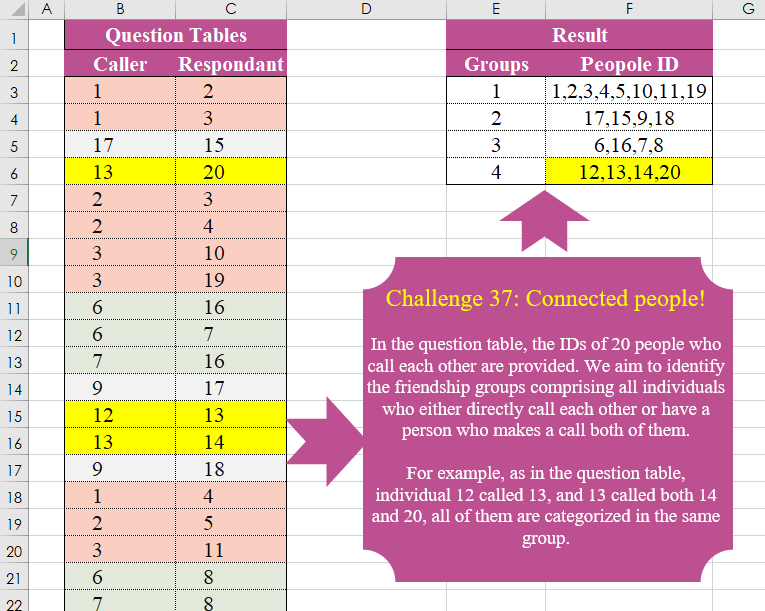
In the question table, the IDs of 20 people who call each other are provided. We aim to identify the friendship groups comprising all individuals who either directly call each other or have a person who makes a call both of them. For example, as in the question table, individual 12 called 13, and 13 called both 14 and 20, all of them are categorized in the same group.
📌 Challenge Details and Links
Challenge Number: 37
Challenge Difficulty: ⭐⭐⭐⭐
📥Download Sample File
📥Link to the solutions on LinkedIn
Solving the challenge of Connected People! with Power Query
Power Query solution 1 for Connected People!, proposed by Bo Rydobon 🇹🇭:
let
  Source = Excel.CurrentWorkbook(){[Name = "Table1"]}[Content],
  Group = List.Transform(
    List.Accumulate(
      Table.ToRows(Source),
      {},
      (s, l) =>
        let
          t = List.Transform(s, each if List.Count(List.Intersect({_, l})) > 0 then _ & l else _)
        in
          if s = t then s & {l} else t
    ),
    each Text.Combine(List.Transform(List.Distinct(_), Text.From), ",")
  ),
  Index = Table.FromColumns({{1 .. List.Count(Group)}, Group}, {"Group", "People ID"})
in
  Index
Power Query solution 2 for Connected People!, proposed by Zoran Milokanović:
let
  Source = Excel.CurrentWorkbook(){[Name = "Input"]}[Content],
  P = List.Accumulate(
    Table.ToRows(Source),
    {},
    (s, c) =>
      let
        p = List.Select(List.Positions(s), each List.ContainsAny(s{_}, {c{0}, c{1}})){0}? ?? - 1
      in
        {List.InsertRange(List.RemoveRange(s, p, 1), p, {List.Distinct(s{p} & c)}), s & {c}}{
          Number.From(p = - 1)
        }
  ),
  S = Table.FromRows(
    List.TransformMany(
      P,
      each {Text.Combine(List.Transform(_, Text.From), ",")},
      (i, _) => {List.PositionOf(P, i) + 1} & {_}
    ),
    {"Group", "People ID"}
  )
in
  S
Power Query solution 3 for Connected People!, proposed by Brian Julius:
let
  S = Excel.CurrentWorkbook(){[Name = "Table1"]}[Content],
  SJ = Table.RenameColumns(
    Table.SelectColumns(
      Table.Join(S, "Respondant", Table.PrefixColumns(S, "2"), "2.Caller"),
      {"Caller", "2.Respondant"}
    ),
    {"2.Respondant", "Respondant"}
  ),
  App = Table.Combine({S, SJ}),
  Gp = Table.Group(App, {"Caller"}, {"PeopleID", each [Respondant], type list}),
  Ex = Table.TransformColumnTypes(
    Table.AddColumn(
      Table.TransformColumns(
        Gp,
        {"PeopleID", each Text.Combine(List.Distinct(List.Transform(_, Text.From)), ","), type text}
      ),
      "Con",
      each 1
    ),
    {"Caller", Text.Type}
  ),
  Mrg = Table.CombineColumns(Ex, {"Caller", "PeopleID"}, each Text.Combine(_, ","), "PID"),
  SJ2 = Table.RemoveColumns(
    Table.SelectRows(
      Table.Join(Mrg, "Con", Table.PrefixColumns(Mrg, "B"), "B.Con", JoinKind.LeftOuter),
      each [PID] <> [B.PID]
    ),
    {"Con", "B.Con"}
  ),
  BCA = Table.AddColumn(
    SJ2,
    "Q",
    each [
      a = Text.Split([PID], ","),
      b = Text.Split([B.PID], ","),
      c = if List.ContainsAll(b, a) then 1 else 0
    ][c]
  ),
  ReG = Table.AddIndexColumn(
    Table.RemoveColumns(
      Table.SelectRows(
        Table.Group(BCA, {"PID"}, {{"Z", each List.Sum([Q]), type number}}),
        each [Z] = 0
      ),
      "Z"
    ),
    "Group",
    1,
    1
  ),
  R = Table.ReorderColumns(ReG, {"Group", "PID"})
in
  R
Power Query solution 4 for Connected People!, proposed by Aditya Kumar Darak 🇮🇳:
let
  Source = Excel.CurrentWorkbook(){[Name = "data"]}[Content],
  Text = Table.Buffer(Table.TransformColumns(Source, {}, Text.From)),
  Generate = List.Generate(
    () => [a = 0, f = {Record.ToList(Text{a})}],
    each [a] < Table.RowCount(Source),
    each [
      a = [a] + 1,
      b = List.Buffer([f]),
      c = Record.ToList(Text{a}),
      d = List.Transform(b, (x) => List.ContainsAny(x, c)),
      e = List.Zip({b, d}),
      f =
        if List.AnyTrue(d) then
          List.Transform(e, (x) => if x{1} then List.Distinct(x{0} & c) else x{0})
        else
          b & {c}
    ]
  ),
  Output = List.Transform(List.Last(Generate)[f], each Text.Combine(_, ", ")),
  Group = List.Transform({1 .. List.Count(Output)}, each "Group-" & Text.From(_)),
  Return = Table.FromRows(List.Zip({Group, Output}), {"Group", "People Id"})
in
  Return
Power Query solution 5 for Connected People!, proposed by Alexis Olson:
let
  Source = Excel.CurrentWorkbook(){[Name = "Table1"]}[Content],
  all_pairs = List.Buffer(Table.ToRows(Source)),
  first_pair = List.First(all_pairs),
  Groups = List.Accumulate(
    all_pairs,
    {first_pair},
    (state, current) =>
      List.Buffer(
        [
          matches = List.Select(state, each List.Intersect({_, current}) <> {}),
          match = List.First(matches) ?? {},
          update = List.Sort(List.Union({match, current})),
          components =
            if match = {} then
              state & {List.Sort(current)}
            else
              List.ReplaceMatchingItems(state, {{match, update}})
        ][components]
      )
  ),
  ToTable = Table.FromColumns({{1 .. List.Count(Groups)}, Groups}, {"Groups", "Peopole ID"}),
  ListToText = Table.TransformColumns(
    ToTable,
    {"Peopole ID", each Text.Combine(List.Transform(_, Text.From), ","), type text}
  )
in
  ListToText
Solving the challenge of Connected People! with Excel
Excel solution 1 for Connected People!, proposed by Bo Rydobon 🇹🇭:
=LET(
    d,
    DROP(
        REDUCE(
            0,
            B3:B25,
            LAMBDA(
                a,
                v,
                LET(
                    u,
                    TAKE(
                        v:C3,
                        -1
                    ),
                    m,
                    MAP(
                        a,
                        LAMBDA(
                            b,
                            IF(
                                COUNT(
                                    XMATCH(
                                        u,
                                        --TEXTSPLIT(
                                            b,
                                            ","
                                        )
                                    )
                                ),
                                TEXTJOIN(
                                    ",",
                                    ,
                                    b,
                                    u
                                ),
                                b
                            )
                        )
                    ),

                    MAP(
                        IF(
                            AND(
                                m=a
                            ),
                            VSTACK(
                                a,
                                TEXTJOIN(
                                    ",",
                                    ,
                                    u
                                )
                            ),
                            m
                        ),
                        LAMBDA(
                            x,
                            TEXTJOIN(
                                ",",
                                ,
                                UNIQUE(
                                    TEXTSPLIT(
                                        x,
                                        ,
                                        ","
                                    )
                                )
                            )
                        )
                    )
                )
            )
        ),
        1
    ),
    HSTACK(
        SEQUENCE(
            ROWS(
                d
            )
        ),
        d
    )
)
Excel solution 2 for Connected People!, proposed by محمد حلمي:
=LET(
    b,
    B3:B25,
    x,
    REDUCE(
        b,
        SEQUENCE(
            5
        ),
        LAMBDA(
            a,
            v,

            IFNA(
                XLOOKUP(
                    a,
                    b,
                    C3:C25
                ),
                a
            )
        )
    ),
    r,
    UNIQUE(
        x
    ),
    HSTACK(
        SEQUENCE(
            ROWS(
                r
            )
        ),        MAP(
            r,
            LAMBDA(
                c,
                TEXTJOIN(
                    ",",
                    ,
                    UNIQUE(
                        TOCOL(
                            IFS(
                                x=c,
                                B3:C25
                            ),
                            2
                        )
                    )
                )
            )
        )
    )
)
Excel solution 3 for Connected People!, proposed by محمد حلمي:
=LET(
    b,
    B3:B25,    x,
    REDUCE(
        b,
        SEQUENCE(
            5
        ),
        LAMBDA(
            a,
            v,

            IFNA(
                XLOOKUP(
                    a,
                    b,
                    C3:C25
                ),
                a
            )
        )
    ),    r,
    UNIQUE(
        x
    ),    HSTACK(
        SEQUENCE(
            ROWS(
                r
            )
        ),        MAP(
            r,
            LAMBDA(
                c,

                TEXTJOIN(
                    ",",
                    ,
                    UNIQUE(
                        TOCOL(
                            IFS(
                                x=c,
                                B3:C25
                            ),
                            2
                        )
                    )
                )
            )
        )
    )
)
Excel solution 4 for Connected People!, proposed by محمد حلمي:
=LET(b,
    B3:B25,x,
    REDUCE(
        b,
        SEQUENCE(
            5
        ),
        LAMBDA(
            a,
            v,

            IFNA(
                XLOOKUP(
                    a,
                    b,
                    C3:C25
                ),
                a
            )
        )
    ),
    r,
    UNIQUE(
        x
    ),HSTACK(SEQUENCE(
    ROWS(
        r
    )
),MAP(r,
    LAMBDA(c,
    TEXTJOIN(",",
    ,
    UNIQUE(TOCOL(B3:C25/(x=c),
    2)))))))
Excel solution 5 for Connected People!, proposed by Oscar Mendez Roca Farell:
=LET(
    C,
     B3:B25,
     R,
     C3:C25,
     D,
     DROP(
         IFNA(
             REDUCE(
                 "",
                  UNIQUE(
                      FILTER(
                          C,
                           ISNA(
                               XMATCH(
                                   C,
                                    R
                               )
                           )
                      )
                  ),
                  LAMBDA(
                      i,
                       x,
                       LET(
                           F,
                            LAMBDA(
                                a,
                                 UNIQUE(
                                     HSTACK(
                                         a,
                                          TOROW(
                                              IFS(
                                                  C=a,
                                                   R
                                              ),
                                               2
                                          )
                                     ),
                                      1
                                 )
                            ),
                            VSTACK(
                                i,
                                 ARRAYTOTEXT(
                                     F(
                                         F(
                                             x
                                         )
                                     )
                                 )
                            )
                       )
                  )
             ),
              ""
         ),
          1
     ),
     HSTACK(
         SEQUENCE(
             ROWS(
                 D
             )
         ),
          D
     )
)
Excel solution 6 for Connected People!, proposed by Julian Poeltl:
=VSTACK(
    {"Groups"."People ID"},
    LET(
        T,
        B3:C25,
        U,
        UNIQUE(
            TOCOL(
                B3:C25
            )
        ),
        C,
        TAKE(
            T,
            ,
            1
        ),
        R,
        TAKE(
            T,
            ,
            -1
        ),
        F,
        MAP(
            U,
            LAMBDA(
                A,
                TEXTJOIN(
                    ",",
                    ,
                    A,
                    FILTER(
                        R,
                        C=A
                    ),
                    ""
                )
            )
        )&",",
        FF,
        ","&FILTER(
            F,
            NOT(
                ISERROR(
                    F
                )
            )
        ),
        RD,
        LAMBDA(
            I,
            MAP(
                I,
                LAMBDA(
                    C,
                    REDUCE(
                        C,
                        I,
                        LAMBDA(
                            A,
                            B,
                            IF(
                                SUM(
                                    --ISNUMBER(
                                        SEARCH(
                                            DROP(
                                                ","&DROP(
                                                    TEXTSPLIT(
                                                        A,
                                                        ","
                                                    ),
                                                    ,
                                                    -1
                                                )&",",
                                                ,
                                                1
                                            ),
                                            B
                                        )
                                    )
                                )>0,
                                A&","&B,
                                A
                            )
                        )
                    )
                )
            )
        ),
        AG,
        RD(
            FF
        ),
        CR,
        LAMBDA(
            I,
            SUBSTITUTE(
                AG,
                ",,",
                ","
            )
        ),
        RC,
        CR(
            AG
        ),
        LL,
        LAMBDA(
            I,
            LEN(
                I
            )
        ),
        L,
        LL(
            RC
        ),
        CL,
        RIGHT(
            LEFT(
                RC,
                L-1
            ),
            L-2
        ),
        UN,
        LAMBDA(
            I,
            UNIQUE(
                MAP(
                    I,
                    LAMBDA(
                        C,
                        TEXTJOIN(
                            ",",
                            ,
                            SORT(
                                UNIQUE(
                                    TEXTSPLIT(
                                        C,
                                        ","
                                    ),
                                    TRUE
                                ),
                                ,
                                1,
                                TRUE
                            )
                        )
                    )
                )
            )
        ),
        GR,
        UN(
            CL
        ),
        O,
        RD(
            GR
        ),
        RES,
        UN(
            O
        ),
        HSTACK(
            SEQUENCE(
                COUNT(
                    RES
                )
            ),
            RES
        )
    )
)
Excel solution 7 for Connected People!, proposed by John Jairo Vergara Domínguez:
=LET(
    r,
    B3:C25,
    c,
    B3:B25,
    f,
    LAMBDA(
        f,
        i,
        LET(
            z,
            REDUCE(
                i,
                i,
                LAMBDA(
                    a,
                    v,
                    UNIQUE(
                        VSTACK(
                            a,
                            TOCOL(
                                r/BYROW(
                                    N(
                                        r=v
                                    ),
                                    SUM
                                ),
                                2
                            )
                        )
                    )
                )
            ),
            IF(
                IFNA(
                    AND(
                        z=i
                    ),

                ),
                ARRAYTOTEXT(
                    i
                ),
                f(
                    f,
                    z
                )
            )
        )
    ),
    b,
    MAP(
        UNIQUE(
            FILTER(
                c,
                ISNA(
                    XMATCH(
                        c,
                        C3:C25
                    )
                )
            )
        ),
        LAMBDA(
            x,
            f(
                f,
                x
            )
        )
    ),
    HSTACK(
        SEQUENCE(
            ROWS(
                b
            )
        ),
        b
    )
)
Excel solution 8 for Connected People!, proposed by Sunny Baggu:
=LET(
 _r, TOCOL(
 MAP(
 SEQUENCE(20),
 LAMBDA(x,
 LET(
 _c1, FILTER(C2:C24, B2:B24 = x),
 _c2, MAP(_c1, LAMBDA(a, ARRAYTOTEXT(FILTER(C2:C24, B2:B24 = a, "")))),
 ARRAYTOTEXT(SORT(--UNIQUE(TEXTSPLIT(TEXTJOIN(", ", , VSTACK(x, _c1, _c2)), , ", "))))
 )
 )
 ),
 3
 ),
 _e, MAP(_r, LAMBDA(a, SUM(IFERROR(SEARCH(", " & TEXTBEFORE(a, ", ") & ", ", ", " & TOROW(_r)), 0)))),
 FILTER(_r, _e = 1)
)
Excel solution 9 for Connected People!, proposed by Hussein SATOUR:
=LET(
    a,
    B3:B25,
    b,
    C3:C25,
    c,
    UNIQUE(
        MAP(
            UNIQUE(
                a
            ),
            LAMBDA(
                z,
                TEXTJOIN(
                    ",",
                    1,
                    SORT(
                        UNIQUE(
                            REDUCE(
                                ,
                                VSTACK(
                                    FILTER(
                                        a,
                                        b=z,
                                        ""
                                    ),
                                     FILTER(
                                         b,
                                         a=z
                                     )
                                ),
                                LAMBDA(
                                    x,
                                    y,
                                    VSTACK(
                                        x,
                                        y,
                                        FILTER(
                                            a,
                                            b=y
                                        ),
                                        FILTER(
                                            b,
                                            a=y,
                                            ""
                                        )
                                    )
                                )
                            )
                        )
                    )
                )
            )
        )
    ),
    FILTER(
        c,
        MAP(
            c,
            LAMBDA(
                w,
                COUNT(
                    BYROW(
                        FIND(
                            TEXTSPLIT(
                                w,
                                ","
                            ),
                            c
                        ),
                        SUM
                    )
                )=1
            )
        )
    )
)
Solving the challenge of Connected People! with Python
Python solution 1 for Connected People!, proposed by Cristobal Salcedo Beltran:
import pandas as pd

path_file = "/lakehouse/default/Files/ChallengeOmid/CH-036 Pareto Line.xlsx"

pandas_df = pd.read_excel(path_file, header=1, usecols=[1, 2, 3, 4])
result = pandas_df.apply(
 lambda row: not any((pandas_df.iloc[:, 1:4] > row[1:4]).all(axis=1)), axis=1
)
result = pandas_df.apply(
 lambda row: not any((pandas_df.iloc[:, 1:4] > row[1:4]).all(axis=1)), axis=1
)
result = (
 result[result].index.to_frame(index=False).rename(columns={0: "Solution ID"}) + 1
)
result["Solution ID"] = result["Solution ID"].astype(int)
print(result)
Python solution 2 for Connected People!, proposed by Konrad Gryczan, PhD:
import pandas as pd
import networkx as nx

input = pd.read_excel("CH-037 Connected people.xlsx", sheet_name="Sheet1", usecols="B:C", skiprows=1, nrows=25)
test  = pd.read_excel("CH-037 Connected people.xlsx", sheet_name="Sheet1", usecols="E:F", skiprows=1, nrows=4)

G = nx.Graph()
for _, row in input.iterrows():
 G.add_edge(row['Caller'], row['Respondant'])
subgraphs = list(nx.connected_components(G))
nodes_per_subgraph = [list(subgraph) for subgraph in subgraphs]
result = pd.DataFrame()
result['People'] = nodes_per_subgraph
result['People'] = result['People'].apply(lambda x: sorted(x))

print(result)
Python solution 3 for Connected People!, proposed by Raphael Okoye:
import pandas as pd

# Read the Excel file into a DataFrame
df = pd.read_excel("people.xlsx")

# Define a function to identify the groups
def create_groups(df):
 groups = {}
 current_group_id = 1

 for index, row in df.iterrows():
 caller_id = row[df.columns[2]] # Accessing third column (index 2) as Caller
 respondent_id = row[df.columns[3]] # Accessing fourth column (index 3) as Respondents

 if caller_id in groups:
 group_id = groups[caller_id]
 groups[respondent_id] = group_id
 elif respondent_id in groups:
 group_id = groups[respondent_id]
 groups[caller_id] = group_id
 else:
 groups[caller_id] = current_group_id
 groups[respondent_id] = current_group_id
 current_group_id += 1

 return groups

# Create groups
groups = create_groups(df)

# Update the DataFrame with the group information
df['Group'] = df.apply(lambda row: groups[row[df.columns[2]]], axis=1)

# Write the updated DataFrame back to the Excel file with a new sheet name
with pd.ExcelWriter("people.xlsx", mode='a', engine='openpyxl') as writer:
 df.to_excel(writer, index=False, sheet_name="Grouped_Data", startrow=0)
Solving the challenge of Connected People! with R
R solution 1 for Connected People!, proposed by Konrad Gryczan, PhD:
library(tidyverse)
library(readxl)
library(igraph)

input = read_excel("files/CH-037 Connected people.xlsx", range = "B2:C25")
test = read_excel("files/CH-037 Connected people.xlsx", range = "E2:F6")

result = input %>%
 graph_from_data_frame(directed = FALSE) %>%
 components() %>%
 membership() %>%
 as.data.frame() %>%
 rownames_to_column("name") %>%
 summarise(People = str_c(sort(as.numeric(name)), collapse = ","), .by = "x")

print(result)
print(test)
R solution 2 for Connected People!, proposed by Anil Kumar Goyal:
library(tidygraph)
library(tidyverse)
df <- read_excel("OM Challanges/CH-037 Connected people.xlsx",
 range = "B2:C25")


tbl_graph(
 edges = df,
 nodes = data.frame(names = 1:20),
 directed = FALSE
) |>
 activate(nodes) |>
 mutate(Group = group_components()) |>
 as_tibble() |>
 summarise(People_ID = str_flatten(names, collapse = ", "), .by = Group)