
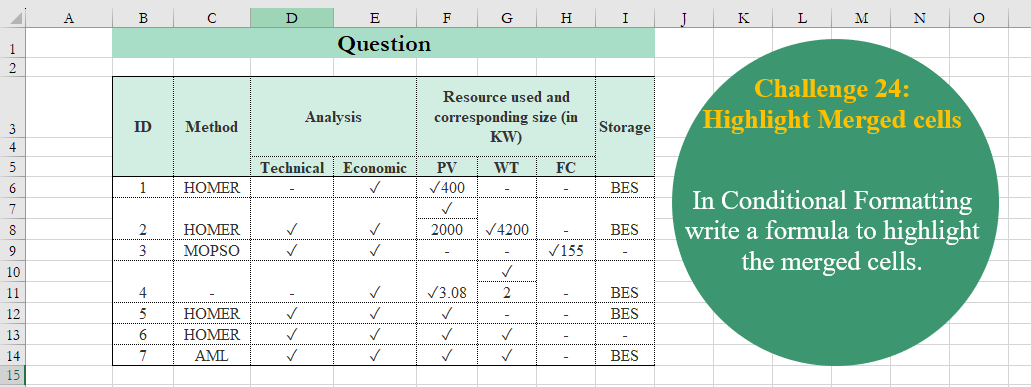
In Conditional Formatting write a formula to highlight the merged cells.
📌 Challenge Details and Links
Challenge Number: 24
Challenge Difficulty: ⭐⭐⭐
📥Download Sample File
📥Link to the solutions on LinkedIn
Solving the challenge of Highlight Merged Cells with Excel
Excel solution 1 for Highlight Merged Cells, proposed by Julian Poeltl:
=LET(
    Z,
    B6,
    IF(
        AND(
            OR(
                ISEMPTY(
                    Z
                ),
                ISEMPTY(
                    OFFSET(
                        Z,
                        1,
                        0
                    )
                )
            ),
            ISEMPTY(
                OFFSET(
                    Z,
                    2,
                    0
                )
            )=FALSE
        ),
        1,
        0
    )
)

VBA-Workaround:
Function AreCellsMerged(
    rng As Range
) As Boolean
 AreCellsMerged = rng.MergeCells
End Function

=LET(
    Z,
    B6,
    AreCellsMerged(
                    Z
                )
)
Excel solution 2 for Highlight Merged Cells, proposed by Burhan Cesur:
=AND(
    COUNTA(
        OFFSET(
            $B6,
            0,
            0,
            2,
            1
        )
    )=1,
    ROW(
        $B6
    )<14
)
Excel solution 3 for Highlight Merged Cells, proposed by Hussein SATOUR:
=OFFSET(
    C6,
    1,
    0
)
Solving the challenge of Highlight Merged Cells with R
R solution 1 for Highlight Merged Cells, proposed by Konrad Gryczan, PhD:
library for this kind of staff :D

Here is PySolution
import openpyxl
from openpyxl.styles import PatternFill

file_path = 'CH-024 Hilight merged dcells.xlsx'
workbook = openpyxl.load_workbook(file_path)

sheet = workbook.active

merged_cells = sheet.merged_cells.ranges

for merged_cell in merged_cells:
 for row in sheet.iter_rows(min_row=merged_cell.min_row, max_row=merged_cell.max_row, min_col=merged_cell.min_col, max_col=merged_cell.max_col):
 for cell in row:
 cell.fill = PatternFill(start_color="FFA07A", end_color="FFA07A", fill_type="solid")