
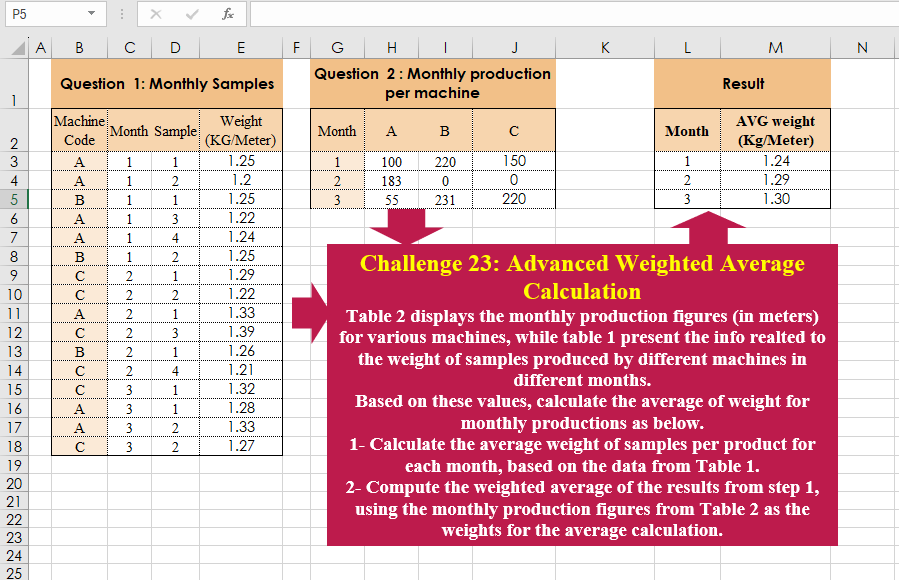
Table 2 displays the monthly production figures (in meters) for various machines, while table 1 present the info realted to the weight of samples produced by different machines in different months. Based on these values, calculate the average of weight for monthly productions as below. 1- Calculate the average weight of samples per product for each month, based on the data from Table 1. 2- Compute the weighted average of the results from step 1, using the monthly production figures from Table 2 as the weights for the average calculation.
📌 Challenge Details and Links
Challenge Number: 23
Challenge Difficulty: ⭐⭐
📥Download Sample File
📥Link to the solutions on LinkedIn
Solving the challenge of Advanced Weighted Average Calculation with Power Query
Power Query solution 1 for Advanced Weighted Average Calculation, proposed by Ramiro Ayala Chávez:
let
t2 = Excel.CurrentWorkbook(){[Name="Table2"]}[Content],
t1 = Excel.CurrentWorkbook(){[Name="Table1"]}[Content],
a = Table.Group(t1,{"Machine Code","Month"},{{"A", each List.Average([#"Weight (KG/Meter)"])}}),
b = Table.AddColumn(a,"B", each [Machine Code]&Text.From([Month])),
c = Table.UnpivotOtherColumns(t2,{"Month"},"C1","C2"),
d = Table.AddColumn(c,"D", each [C1]&Text.From([Month])),
e = Table.AddColumn(b,"E",each d[C2]{List.PositionOf(d[D],[B])}),
f = Table.AddColumn(e,"F", each [A]*[E])[[Month],[E],[F]],
g = Table.Group(f,{"Month"},{{"AVG weight (Kg/Meter)", each [[E],[F]]}}),
Sol = Table.TransformColumns(g,{"AVG weight (Kg/Meter)", each Number.Round(List.Sum([F])/List.Sum([E]),2)})
in
Sol
Power Query solution 2 for Advanced Weighted Average Calculation, proposed by Aditya Kumar Darak 🇮🇳:
let
  MonthlySample = Excel.CurrentWorkbook(){[Name = "MonthlySample"]}[Content],
  MonthlyProduction = Excel.CurrentWorkbook(){[Name = "MonthlyProduction"]}[Content],
  Unpivot = Table.UnpivotOtherColumns(MonthlyProduction, {"Month"}, "Machine", "Metre"),
  Join = Table.AddJoinColumn(
    MonthlySample,
    {"Machine Code", "Month"},
    Unpivot,
    {"Machine", "Month"},
    "Join"
  ),
  Expand = Table.ExpandTableColumn(Join, "Join", {"Metre"}, {"Metres"}),
  Multiply = Table.AddColumn(Expand, "Material", each [#"Weight (KG/Meter)"] * [Metres]),
  Group = Table.Group(
    Multiply,
    {"Month"},
    {{"Metres", each List.Sum([Metres])}, {"Material", each List.Sum([Material])}}
  ),
  WeightedAverage = Table.AddColumn(
    Group,
    "Weighted Average",
    each [Material] / [Metres],
    type number
  ),
  Return = Table.TransformColumnTypes(
    WeightedAverage,
    {
      {"Month", Int64.Type},
      {"Metres", Int64.Type},
      {"Material", type number},
      {"Weighted Average", Currency.Type}
    }
  )
in
  Return
Power Query solution 3 for Advanced Weighted Average Calculation, proposed by Kris Jaganah:
let
  T2 = Excel.CurrentWorkbook(){[Name = "Table2"]}[Content],
  Unpivot = Table.UnpivotOtherColumns(T2, {"Month"}, "xx", "Value"),
  T1 = Excel.CurrentWorkbook(){[Name = "Table1"]}[Content],
  Merge = Table.NestedJoin(T1, {"Month", "Machine Code"}, Unpivot, {"Month", "xx"}, "Monthly Prod"),
  Xpand = Table.ExpandTableColumn(Merge, "Monthly Prod", {"Value"}, {"Monthly Prod"}),
  WXProd = Table.AddColumn(Xpand, "W x Monthly Prod", each [#"Weight (KG/Meter)"] * [Monthly Prod]),
  Group = Table.Group(
    WXProd,
    {"Month"},
    {
      {"aa", each List.Sum([W x Monthly Prod]), type number},
      {"bb", each List.Sum([Monthly Prod]), type number}
    }
  ),
  WeightedAvg = Table.AddColumn(Group, "Avg Weight (Kg/Meter)", each Number.Round([aa] / [bb], 2)),
  Select = Table.SelectColumns(WeightedAvg, {"Month", "Avg Weight (Kg/Meter)"})
in
  Select
Power Query solution 4 for Advanced Weighted Average Calculation, proposed by 🇮🇷 Navid Esmaeilzadeh اسماعیل زاده:
let
  S2 = Excel.CurrentWorkbook(){[Name = "T_2"]}[Content],
  T2 = Table.UnpivotOtherColumns(S2, {"Month"}, "Machine Code", "V"),
  T1 = Excel.CurrentWorkbook(){[Name = "T_1"]}[Content],
  A = Table.NestedJoin(
    T1,
    {"Month", "Machine Code"},
    T2,
    {"Month", "Machine Code"},
    "N",
    JoinKind.LeftOuter
  ),
  E = Table.ExpandTableColumn(A, "N", {"V"}, {"V"}),
  C = Table.AddColumn(E, "C", each [#"Weight (KG/Meter)"] * [V]),
  G = Table.Group(
    C,
    {"Month"},
    {{"TotalV", each List.Sum([V]), type number}, {"TotalC", each List.Sum([C]), type number}}
  ),
  H = Table.AddColumn(G, "AVG weight (kg/meter)", each [TotalC] / [TotalV]),
  R = Table.TransformColumns(H, {{"AVG weight (kg/meter)", each Number.Round(_, 2), type number}}),
  Sol = Table.SelectColumns(R, {"Month", "AVG weight (kg/meter)"})
in
  Sol
Power Query solution 5 for Advanced Weighted Average Calculation, proposed by Glyn Willis:
let
  Source = Excel.CurrentWorkbook(){[Name = "Table1"]}[Content],
  #"Changed Type" = Table.TransformColumnTypes(
    Source,
    {
      {"Machine Code", type text},
      {"Month", Int64.Type},
      {"Sample", Int64.Type},
      {"Weight (KG/Meter)", type number}
    }
  ),
  #"Grouped Rows" = Table.Group(
    #"Changed Type",
    {"Machine Code", "Month"},
    {{"AvgWeight", each List.Average([#"Weight (KG/Meter)"]), type nullable text}}
  ),
  T2 =
    let
      Source = Excel.CurrentWorkbook(){[Name = "Table2"]}[Content],
      #"Changed Type" = Table.TransformColumnTypes(
        Source,
        {{"Month", Int64.Type}, {"A", Int64.Type}, {"B", Int64.Type}, {"C", Int64.Type}}
      )
    in
      #"Changed Type",
  #"Added Custom" = Table.AddColumn(
    T2,
    "Avg Weight (KG/Meter)",
    each
      let
        m = [Month],
        t = Table.AddColumn(
          Table.SelectRows(Record.ToTable(Record.RemoveFields(_, "Month")), (z) => z[Value] <> 0),
          "aw",
          (x) => (
            Table.SelectRows(#"Grouped Rows", (y) => y[Month] = m and y[Machine Code] = x[Name])[
              AvgWeight
            ]{0}
          )
            * x[Value]
        )
      in
        List.Sum(t[aw]) / List.Sum(t[Value])
  )[[Month], [#"Avg Weight (KG/Meter)"]]
in
  #"Added Custom"
Solving the challenge of Advanced Weighted Average Calculation with Excel
Excel solution 1 for Advanced Weighted Average Calculation, proposed by Oscar Mendez Roca Farell:
=LET(
    _b,
     B3:B18,
    _c,
     C3:C18,
    _u,
     UNIQUE(
         _c
     ),
    _p,
     IFERROR(
         AVERAGEIFS(
             E3:E18,
             _b,
              TOROW(
                  UNIQUE(
                      _b
                  )
              ),
             _c,
             _u
         ),     ),
    _w,
     IFS(
         _p,
         H3:J5,
         1,     ),
     F,
     LAMBDA(
         i,
          BYROW(
              i,
               LAMBDA(
                   r,
                    SUM(
                        r
                    )
               )
          )
     ),
     HSTACK(
         _u,
          ROUND(
              F(
                  _p*_w/F(
                      _w
                  )
              ),
               2
          )
     )
)
Excel solution 2 for Advanced Weighted Average Calculation, proposed by Julian Poeltl:
=LET(Table1,
    B3:E18,
    Table2,
    L_Flattena2DTableintoColumns(
        G2:J5
    ),
    T1MC,
    CHOOSECOLS(
        Table1,
        1
    ),
    T1M,
    CHOOSECOLS(
        Table1,
        2
    ),
    MonthsU,
    UNIQUE(
        T1M
    ),
    MachinesU,
    UNIQUE(
        T1MC
    ),
    T1W,
    CHOOSECOLS(
        Table1,
        4
    ),
    T2M,
    CHOOSECOLS(
        Table2,
        1
    ),
    T2MC,
    CHOOSECOLS(
        Table2,
        2
    ),
    T2W,
    CHOOSECOLS(
        Table2,
        3
    ),
    PR,
    WRAPROWS(IFERROR(MAP(T2M,
    T2MC,
    LAMBDA(A,
    B,
    TRANSPOSE(AVERAGE(FILTER(T1W,
    (T1M=A)*(T1MC=B)))))),
    0)*T2W,
    COUNTA(
        MachinesU
    )),
    BR,
    BYROW(
        PR,
        LAMBDA(
            A,
            SUM(
                A
            )
        )
    ),
    PbyM,
    BYROW(
        MonthsU,
        LAMBDA(
            A,
            TRANSPOSE(
                SUM(
                    FILTER(
                        T2W,
                        T2M=A
                    )
                )
            )
        )
    ),
    VSTACK(
        HSTACK(
            "Month",
            "AVG weight (Kg/Meter)"
        ),
        HSTACK(
            MonthsU,
            BR/PbyM
        )
    ))

L_Flattena2DTableintoColumns: =LAMBDA(Table,
    LET(ROWS,
    ROWS(
        DROP(
            Table,
            1,
            1
        )
    ),
    COLUMNS,
    COLUMNS(
        DROP(
            Table,
            1,
            1
        )
    ),
    HRows,
    CHOOSEROWS(TAKE(
        Table,
        -ROWS,
        1
    ),
    (ROUNDDOWN(
        SEQUENCE(
            ROWS*COLUMNS,
            ,
            0
        )/COLUMNS,
        0
    )+1)),
    HColumn,
    CHOOSEROWS(
        TOCOL(
            TAKE(
                Table,
                1,
                -COLUMNS
            )
        ),
        L_RepeatingNumberSequence(
            COLUMNS,
            ROWS
        )
    ),
    Data,
    TOCOL(
        DROP(
            Table,
            1,
            1
        )
    ),
    HSTACK(
        HRows,
        HColumn,
        Data
    )))

L_RepeatingNumberSequence:
=LAMBDA(
    Numbers,
    Repetitions,
    IF(
        MOD(
            SEQUENCE(
                Numbers*Repetitions
            ),
            Numbers
        )=0,
        Numbers,
        MOD(
            SEQUENCE(
                Repetitions*Numbers
            ),
            Numbers
        )
    )
)
Excel solution 3 for Advanced Weighted Average Calculation, proposed by Kris Jaganah:
=LET(a,
    B3:B18,
    b,
    C3:C18,
    d,
    E3:E18,
    e,
    G2:J5,
    f,
    MAP(
        a,
        b,
        LAMBDA(
            x,
            y,
            VLOOKUP(
                y,
                e,
                XMATCH(
                    x,
                    TAKE(
                        e,
                        1
                    ),
                    0
                )
            )
        )
    ),
    g,
    UNIQUE(
        b
    ),
    HSTACK(g,
    MAP(g,
    LAMBDA(v,
    ROUND(SUM((v=b)*f*d)/SUM((v=b)*f),
    2)))))
Excel solution 4 for Advanced Weighted Average Calculation, proposed by John Jairo Vergara Domínguez:
=LET(
    s,
    LAMBDA(
        r,
        BYROW(
            r,
            SUM
        )
    ),
    p,
    H3:J5,
    m,
    G3:G5,
    HSTACK(
        m,
        s(
            IFERROR(
                AVERAGEIFS(
                    E3:E18,
                    B3:B18,
                    H2:J2,
                    C3:C18,
                    m
                )*p,

            )/s(
                p
            )
        )
    )
)
Excel solution 5 for Advanced Weighted Average Calculation, proposed by Hussein SATOUR:
=LET(c,
    B3:B18,
    m,
    C3:C18,
    p,
    H3:J5,
    mm,
    G3:G5,
    MAP({1;2;3},
    LAMBDA(y,
    SUM(MAP(UNIQUE(
        FILTER(
            c,
            m=y
        )
    ),
    LAMBDA(x,
    LET(a,
    FILTER(D3:D18,
    (c=x)*(m=y)),
    SUMPRODUCT(a,
    FILTER(E3:E18,
    (c=x)*(m=y)))*INDEX(
        p,
        XMATCH(
            y,
            mm
        ),
        XMATCH(
            x,
            H2:J2
        )
    )/SUM(
        a
    )))))/SUM(
        XLOOKUP(
            y,
            mm,
            p
        )
    ))))
Solving the challenge of Advanced Weighted Average Calculation with R
R solution 1 for Advanced Weighted Average Calculation, proposed by Konrad Gryczan, PhD:
library(tidyverse)
library(readxl)

input1 = read_excel("files/CH-023 Advance Weighted AVG.xlsx", range = "B2:E18")
input2 = read_excel("files/CH-023 Advance Weighted AVG.xlsx", range = "G2:J5")
test  = read_excel("files/CH-023 Advance Weighted AVG.xlsx", range = "L2:M5")

prod = input2 %>%
 pivot_longer(cols = -Month, names_to = "Machine Code", values_to = "value")

result = input1 %>%
 group_by(Month, `Machine Code`) %>%
 summarise(Avg = mean(`Weight (KG/Meter)`)) %>%
 left_join(prod, by = c("Machine Code", "Month")) %>%
 ungroup() %>%
 group_by(Month) %>%
 summarise(`AVG weight (Kg/Meter)` = sum(Avg * value) / sum(value)) %>%
 mutate(`AVG weight (Kg/Meter)` = round(`AVG weight (Kg/Meter)`, 2)) %>%
 ungroup()

identical(result, test)
# [1] TRUE