
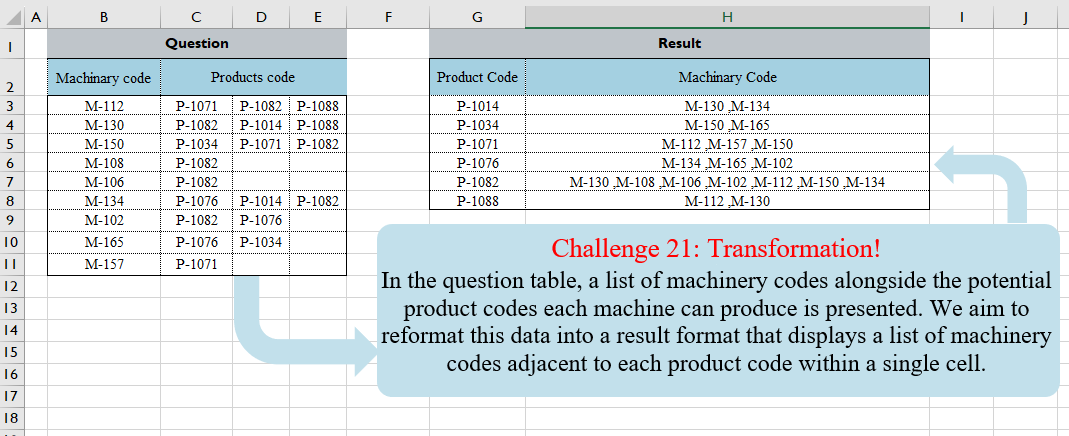
In the question table, a list of machinery codes alongside the potential product codes each machine can produce is presented. We aim to reformat this data into a result format that displays a list of machinery codes adjacent to each product code within a single cell.
📌 Challenge Details and Links
Challenge Number: 21
Challenge Difficulty: ⭐⭐
📥Download Sample File
📥Link to the solutions on LinkedIn
Solving the challenge of Table Transformation! Part 3 with Power Query
Power Query solution 1 for Table Transformation! Part 3, proposed by Ramiro Ayala Chávez:
let
S = Excel.CurrentWorkbook(){[Name="Table1"]}[Content],
a = Table.UnpivotOtherColumns(S,{"Column1"},"A","V")[[Column1],[V]],
b = Table.Sort(Table.Group(a,{"V"},{{"G", each _}}),{{"V",0}}),
c = List.Transform(b[G], each [Column1]),
d = List.Transform(c, each Text.Combine(List.Transform(_,Text.From)," ,")),
Sol = Table.FromColumns({b[V],d},{"Product Code","Machinary Code"})
in
Sol
Power Query solution 2 for Table Transformation! Part 3, proposed by Alejandro Simón 🇵🇦 🇪🇸:
let
  Source = Excel.CurrentWorkbook(){[Name = "Table1"]}[Content],
  MCode = Table.AddColumn(
    Source,
    "Product Code",
    each List.Skip(List.RemoveNulls(Record.ToList(_)))
  ),
  Expand = Table.ExpandListColumn(MCode, "Product Code"),
  Sol = Table.Sort(
    Table.Group(
      Expand,
      {"Product Code"},
      {{"Machinary code", each Text.Combine([Machinary code], ", ")}}
    ),
    "Product Code"
  )
in
  Sol
Power Query solution 3 for Table Transformation! Part 3, proposed by Kris Jaganah:
let
  Source = Excel.CurrentWorkbook(){[Name = "Table1"]}[Content],
  Unpivot = Table.UnpivotOtherColumns(Source, {"Machinary code"}, "Product code", "Value"),
  Group = Table.Group(
    Unpivot,
    {"Value"},
    {"Machine code", each Text.Combine([Machinary code], ", ")}
  ),
  Sort = Table.Sort(Group, {{"Value", Order.Ascending}})
in
  Sort
Power Query solution 4 for Table Transformation! Part 3, proposed by 🇮🇷 Navid Esmaeilzadeh اسماعیل زاده:
let
  Source = Excel.CurrentWorkbook(){[Name = "Table1"]}[Content],
  #"Unpivoted Other Columns" = Table.UnpivotOtherColumns(
    Source,
    {"Machinary code"},
    "Attribute",
    "Product Code"
  ),
  #"Removed Other Columns" = Table.SelectColumns(
    #"Unpivoted Other Columns",
    {"Machinary code", "Product Code"}
  ),
  #"Grouped Rows" = Table.Group(
    #"Removed Other Columns",
    {"Product Code"},
    {
      {
        "Machinary Code",
        each Text.Combine(List.Sort(List.Distinct([Machinary code])), " ,"),
        type text
      }
    }
  ),
  #"Sorted Rows" = Table.Sort(#"Grouped Rows", {{"Product Code", Order.Ascending}})
in
  #"Sorted Rows"
Power Query solution 5 for Table Transformation! Part 3, proposed by Glyn Willis:
let
  Source = Excel.CurrentWorkbook(){[Name = "Table1"]}[Content],
  #"Changed Type" = Table.TransformColumnTypes(
    Source,
    {
      {"Machinary code", type text},
      {"Products code", type text},
      {"Column1", type text},
      {"Column2", type text}
    }
  ),
  #"Added Custom" = Table.Combine(
    Table.AddColumn(
      #"Changed Type",
      "Custom",
      each
        let
          r = Record.ToList(_)
        in
          Table.FillDown(
            Table.FromColumns(
              {{r{0}}, List.RemoveNulls(List.RemoveFirstN(r, 1))},
              {"Machinery Code", "Product Code"}
            ),
            {"Machinery Code"}
          )
    )[Custom]
  ),
  #"Grouped Rows" = Table.Group(
    #"Added Custom",
    {"Product Code"},
    {{"Machinery Code", each Text.Combine([Machinery Code], " ,"), type text}}
  ),
  #"Sorted Rows" = Table.Sort(#"Grouped Rows", {{"Product Code", Order.Ascending}})
in
  #"Sorted Rows"
Power Query solution 6 for Table Transformation! Part 3, proposed by Talha Parkar:
let
  Source = Excel.CurrentWorkbook(){[Name = "Table1"]}[Content],
  #"Changed Type" = Table.TransformColumnTypes(
    Source,
    {
      {"Machinary code", type text},
      {"Products code", type text},
      {"Column1", type text},
      {"Column2", type text}
    }
  ),
  #"Unpivoted Other Columns" = Table.UnpivotOtherColumns(
    #"Changed Type",
    {"Machinary code"},
    "Attribute",
    "Value"
  ),
  #"Renamed Columns" = Table.RenameColumns(#"Unpivoted Other Columns", {{"Value", "Product Codes"}}),
  #"Removed Columns" = Table.RemoveColumns(#"Renamed Columns", {"Attribute"}),
  #"Reordered Columns" = Table.ReorderColumns(
    #"Removed Columns",
    {"Product Codes", "Machinary code"}
  ),
  #"Grouped Rows" = Table.Group(
    #"Reordered Columns",
    {"Product Codes"},
    {{"Machinery Codes", each Text.Combine([Machinary code], ", "), type text}}
  ),
  #"Sorted Rows" = Table.Sort(#"Grouped Rows", {{"Product Codes", Order.Ascending}})
in
  #"Sorted Rows"
Solving the challenge of Table Transformation! Part 3 with Excel
Excel solution 1 for Table Transformation! Part 3, proposed by Bo Rydobon 🇹🇭:
=GROUPBY(
    TOCOL(
        C3:E11,
        3
    ),
    TOCOL(
        IFS(
            C3:E11>0,
            B3:B11
        ),
        3
    ),
    ARRAYTOTEXT,
    0,
    0
)
Excel solution 2 for Table Transformation! Part 3, proposed by Oscar Mendez Roca Farell:
=LET(_c,
     C3:E11,
    _u,
     SORT(
         UNIQUE(
             TOCOL(
                 _c,
                  1
             )
         )
     ),
     HSTACK(
         _u,
          MAP(
              _u,
               LAMBDA(
                   a,
                    ARRAYTOTEXT(
                        TOCOL(
                            IFS(
                                _c=a,
                                 B3:B11,
                                 2,
                                 1
                            )
                        )
                    )
               )
          )
     )
Excel solution 3 for Table Transformation! Part 3, proposed by Julian Poeltl:
=LET(
    M,
    B3:B11,
    P,
    TOCOL(
        C3:E11,
        ,
        TRUE
    ),
    MM,
    VSTACK(
        M,
        M,
        M
    ),
    F,
    FILTER(
        P&","&MM,
        P<>0
    ),
    PU,
    SORT(
        UNIQUE(
            TEXTBEFORE(
                F,
                ","
            )
        )
    ),
    HSTACK(
        PU,
        BYROW(
            PU,
            LAMBDA(
                A,
                TEXTJOIN(
                    " ,",
                    ,
                    TEXTAFTER(
                        FILTER(
                            F,
                            ISNUMBER(
                                SEARCH(
                                    A,
                                    F
                                )
                            )
                        ),
                        ","
                    )
                )
            )
        )
    )
)
Excel solution 4 for Table Transformation! Part 3, proposed by Kris Jaganah:
=LET(a,
    B3:B11,
    b,
    C3:E11,
    c,
    SORT(
        UNIQUE(
            TOCOL(
                b,
                3
            )
        )
    ),
    HSTACK(c,
    MAP(c,
    LAMBDA(y,
    ARRAYTOTEXT(FILTER(a,
    BYROW(b,
    LAMBDA(x,
    SUM(--(x=y))))))))))
Excel solution 5 for Table Transformation! Part 3, proposed by Kris Jaganah:
=LET(a,
    TOCOL(
        B3:B11&C3:E11
    ),
    b,
    RIGHT(
        a,
        6
    ),
    c,
    LEFT(
        a,
        5
    ),
    d,
    GROUPBY(b,
    c,
    ARRAYTOTEXT,
    0,
    0,
    ,
    (LEFT(
        b
    )<>"M")),
    d)
Excel solution 6 for Table Transformation! Part 3, proposed by John Jairo Vergara Domínguez:
=LET(
    d,
    C3:E11,
    p,
    SORT(
        UNIQUE(
            TOCOL(
                d,
                1
            )
        )
    ),
    HSTACK(
        p,
        MAP(
            p,
            LAMBDA(
                x,
                TEXTJOIN(
                    " ,",
                    ,
                    REPT(
                        B3:B11,
                        d=x
                    )
                )
            )
        )
    )
)
Excel solution 7 for Table Transformation! Part 3, proposed by Sunny Baggu:
=LET(     _p,
     SORT(
         UNIQUE(
             TOCOL(
                 C3:E11,
                  3
             )
         )
     ),     HSTACK(          _p,          MAP(
              _p,
               LAMBDA(
                   a,
                    ARRAYTOTEXT(
                        TOCOL(
                            IF(
                                C3:E11 = a,
                                 B3:B11,
                                 x
                            ),
                             3
                        )
                    )
               )
          )     ))
Excel solution 8 for Table Transformation! Part 3, proposed by Asheesh Pahwa:
=LET(
    mc,
    B3:B11,
    pc,
    C3:E11,    a,
    mc&"|"&pc,
    TOCOL(
        a
    ),    u,
    SORT(
        UNIQUE(
            TOCOL(
                pc,
                1
            )
        )
    ),    MAP(
        u,
        LAMBDA(
            x,

            ARRAYTOTEXT(
                SUBSTITUTE(
                    SORT(
                        FILTER(
                            t,
                            ISNUMBER(
                                FIND(
                                    x,
                                    t
                                )
                            )
                        )
                    ),
                    "|"&x,
                    ""
                )
            )
        )
    )
)
Excel solution 9 for Table Transformation! Part 3, proposed by CA Raghunath Gundi:
=LET(a,TOCOL(IF(COLUMN(C3:E3),B3:B11)),b,TOCOL(C3:E11),c,SORT(UNIQUE(TOCOL(C3:E11,3))),
HSTACK(c,BYROW(c,LAMBDA(x, TEXTJOIN(" ,",TRUE, FILTER(a,b=x))))))
Excel solution 10 for Table Transformation! Part 3, proposed by Crispo Mwangi:
=TEXTJOIN(",",
    ,FILTER($B$3:$B$11,MMULT(--($C$3:$E$11=G3),
    TRANSPOSE(
        COLUMN(
            $C$3:$E$11
        )
    ))>1))
Excel solution 11 for Table Transformation! Part 3, proposed by Hussein SATOUR:
=LET(
    p,
    C3:E11,
    a,
    DROP(
        SORT(
            UNIQUE(
                TOCOL(
                    p
                )
            )
        ),
        -1
    ),
    b,
    TOCOL(
        B3:B11&"/"&p
    ),
    HSTACK(
        a,
        MAP(
            a,
            LAMBDA(
                x,
                TEXTJOIN(
                    ",",
                    ,
                    FILTER(
                        TEXTBEFORE(
                            b,
                            "/"
                        ),
                        TEXTAFTER(
                            b,
                            "/"
                        )=x
                    )
                )
            )
        )
    )
)
Excel solution 12 for Table Transformation! Part 3, proposed by Josh Brodrick:
=LET(heading,
    {"Product Code",
    "Machinary Code"},x,
    SORT(UNIQUE(TOCOL((B3:D11),
    1))),VSTACK(
    heading,
    HSTACK(
        x,
        MAP(
            x,
            LAMBDA(
                a,
                TEXTJOIN(
                    ",",
                    TRUE,
                    TOROW(
                        IFNA(
                            IFS(
                                B3:D11=a,
                                A3:A11
                            ),
                            ""
                        )
                    )
                )
            )
        )
    )
))
Excel solution 13 for Table Transformation! Part 3, proposed by Tyler Cameron:
=LET(
    a,
    SORT(
        UNIQUE(
            FILTER(
                TOCOL(
                    C3:E11
                ),
                TOCOL(
                    C3:E11
                )<>""
            )
        )
    ),
    VSTACK(
        CHOOSECOLS(
            B2:E2,
            2,
            1
        ),
        HSTACK(
            a,
            MAP(
                a,
                LAMBDA(
                    x,
                    LET(
                        b,
                        VSTACK(
                            FILTER(
                                B3:B11,
                                C3:C11=x,
                                ""
                            ),
                            FILTER(
                                B3:B11,
                                D3:D11=x,
                                ""
                            ),
                            FILTER(
                                B3:B11,
                                E3:E11=x,
                                ""
                            )
                        ),
                        ARRAYTOTEXT(
                            FILTER(
                                b,
                                b<>""
                            )
                        )
                    )
                )
            )
        )
    )
)
Solving the challenge of Table Transformation! Part 3 with R
R solution 1 for Table Transformation! Part 3, proposed by Konrad Gryczan, PhD:
library(tidyverse)
library(readxl)

input = read_excel("files/CH-021 Transformation.xlsx", range = "B2:E11")
test = read_excel("files/CH-021 Transformation.xlsx", range = "G2:H8")

result = input %>%
 select(`Machinary code`, Product_1 = 2, Product_2 = 3, Product_3 = 4) %>%
 pivot_longer(cols = -`Machinary code`, names_to = "Product", values_to = "Value") %>%
 na.omit() %>%
 arrange(Product) %>%
 group_by(Value) %>%
 summarise(Machine = paste0(`Machinary code`, collapse = " ,")) %>%
 select(`Product Code`= Value, `Machinary Code` = Machine)

identical(result, test)
# [1] TRUE