
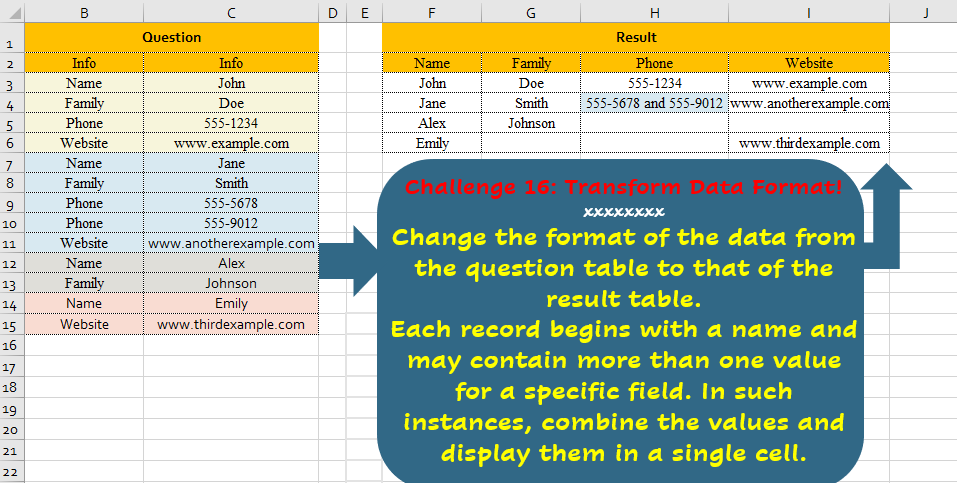
Change the format of the data from the question table to that of the result table. Each record begins with a name and may contain more than one value for a specific field. In such instances, combine the values and display them in a single cell.
📌 Challenge Details and Links
Challenge Number: 16
Challenge Difficulty: ⭐⭐⭐
📥Download Sample File
📥Link to the solutions on LinkedIn
📥Link to the solution on YouTube
Solving the challenge of Transform Data Format! with Power Query
Power Query solution 1 for Transform Data Format!, proposed by Alejandro Simón 🇵🇦 🇪🇸:
let
  Source = Excel.CurrentWorkbook(){[Name = "Table1"]}[Content],
  Group = Table.Group(
    Source,
    {"Info"},
    {{"Count", each Text.Combine([Info2], " and ")}},
    GroupKind.Local
  ),
  LG = List.Skip(
    List.Generate(
      () => [x = 0, y = 0],
      each [x] <= List.Count(Group[Info]),
      each [x = [x] + 1, y = if Group[Info]{[x]} = "Name" then [y] + 1 else [y]],
      each [y]
    )
  ),
  Tabla = Table.FromColumns(Table.ToColumns(Group) & {LG}),
  Sol = Table.SelectColumns(
    Table.Pivot(Tabla, List.Distinct(Tabla[Column1]), "Column1", "Column2"),
    List.Distinct(Source[Info])
  )
in
  Sol
Power Query solution 2 for Transform Data Format!, proposed by 🇮🇷 Navid Esmaeilzadeh اسماعیل زاده:
let
  S = Excel.CurrentWorkbook(){[Name = "Table1"]}[Content],
  C = Table.TransformColumnTypes(S, {{"Info", type text}, {"Info2", type text}}),
  A = Table.AddIndexColumn(C, "Index", 1, 1, Int64.Type),
  B = Table.AddColumn(A, "In", each if [Info] = "Name" then [Index] else null),
  D = Table.FillDown(B, {"In"}),
  R = Table.SelectColumns(D, {"In", "Info", "Info2"}),
  G = Table.Group(
    R,
    {"In"},
    {{"Tbl", each _, type table [In = number, Info = nullable text, Info2 = nullable text]}}
  ),
  A2 = Table.AddColumn(G, "info", each List.Distinct([Tbl][Info])),
  E = Table.ExpandListColumn(A2, "info"),
  A3 = Table.AddColumn(
    E,
    "info2",
    each Text.Combine(Table.SelectRows([Tbl], (X) => X[Info] = [info])[Info2], " and ")
  ),
  R2 = Table.SelectColumns(A3, {"In", "info", "info2"}),
  P = Table.Pivot(R2, List.Distinct(R2[info]), "info", "info2"),
  Sol = Table.RemoveColumns(P, {"In"})
in
  Sol
Power Query solution 3 for Transform Data Format!, proposed by Seokho MOON:
let
  Source = Excel.CurrentWorkbook(){[Name = "Table1"]}[Content],
  Group = Table.Group(Source, "Info", {"tbl", F}, 0, (x, y) => Number.From(y = "Name"))[tbl],
  F = each Table.Pivot(_, List.Distinct([Info]), "Info", "Info2", each Text.Combine(_, " and ")),
  Res = Table.Combine(Group)
in
  Res
Power Query solution 4 for Transform Data Format!, proposed by Glyn Willis:
let
  Source = Excel.CurrentWorkbook(){[Name = "Table1"]}[Content],
  #"Changed Type" = Table.TransformColumnTypes(Source, {{"Info", type text}, {"Info2", type text}}),
  #"Grouped Rows" = Table.FromRecords(
    Table.Group(
      #"Changed Type",
      {"Info"},
      {
        {
          "a",
          each
            let
              rec = Table.ToColumns(
                Table.Group(_, {"Info"}, {{"b", (r) => Text.Combine(r[Info2], " and "), type text}})
              )
            in
              Record.FromList(rec{1}, rec{0}),
          type table
        }
      },
      GroupKind.Local,
      (x, y) => Int64.From(y[Info] = "Name")
    )[a],
    null,
    MissingField.UseNull
  )
in
  #"Grouped Rows"
Solving the challenge of Transform Data Format! with Excel
Excel solution 1 for Transform Data Format!, proposed by Bo Rydobon 🇹🇭:
=LET(a,B3:B15,CHOOSECOLS(PIVOTBY(SCAN(0,a="Name",SUM),a,C3:C15,LAMBDA(x,TEXTJOIN(" and ",,x)),,0,,0),{3,2,4,5}))Excel solution 2 for Transform Data Format!, proposed by Bo Rydobon 🇹🇭:
=LET(a,
    B3:B15,
    n,
    SCAN(
        0,
        a="Name",
        LAMBDA(
            c,
            v,
            c+v
        )
    ),
    h,
    TOROW(
        UNIQUE(
            a
        )
    ),
    REDUCE(h,
    UNIQUE(
        n
    ),
    LAMBDA(c,
    m,
    VSTACK(c,
    MAP(h,
    LAMBDA(i,
    TEXTJOIN(" and ",
    ,
    REPT(C3:C15,
    (a=i)*(n=m)))))))))
Excel solution 3 for Transform Data Format!, proposed by 🇰🇷 Taeyong Shin:
=LET(
    c,
    B3:B15,
    i,
    C3:C15,
    u,
    TOROW(
        UNIQUE(
            c
        )
    ),
    n,
    SCAN(
        0,
        c="Name",
        SUM
    ),
    m,
    IFNA(
        SEQUENCE(
            MAX(
                n
            )
        ),
        u
    ),
    VSTACK(
        u,
        MAP(
            IFNA(
                u,
                m
            ),
            m,
            LAMBDA(
                x,
                y,
                TEXTJOIN(
                    " and ",
                    ,
                    REPT(
                        i,
                        c&n=x&y
                    )
                )
            )
        )
    )
)
Excel solution 4 for Transform Data Format!, proposed by 🇰🇷 Taeyong Shin:
=LET(
    c,
    B3:B15,
    DROP(
        PIVOTBY(
            SCAN(
                0,
                c="Name",
                SUM
            ),
            HSTACK(
                XMATCH(
                    c,
                    c
                ),
                c
            ),
            C3:C15,
            LAMBDA(
                x,
                TEXTJOIN(
                    " and ",
                    ,
                    x
                )
            ),
            ,
            0,
            ,
            0
        ),
        1,
        1
    )
)
Excel solution 5 for Transform Data Format!, proposed by محمد حلمي:
=LET(
    B,
    B3:B121,
    C,
    C3:C121,
    M,
    F3,
    D,
    DATE(
        2023,
        M,
        1
    ),    R,
    WRAPROWS(
        VSTACK(
            IF(
                SEQUENCE(
                    WEEKNUM(
                        D
                    )-2
                ),
                ""
            ),

            DATE(
                2023,
                M,
                SEQUENCE(
                    DAY(
                        EDATE(
                            D,
                            1
                        )-1
                    )
                )
            )
        ),
        7,
        ""
    ),    V,
    XLOOKUP(
        R,
        B,
        C,
        0
    ),
    IFS(
        R="",
        "",
        V=0,
        "-",        V>AVERAGE(
            FILTER(
                C,
                MONTH(
                    B
                )=M
            )
        ),
        "U",
        1,
        "L"
    )
)
Excel solution 6 for Transform Data Format!, proposed by محمد حلمي:
=LET(n,
    B3:B15,
    j,
    SCAN(
        0,
        n=B3,
        LAMBDA(
            a,
            d,
            a+d
        )
    ),u,
    TOROW(
        UNIQUE(
            n
        )
    ),
    REDUCE(u,
    UNIQUE(
        j
    ),LAMBDA(a,
    e,
    VSTACK(a,
    MAP(u,
    LAMBDA(c,TEXTJOIN(" and ",
    ,
    IF((j=e)*(n=c),
    C3:C15,
    ""))))))))
Excel solution 7 for Transform Data Format!, proposed by 🇵🇪 Ned Navarrete C.:
=LET(m,
    B3:B15,
    x,
    TOROW(
        UNIQUE(
            m
        )
    ),
    i,
    SCAN(0,
    m,
    LAMBDA(c,
    v,
    c+(v="Name"))),
    u,
    UNIQUE(
        i
    ),
     REDUCE(
         x,
         u,
         LAMBDA(
             c,
             v,
              LET(
                  a,
                  FILTER(
                      B3:C15,
                      i=v
                  ),
                   b,
                  IF(
                      TAKE(
                          a,
                          ,
                          1
                      )=x,
                      TAKE(
                          a,
                          ,
                          -1
                      ),
                      ""
                  ),
                   VSTACK(
                       c,
                       BYCOL(
                           b,
                            LAMBDA(
                                c,
                                 TEXTJOIN(
                                     " and ",
                                     1,
                                     c
                                 )
                            )
                       )
                   )
              )
         )
     ))
Excel solution 8 for Transform Data Format!, proposed by Oscar Mendez Roca Farell:
=LET(_b,
     B3:B15,
    _s,
     SCAN(0,
    _b,
    LAMBDA(i,
     x,
     i+(x="Name"))),
    _t,
     TOROW(
         UNIQUE(
             _b
         )
     ),
     REDUCE(
         _t,
          UNIQUE(
              _s
          ),
          LAMBDA(
              j,
               y,
               LET(
                   _f,
                    FILTER(
                        B3:C15,
                        _s=y
                    ),
                    VSTACK(
                        j,
                         BYCOL(
                             REPT(
                                 DROP(
                                     _f,
                                     ,
                                     1
                                 ),
                                  TAKE(
                                     _f,
                                     ,
                                     1
                                 )=_t
                             ),
                              LAMBDA(
                                  c,
                                   TEXTJOIN(
                                       " and ",
                                       1,
                                       c
                                   )
                              )
                         )
                    )
               )
          )
     ))
Excel solution 9 for Transform Data Format!, proposed by Julian Poeltl:
=LET(Info1,
    B3:B15,
    Info2,
    C3:C15,
    UniqInfo1,
    SCAN(
        0,
        Info1="Name",
        LAMBDA(
            A,
            B,
            A+B
        )
    ),
    UInfo1,
    TRANSPOSE(
        UNIQUE(
            Info1
        )
    ),
    REDUCE(UInfo1,
    UNIQUE(
        UniqInfo1
    ),
    LAMBDA(A,
    B,
    VSTACK(A,
    MAP(UInfo1,
    LAMBDA(C,
    TEXTJOIN(" and ",
    ,
    REPT(Info2,
    (Info1=C)*(UniqInfo1=B)))))))))
Excel solution 10 for Transform Data Format!, proposed by Kris Jaganah:
=LET(a,
    B3:B15,
    b,
    C3:C15,
    c,
    SCAN(
        0,
        a,
        LAMBDA(
            x,
            y,
            IF(
                y="Name",
                1+x,
                x
            )
        )
    ),
    d,
    MAP(a,
    c,
    LAMBDA(x,
    y,
    TEXTJOIN(" and ",
    ,
    FILTER(b,
    (a=x)*(c=y))))),
    e,
    TOROW(
        UNIQUE(
            a
        )
    ),
    VSTACK(
        e,
        XLOOKUP(
            UNIQUE(
                c
            )&e,
            c&a,
            d,
            ""
        )
    ))
Excel solution 11 for Transform Data Format!, proposed by John Jairo Vergara Domínguez:
=CHOOSECOLS(
    PIVOTBY(
        SCAN(
            0,
            B3:B15=B3,
            SUM
        ),
        B3:B15,
        C3:C15,
        LAMBDA(
            x,
            TEXTJOIN(
                " and ",
                ,
                x
            )
        ),
        ,
        0,
        ,
        0
    ),
    3,
    2,
    4,
    5
)
Excel solution 12 for Transform Data Format!, proposed by Sunny Baggu:
=LET(
 _h,
     TOROW(
         UNIQUE(
             B3:B15
         )
     ), _g,
     SCAN(
         0,
          N(
              B3:B15 = B3
          ),
          LAMBDA(
              a,
               v,
               a + v
          )
     ), _ug,
     UNIQUE(
         _g
     ), IFERROR(
 REDUCE(
 _h, _ug, LAMBDA(x,
     y, VSTACK(x,
     MAP(_h,
     LAMBDA(a,
     TEXTJOIN("and",
     ,
     FILTER(C3:C15,
     (_g = y) * (B3:B15 = a))))))
 )
 ), ""
 )
)
Excel solution 13 for Transform Data Format!, proposed by Charles Roldan:
=LET(Field,
     B3:B15,
     Value,
     C3:C15,
     Header,
     TOROW(
         UNIQUE(
             Field
         )
     ),
     Row,
     SCAN(
         0,
          Field = TAKE(
              Field,
               1
          ),
          LAMBDA(
              u,
              v,
               u + v
          )
     ),
     REDUCE(Header,
     UNIQUE(
         Row
     ),
     LAMBDA(a,
    r,
     VSTACK(a,
     BYCOL(Header,
     LAMBDA(f,
     TEXTJOIN(" and ",
     ,
     FILTER(Value,
     (Row = r) * (Field = f),
     ""))))))))
Excel solution 14 for Transform Data Format!, proposed by Hussein SATOUR:
=LET(a,SCAN(,IF(B3:B15="Name",C3:C15),LAMBDA(x,y,IF(y<>FALSE,y,x))),CHOOSECOLS(PIVOTBY(a,B3:B15,C3:C15,LAMBDA(x,TEXTJOIN(" and ",,x)),,0,,0),3,2,4,5))Solving the challenge of Transform Data Format! with R
R solution 1 for Transform Data Format!, proposed by Konrad Gryczan, PhD:
library(tidyverse)
library(readxl)

input = read_excel("files/CH-016 .xlsx", range = "B2:C15")
test = read_excel("files/CH-016 .xlsx", range = "F2:I6")

result = input %>%
 mutate(name = ifelse(Info...1 == "Name", 1, 0)) %>%
 mutate(name = cumsum(name)) %>%
 pivot_wider(names_from = Info...1, values_from = Info...2,
 values_fn = ~ paste(.x, collapse = " and ")) %>%
 select(-name)